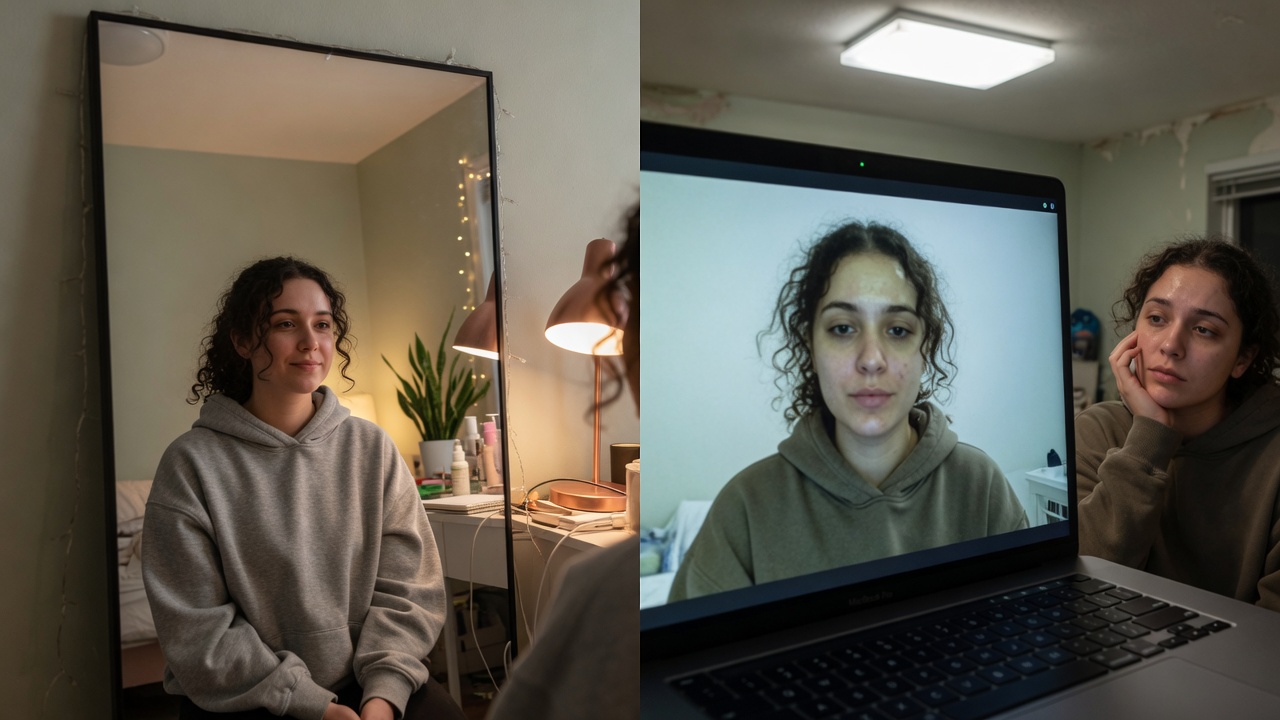
You can enable Touch Up My Appearance, drag the slider, and still not like what you see. Too low and the laptop wins. Too high and you look soft-focus soft — the “I turned on a filter” look that makes serious calls feel less serious.

Even front light and natural skin on a live work video call.
Working parents on forums treat Touch Up as a foundation skip. Fair. But high-stakes work in 2026 often needs more than one soften control — and it needs to work when the next call is Google Meet.
That is when you need a real alternative: Imagera GlowCam.
Real Imagera output: webcam footage cleaned up and brightened.
Quick answer: Imagera is a browser-based alternative to Zoom's touch-up feature that polishes your appearance on work calls without needing Zoom's built-in filter, delivering studio-quality video enhancement in seconds.
1.How does an Imagera work-call touch-up compare to Zoom's built-in "Touch Up My Appearance" slider?
Zoom's "Touch Up My Appearance" is a single 0-10 smoothing slider baked into one app, while Imagera runs in any browser regardless of your meeting setup. It sharpens up to 4K, handles lighting, skin, and framing in under 60 seconds per clip, and gives you far more control than a single blur slider.
2.Which is better for polished 2026 work calls: a live blur filter or a rendered enhancement pass?
A live filter smooths one frame at a time and can shimmer during motion, whereas Imagera renders a full pass at up to 8K with cleaner edges and no per-frame flicker. A rendered enhancement holds fine detail far better than a real-time beauty filter, especially across varied and uneven lighting.
3.What Touch Up is good at
- Mild soften for casual Zooms
- Zero install
- Familiar setting buried in video options
4.What Touch Up is bad at
- Targeted under-eye help
- Separate skin vs definition control
- Looking good at low strength and high stakes
- Following you to Meet or Teams
- Background calm in the same system
- Saving a personal “interview look” you trust every time
Medium reviews have said the same for years: it is a soft focus, not a full appearance system — and it is not on every platform.
5.Signs you have outgrown it
- Final-round interviews on your calendar
- Sales or CS all-day camera time
- Fundraising stacks
- Camera-on culture with zero recovery time between calls
- You look plastic at 50% and tired at 10%
6.The alternative: control without looking filtered
GlowCam is a Chrome extension that enhances outgoing video on browser Zoom, Meet, Teams, Webex, Whereby, and Discord.
| Need | Touch Up | GlowCam |
|---|---|---|
| Even skin | One soft control | Full skin panel |
| Tired eyes | Not targeted | Under-eye brighten |
| Light makeup | No | Yes, optional |
| Background | Separate Zoom feature | Same look system |
| Other apps | Zoom only | Multi-app Chrome |
| Privacy story | Platform feature | On-device product design |
Presets: Natural, Meeting, Polished. Save your own. Keep strength low for work.
7-day trial, no card · from $24.99/month
GlowCam · Chrome Web Store
7.How to look better on Zoom without looking like a filter
- Front light first
- Camera height second
- GlowCam Meeting low third
- Fix only the worst problem (usually under-eye)
- Check motion — reduce if shimmer
- Prefer Zoom web in Chrome when you want the extension path
- Hide self-view after you confirm framing
8.Outcome framing
Looking good on Zoom is not the interview. It is the envelope the interview arrives in — same for investor updates and customer renewals. Touch Up was a start. High-intent careers need a tool that matches the stakes.
9.The gap a live filter can't close: recordings, screenshots, and async video
A real-time webcam filter only helps while the call is happening. It does nothing for the artifacts that outlast the call — the recorded session your team rewatches, the screenshot grabbed for a deck, the headshot cropped from a Zoom frame for a bio or LinkedIn banner, or the async video you record once and send to twenty prospects. This is where most people quietly lose polish, because they assume the live filter "already handled it." It didn't. The recording captures whatever the camera saw, and by then the moment is gone.
Imagera works on the finished frame instead of the live feed, which changes what's possible. Because it operates on a still or an exported clip after capture, you get corrections a slider on a call can't attempt:
- Fix a bad still, not the whole call. Pull the one frame where your expression landed well but the lighting was harsh, and correct just that image — even if the live call looked fine.
- Rescue footage recorded without any filter. If you forgot to enable touch-up before hitting record, the live filter can't retroactively help. Editing the exported frames can.
- Match a look across sources. A screenshot from Zoom, a phone selfie, and a webcam grab rarely look like the same person. Aligning skin, warmth, and clarity after the fact keeps a profile or team page consistent.
A practical division of labor:
| Scenario | Live webcam filter | Imagera (post-capture) |
|---|---|---|
| Ongoing meeting, real-time | Handles it | Not needed |
| Screenshot for a slide or bio | No control after capture | Correct the exact frame |
| Recorded session for rewatch | Baked in as-shot | Edit the exported frames |
| Async video sent repeatedly | Applied once, live | Refine before you send it many times |
| Headshot cropped from a call | Whatever the call looked like | Retouch as a proper portrait |
The async case is where the math tips hardest. A live filter runs once, during a call one person sees. An async video or a headshot is viewed dozens of times, so a few credits spent cleaning it up compounds across every viewer.
A reliable edge-case workflow: leave your normal call setup alone, but after any session you might reuse, export one clean frame and treat it as source material. Correct uneven light from a window behind you, lift shadowed under-eyes on a late call, and even out skin without the plastic look a maxed-out live slider produces. You keep the spontaneity of the live call and still ship a frame that reads as deliberate — because on a recording, "as-shot" is a choice you no longer have to accept.
10.Related reading
| Topic | Link |
|---|---|
| Snap replacement | Snap Camera alternative |
| Why camera lies | Worse on camera than in person |
| Fatigue | Look awake on camera |
| Product | GlowCam |
11.Key takeaways
- One slider cannot serve every professional look.
- Multi-app weeks need multi-app tools.
- GlowCam is the work-grade alternative.
- Invisible strength only.
- Light still beats software.
12.Make Touch Up replacement automatic
If you are leaving Zoom's slider behind, lock a browser-first habit:
- Default join path: Zoom (or Meet) in Chrome, not a random desktop app for high-stakes calls.
- Named preset: Save in GlowCam — under-eye low, skin mild, no reshape on interview day.
Work-Natural - T−10 check: Confirm Touch Up is off so you are not double-softening.
- One fail-open rule: If the extension fails, you still have light + height. Software is additive, not your only plan.
Practice on two low-stakes Zooms before a final round. Muscle memory beats last-minute slider panic.
Start the 7-day trial when you want control beyond one slider: imagera.ai/glowcam.
13.Who this alternative is for
People who outgrew a single soften control: final-round candidates, sellers on multi-app weeks, founders who bounce Zoom → Meet → Teams. Not for meme filters. For invisible, work-grade presence that follows you across platforms.
14.When Touch Up is enough — and when it is malpractice
Enough: internal social Zoom, low stakes, good light already.
Malpractice: final round, enterprise demo, investor update, or any week where Meet is tomorrow and Touch Up cannot follow you.
Professionals outgrow tools the way they outgrow free email. The calendar is the signal.
15.Building an “interview look” library
Save three named presets in GlowCam:
- — almost off
Standup - — mild skin + under-eye
Client - — Client + tiny definition
Interview
Never invent a fourth at T−2 minutes.
16.Closing
Touch Up was a kind feature. High-intent work needs a fuller, multi-app, privacy-aware system. That is GlowCam — trial it on a real week of calls and keep it only if your dread drops.
17.Where to open next
| Goal | Link |
|---|---|
| GlowCam product | GlowCam |
| Pricing | Pricing |
| Still headshots | AI Headshot |

Before and after: harsh overhead light versus front light on the same person.
18.When Touch Up fails in the field
Final-round week: Touch Up on desktop Zoom cannot follow you into a Meet loop. Switch the browser path early.
Enterprise demo day: One soften slider cannot fix under-eye tunnels after travel. Geometry + targeted under-eye beats maxing Touch Up.
Policy reality: If IT blocks extensions, you still win with light and height — then re-enable GlowCam when allowed.
| Symptom | Touch Up response | Better path |
|---|---|---|
| Still tired | Raise slider | Face light + under-eye low |
| Looks fake | Lower slider | Halve all soft controls |
| Next call is Meet | Stuck | Chrome + GlowCam |
| Background chaos | N/A | Soft blur in GlowCam |
Commercial: 7-day trial, no card · then from $24.99/mo · Chrome Web Store · /glowcam
19.Touch Up vs GlowCam: control map (what you can actually adjust)
Touch Up is one global softener. GlowCam is a small studio of live controls. Use this map when you decide whether to stay on Zoom’s slider.
| Job | Zoom Touch Up | GlowCam (work defaults) |
|---|---|---|
| Soften harsh laptop skin | Yes — single intensity | Yes — skin strength, separate from under-eye |
| Brighten under-eyes without melting face detail | No dedicated control | Under-eye control at low strength |
| Even tone / mild glow | Partial (global only) | Targeted; keep “invisible” |
| Virtual makeup (blush, lips, teeth) | No | Optional; most work presets leave this off |
| Background calm | Zoom has its own blur tools | Soft blur/replace in the same live stack |
| Follow you to Google Meet | No | Yes (Chrome path) |
| Follow you to Teams in browser | No | Yes (supported browser calls) |
| Save “Interview” vs “Standup” looks | No | Named presets |
| On-device processing intent | Platform feature | Designed on-device; webcam not uploaded for filtering |
If your week is 100% Zoom desktop and your light is already good, Touch Up can still be enough. If your week mixes apps — or your face still reads tired after maxing the slider — you have outgrown it.
20.How to migrate off Touch Up in one afternoon (no drama)
- Turn Touch Up off on a low-stakes call first. You want a clean A/B, not two softeners fighting.
- Fix free geometry: lamp facing you, laptop camera at eye height, wipe the lens.
- Install GlowCam from the Chrome Web Store and open a test Meet or Zoom in Chrome.
- Start lower than you think. Skin mild + under-eye low beats “full glamour.”
- Save three presets only: (almost off),
Standup(mild),Client(Client + tiny definition if needed).Interview - Hide self-view after framing. Self-surveillance is why people keep cranking sliders.
- Run one real client call. If anyone would say “new filter?”, halve strength.
This is infrastructure, not a beauty hobby. The goal is a fair image so the conversation carries the weight.
21.Decision tree: stay, stack, or switch
Is the call Zoom-only this week? ├─ Yes → Is front light already good and skin only mildly harsh? │ ├─ Yes → Touch Up low is fine │ └─ No → GlowCam (or light fix first) └─ No (Meet/Teams mix) → Touch Up cannot follow you → GlowCam on browser path
Never stack Touch Up + GlowCam. You will get plastic skin and blame the wrong tool.
22.Try GlowCam — start your free trial
This guide is about Imagera GlowCam — a real-time, on-device webcam beauty filter for Google Meet, Zoom, Microsoft Teams, and more in Chrome. Use the links below to convert from reading to installing.
| Goal | Action |
|---|---|
| Start free (7 days, no card) | Open GlowCam product page |
| Install the extension | Chrome Web Store — GlowCam |
| Compare plans | Pricing |
| Decision / alternatives | Snap Camera alternative · Zoom Touch Up alternative |
What you get on a work call: natural skin + under-eye polish, optional makeup, background calm, and saved presets (standup / client / interview). Processing is designed to stay on your device.
Convert now: Get GlowCam — free 7-day trial → install once → save a low-strength Work-Natural preset → join your next high-stakes call looking like yourself on a good day.