If you have ever opened Zoom's video settings and toggled Touch Up My Appearance, you already know the appeal of looking a little more rested on camera. But you have also probably noticed its limit: it is one slider. It softens your skin and stops there. The moment you switch to Google Meet, or your lighting changes, or you want anything beyond a blur of the pores, Touch Up has nothing left to give.
This page is an honest, feature-by-feature look at the best Zoom Touch Up My Appearance alternative — when the built-in control is enough, where it runs out of road, and how GlowCam by Imagera AI replaces a single smoothing setting with a complete, on-device beauty toolkit that works the same way across every video app you use.
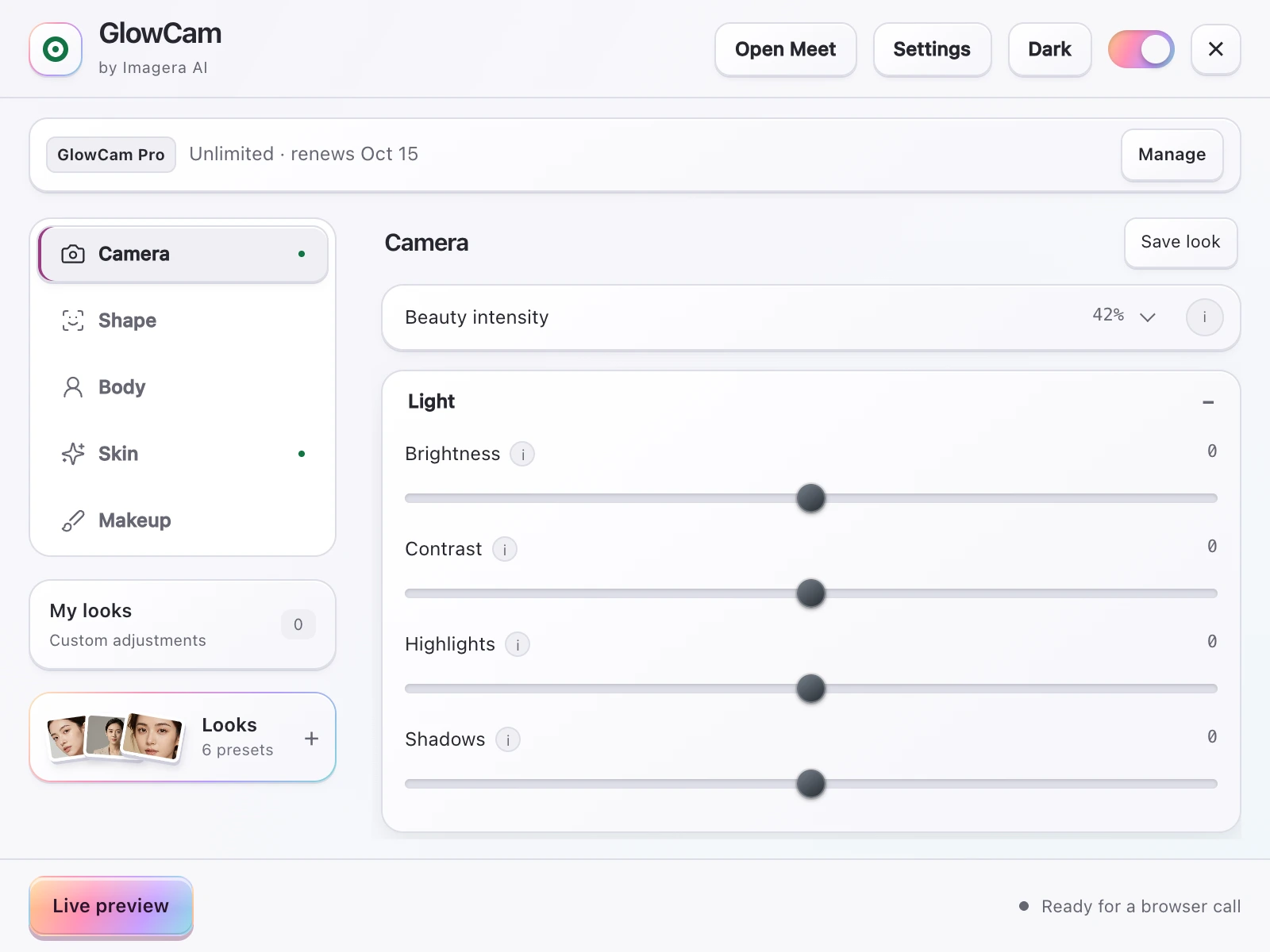
Screenshot of the GlowCam extension's controls. The filter runs on your own device, inside the browser tab of your call.
1.What Zoom's Touch Up My Appearance actually does
Let's be precise, because accuracy matters here. Touch Up My Appearance is a skin-smoothing control built into the Zoom client. Per [support.zoom.com](https://support.zoom.com), it is found under Settings → Video, and recent versions added a slider so you can dial the intensity instead of a simple on/off switch. Zoom also ships a small set of studio effects — adjustable eyebrows, lip colour, and a few facial filters — that live in a separate panel.
That is the whole offering. It is genuinely useful for a quick polish, it runs locally, and it is free with Zoom. For a lot of people on a lot of calls, that is plenty.
The friction shows up at the edges:
- It is Zoom-only. Open Google Meet, Microsoft Teams, or Webex and your settings do not travel with you. Each app has its own controls, its own intensity, its own quirks.
- It is smoothing-first. There is no skin even-tone correction, no glow, no warmth, no blemish-specific cleanup, no under-eye brightening.
- No hair, no reshape. Studio effects touch brows and lips. There is nothing for hair colour or subtle face-shape adjustments.
- Backgrounds are separate. Blur and virtual backgrounds are a different feature with their own behaviour.
None of that makes Touch Up bad. It makes it one tool. The question is whether one tool is what you need.
2.Why how you look on camera is not vanity
It is easy to wave this off as superficial. The research says otherwise — and the numbers are specific.
People who are unhappy with their on-camera appearance are more likely to experience video-call fatigue, driven by the "self-focused attention" created by the self-view window. Roughly 13.8% of women versus 5.5% of men report feeling "very" to "extremely" fatigued after video calls. — studyfinds.org
57% of workers aged 25-34 report video-call exhaustion, and 49% say on-camera meetings are more tiring than audio-only calls. A Scientific Reports (2025) study found that turning off self-view reduced cognitive load and fatigue. — speakwiseapp.com
The pattern is clear: staring at a version of yourself you are not comfortable with is a measurable drain. Feeling settled about your image is one of the cheapest ways to reduce that drag — which is exactly the job a good beauty layer is hired to do. A single smoothing slider chips at the problem. A toolkit that lets you look like a rested, well-lit version of yourself addresses it.
And it is not just faces. A Durham University (2023) study found that video backgrounds featuring plants or bookshelves were rated highest for trustworthiness and competence ([scienceofpeople.com](https://scienceofpeople.com)). Your background is part of how you are read — another thing a smoothing-only control cannot help with, but a full kit can.
3.Feature-by-feature: Zoom Touch Up My Appearance vs GlowCam
Here is the honest side-by-side. Zoom's column reflects Touch Up plus its studio effects; it is not nothing, but the gap is real.
| Capability | Zoom Touch Up My Appearance | GlowCam by Imagera AI |
|---|---|---|
| Skin smoothing | Yes (slider) | Yes — edge-preserving, skin-masked |
| Blemish / pimple cleanup | No | Yes |
| Even skin tone | No | Yes |
| Glow, warmth, brightness | No | Yes |
| Fair / lighten, under-eye brighten | No | Yes |
| Makeup: lipstick & blush | Lip colour (studio effects) | Yes — face-tracked lipstick + blush |
| Teeth whitening | No | Yes |
| Eye brightening | No | Yes |
| Hair recolour | No | Yes (PRO) — keeps shine & strands |
| Face reshape (slim, nose, jaw/chin V-line) | No | Yes (PRO) |
| Lip plump, eye enlarge | No | Yes (PRO) |
| Background blur / replace / brighten | Separate feature | Yes — blur, replace, brighten, presets |
| Saved "Looks" / presets | Filters only | Natural / Meeting / Polished + save your own |
| Works across Meet, Teams, Webex, more | Zoom only | Yes — one extension, every app |
| 100% on-device (no upload) | Local processing | Yes — runs on your device, never uploaded |
| Instant raw-feed restore | Toggle off | Master on/off restores raw feed instantly |
The headline difference is not any one row. It is that GlowCam turns "a smoothing slider in one app" into "a consistent look you carry into every call."
4.What GlowCam adds that no built-in offers
GlowCam is a Chrome (Chromium) browser extension that intercepts your webcam feed, applies beauty enhancements frame by frame, and then passes it to the meeting app. Because it intercepts at the browser level, the same look applies on Google Meet, Zoom, Microsoft Teams, Cisco Webex, Whereby, and Discord — without re-configuring anything per app.
Skin, done properly. Beyond smoothing, you get blemish cleanup, even tone, glow, warmth, brightness, fair/lighten, and under-eye brightening — each masked to your skin so eyes, lips, hair, and background stay sharp.
Makeup that tracks your face. Lipstick and blush that follow your movement, plus teeth whitening and eye brightening. This is closer in spirit to what Teams offers through its Maybelline Beauty app (more on that below) than to Zoom's lighter studio effects.
Hair recolour (PRO). Change hair colour while keeping shine and individual strands intact — a capability no built-in platform filter provides.
Reshape (PRO). Subtle face slim, nose slim, jaw/chin V-line, lip plump, and eye enlarge. Deliberately gentle, because the goal is "rested you," not "different person."
Backgrounds. Blur, replace, brighten, custom colour, and presets — useful given the Durham finding that the right background reads as more competent.
Looks. Start from Natural, Meeting, or Polished, then save your own. The master on/off restores your raw feed instantly when you want the unedited picture.
For a deeper tour, see the GlowCam page, the Zoom beauty filter breakdown, and the virtual makeup for video calls guide.
5.How GlowCam compares to other built-in filters (stated accurately)
Touch Up is not the only built-in worth knowing, and it is worth being correct about the landscape:
- Microsoft Teams has its own Touch Up My Appearance and a Maybelline Beauty app powered by Modiface — roughly 12 looks mapping 70+ facial points (sources: [pcworld.com](https://www.pcworld.com), [techcommunity.microsoft.com](https://techcommunity.microsoft.com)). This is the most full-featured built-in. See our Microsoft Teams beauty filter comparison.
- Zoom has Touch Up My Appearance plus studio effects (eyebrows, lip colour, filters) — [support.zoom.com](https://support.zoom.com).
- Google Meet offers background effects/blur and limited appearance touch-up. See the beauty filter for Google Meet page.
- Webex offers limited touch-up and lighting adjustments. Whereby and Discord (web) offer background blur but no built-in beauty/skin filter on Discord — stated cautiously. See Webex, Whereby & Discord.
A note on history: Snap Camera, the old go-to for cross-app filters, was discontinued January 25, 2023 and required a separate desktop app plus a virtual camera ([help.snapchat.com](https://help.snapchat.com)). GlowCam needs neither — it is a browser extension. If you landed here from that era, the Snap Camera alternative page is the natural next read.
GlowCam's edge over all of these built-ins is consistency: one cross-platform extension, the same look everywhere, plus hair recolour and face reshaping none of them offer — all processed on-device.
6."But is my video safe?" — privacy and the on-device promise
This is the question that should follow any beauty tool, and GlowCam's answer is concrete. Processing happens locally on your device. Your webcam feed never leaves your computer — it is transformed frame by frame and handed to the meeting app as your camera. No discrete GPU or heavy neural upscaling is required; it is built to run on ordinary laptops.
An honest scope note: GlowCam is fully end-to-end tested on Google Meet today. Other supported platforms use the same approach, and support is expanding. We would rather tell you that than overstate it.
Full details live at the privacy page.
7.Get the look right before you reach for any slider
A filter amplifies what your camera already captures, so the basics still pay off. Per [med.stanford.edu](https://med.stanford.edu) and [iphonelife.com](https://www.iphonelife.com):
- Position the camera at or slightly above eye level. It flatters the face and reads as more natural than a below-the-chin angle.
- Use a 1080p+ webcam if you can. More real detail means smoothing has cleaner data to work with.
- Add front lighting before increasing smoothing. Good light fixes most "tired" looks on its own; smoothing then does less work and looks more believable.
Get those three right, apply a light GlowCam Look on top, and you will rarely need to push any slider hard. Our how to look better on video calls and best webcam filters 2026 guides go deeper.
8.Who should stick with Touch Up, and who should switch
Stay with Touch Up My Appearance if: you only ever use Zoom, you want nothing more than light smoothing, and a single slider already does the job. There is no reason to add a tool you do not need.
Switch to GlowCam if: you bounce between Zoom, Meet, Teams, and Webex; you want more than smoothing (even tone, glow, makeup, hair, reshape, backgrounds); you want a saved Look that follows you everywhere; and you want all of it processed on-device with an instant raw-feed toggle.
GlowCam includes a 2-day free trial with no credit card. Skin, Makeup, and Background features are available during the trial; Hair colour and Reshape are PRO. After the trial it is $24.99/month or $249.99/year (~17% saving), plus pay-per-use credits. Sign in with an Imagera AI account (email/password or Google), grab it from the Chrome Web Store, and you are running in minutes.
9.The bottom line
Zoom's Touch Up My Appearance is a good one-trick control: free, local, and fine for a quick smooth. But it is one trick, and it stays inside Zoom. If looking your best on camera matters across all your apps — and the fatigue and trust research suggests it does more than we admit — a full, consistent, on-device toolkit is the upgrade.
Try GlowCam free for 2 days, no card required → https://chromewebstore.google.com/detail/imagera-ai-presents-glowc/jgelcjbncndabncbjglfdmeeiddnnnlm