If you typed "snap camera alternative" into a search box, you already know the bad news: Snap Camera is gone. Snapchat discontinued the desktop app on January 25, 2023 ([help.snapchat.com](https://help.snapchat.com)). The download links are dead, and even if you saved an old installer, it depended on a separate desktop app feeding a virtual camera into Zoom, Meet, or Teams — a setup that breaks every time a platform tightens its security policies.
The good news: the thing most people actually used Snap Camera for — looking a little better, a little more polished, a little more yourself on camera — no longer requires a clunky virtual-camera hack at all. GlowCam by Imagera AI is the in-browser successor. It is a Chrome (Chromium) extension that applies real-time beautification directly to your webcam feed on the web apps you already use, with no app to install, no virtual camera to configure, and nothing leaving your computer.
This page explains exactly what changed, why so many people want this in the first place, and how GlowCam compares to both Snap Camera and the beauty filters now built into Zoom, Teams, and Meet.
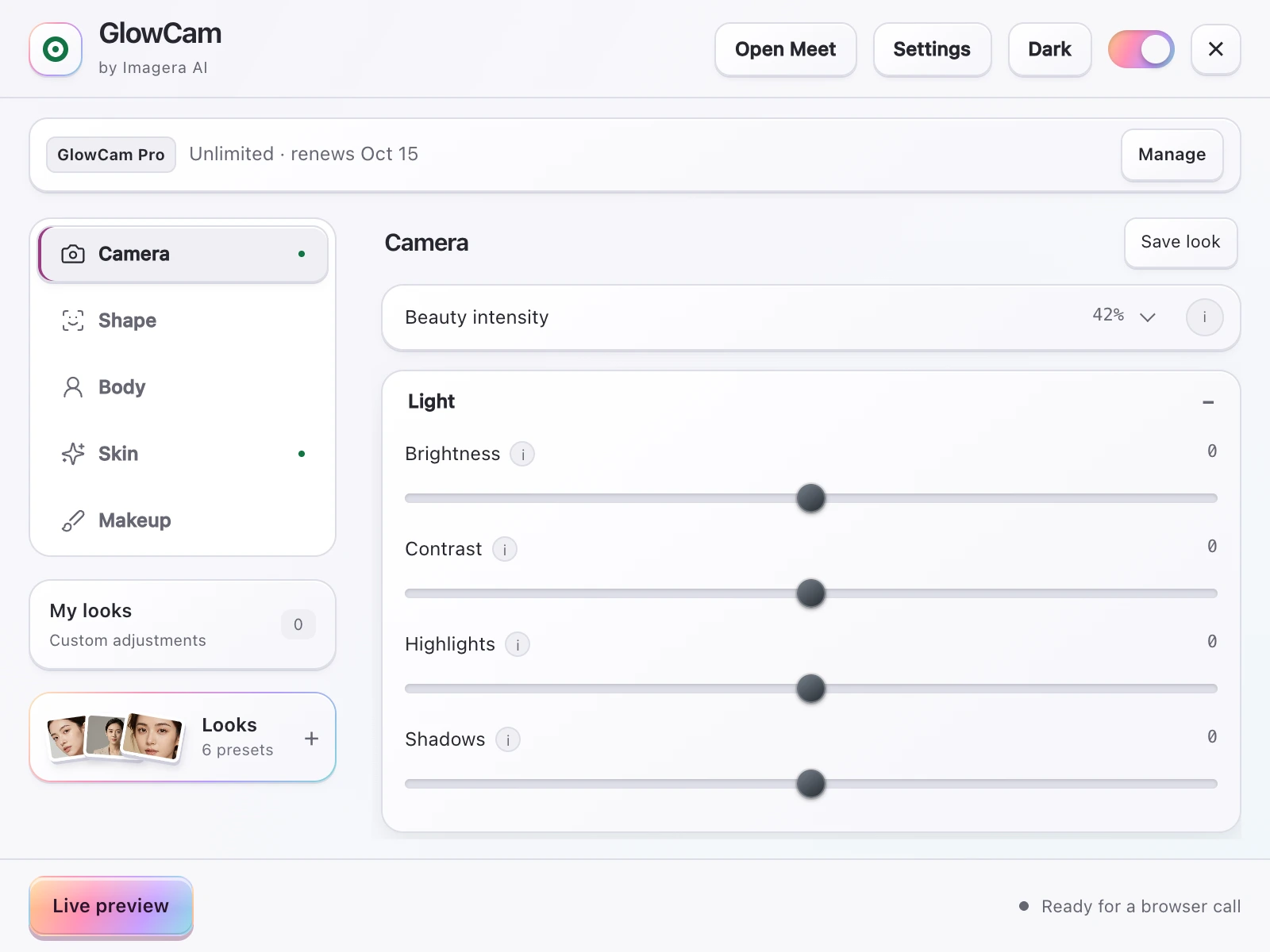
Screenshot of the GlowCam extension's controls. The filter runs on your own device, inside the browser tab of your call.
1.Why Snap Camera went away — and why the replacement is different
Snap Camera was a desktop application. You installed it, it created a virtual webcam device, and then inside Zoom or Meet you selected "Snap Camera" instead of your real webcam. It worked, but it had three structural problems that GlowCam was built to avoid.
First, it required a separate install and a virtual camera driver. That meant admin rights you might not have on a work laptop, antivirus warnings, and conferencing apps that sometimes refused to recognise the virtual device after an update. If you ever spent ten minutes before a meeting wondering why Zoom could not find "Snap Camera" in its device list, you know exactly how fragile that chain was.
Second, it was a general-purpose Lens engine, optimised for dog ears, rainbow vomit, and face-swaps — not for the "subtle, professional, look-my-best" use case most remote workers actually wanted. The handful of genuinely flattering Lenses were buried among thousands of novelty effects, and none of them gave you fine control over how much smoothing or warmth you applied.
Third, it is no longer maintained or supported, so it receives no security or compatibility updates. As browsers and conferencing apps evolve, an abandoned virtual-camera driver only gets riskier and less reliable to keep installed.
GlowCam takes the opposite approach. It runs inside your browser on the conferencing site itself, processing the camera feed in real time before the call ever sees it. There is no virtual camera, no driver, and no desktop installer — just a browser extension and a master on/off switch that restores your raw feed instantly. Because it lives in the browser, it updates the way every other extension does, quietly and automatically, and it never touches the rest of your operating system.
Snap Camera (the desktop app) was discontinued on January 25, 2023, and it required a separate desktop app plus a virtual camera to function. — help.snapchat.com
2.Why people actually want this: appearance anxiety is real
It's easy to dismiss webcam beautification as vanity. The research says otherwise. The discomfort people feel staring at their own face in the self-view window has a name in the literature — self-focused attention — and it is a measurable driver of video-call fatigue.
People who are unhappy with their on-camera appearance are more likely to experience Zoom fatigue, driven by the "self-focused attention" created by the self-view window. — studyfinds.org
The numbers are uneven across groups, and they're worth stating precisely:
Roughly 13.8% of women versus 5.5% of men report feeling "very" to "extremely" fatigued after video calls. — studyfinds.org
57% of workers aged 25–34 report video-call exhaustion, and 49% say on-camera meetings are more tiring than audio-only calls. — speakwiseapp.com
A 2025 Scientific Reports study found that turning off the self-view window reduced cognitive load and fatigue ([studyfinds.org](https://studyfinds.org)). That's a clue to why a tool like GlowCam helps. When you feel comfortable with how you look, the self-view stops being a source of low-grade stress. You're not hiding and you're not pretending to be someone else — you're simply removing a distraction so you can pay attention to the meeting instead of your own forehead. For younger workers in back-to-back calls, that small reduction in self-consciousness can add up over an eight-hour day.
3.What GlowCam actually does
GlowCam is not a Lens engine and it's not a cartoon-filter app. It's a precise, adjustable webcam beautifier aimed at professional and social video calls. Everything runs 100% on-device right on your own computer, so your webcam feed is never uploaded, transmitted, or stored (privacy details). It doesn't need a discrete GPU or heavy neural upscaling, so it runs on ordinary laptops without spinning up the fans.
- Skin: smoothing, blemish and pimple cleanup, even tone, glow, warmth, brightness, fair/lighten, and under-eye brightening.
- Makeup that tracks your face: lipstick, blush, teeth whitening, and eye brightening — applied to the right spot even as you move.
- Hair (PRO): recolour while keeping natural shine and individual strands.
- Reshape (PRO): face slim, nose slim, jaw/chin V-line, lip plump, and eye enlarge.
- Background: blur, replace, brighten, custom colour, and ready-made presets.
- Looks: Natural, Meeting, and Polished presets — or save your own — plus a master on/off toggle that restores the raw feed instantly.
Every slider is adjustable, so you can dial smoothing down to barely-there for a serious client call or push glow and warmth a little further for a casual catch-up. The Looks presets exist precisely so you don't have to rebuild your settings each time: pick Meeting for work, Polished for an interview, Natural for everything in between.
It works across Google Meet, Zoom (web), Microsoft Teams (teams.microsoft.com and teams.live.com), Cisco Webex, Whereby, and Discord (web) — one extension, the same look everywhere. An honest note on testing: only Google Meet is fully end-to-end tested; the other supported platforms use the same in-browser technique, but your mileage may vary slightly by app. For a Meet-specific walkthrough, see the beauty filter for Google Meet page.
4.Snap Camera vs GlowCam vs built-in filters
This is the part most "alternative" pages get wrong, so let's be accurate. Several platforms now ship their own appearance tools, and they're genuinely useful for basic touch-up. GlowCam's advantage isn't that built-ins don't exist — it's that it's one consistent, deeper layer across every app, with features the built-ins simply don't offer.
| Capability | Snap Camera (discontinued) | Built-in platform filters | GlowCam |
|---|---|---|---|
| Still available / maintained | No (ended Jan 25, 2023) | Yes | Yes |
| Install required | Desktop app + virtual camera | None | Browser extension only |
| Skin smoothing / touch-up | Yes (Lens-based) | Yes (see below) | Yes, adjustable |
| Makeup (lipstick, blush) | Limited | Teams and Zoom partial | Yes, face-tracked |
| Hair recolour | No | No | Yes (PRO) |
| Face / feature reshaping | No | No | Yes (PRO) |
| Works across multiple apps | Via virtual camera | Per-app only | One extension, all apps |
| Processing location | On-device | On-device | On-device, never uploaded |
To set expectations correctly on the built-ins:
- Microsoft Teams has "Touch Up My Appearance" and a Maybelline Beauty app powered by Modiface — about 12 looks that map 70+ facial points ([pcworld.com](https://www.pcworld.com), [techcommunity.microsoft.com](https://techcommunity.microsoft.com)). It's the most feature-rich built-in. See how GlowCam compares on the Microsoft Teams beauty filter page.
- Zoom has "Touch Up My Appearance" (a skin-smoothing slider) plus studio effects for eyebrows, lip colour, and filters ([support.zoom.com](https://support.zoom.com)). If you only ever use Zoom, that's a real comparison — covered in detail on our Zoom Touch Up My Appearance alternative page.
- Google Meet offers background effects, blur, and limited appearance touch-up.
- Webex offers limited touch-up and lighting. Whereby and Discord (web) offer background blur; Discord has no built-in beauty or skin filter, so it's worth stating that one cautiously.
The pattern is clear: built-ins are improving, but they're per-app, shallow, and inconsistent. The smoothing slider you've tuned in Zoom does nothing for you the moment a client invites you to a Teams call, and Teams' Maybelline looks don't follow you into Meet. GlowCam gives you one toolkit — including hair recolour and feature reshaping no built-in offers — that behaves identically whether you're in Meet today and Teams tomorrow. You learn it once and it travels with you.
5.Look-better basics that work with any tool
Beautification software is the finishing layer, not the foundation. Before you reach for a smoothing slider, fix the physical setup — it makes every filter look more natural:
- Raise your camera to eye level or slightly above. A camera looking up at you is rarely flattering ([med.stanford.edu](https://med.stanford.edu)).
- Use a 1080p or higher webcam if you can; sharper input means subtler, cleaner enhancement ([iphonelife.com](https://www.iphonelife.com)).
- Add front lighting before you increase smoothing. Good light reduces how much retouching you need in the first place ([med.stanford.edu](https://med.stanford.edu)).
The order matters. Get the camera height and lighting right first, and you'll find you need far less smoothing to look polished, which keeps the result believable rather than plastic. Software then handles the small things hardware can't — an uneven night's sleep under the eyes, a stubborn blemish, a slightly tired complexion. For a full routine, our guide on how to look better on video calls walks through camera, light, and software in order.
6.Your background matters more than you think
It's not just your face. What's behind you shapes how others judge you on a call.
A 2023 Durham University study found that video backgrounds featuring plants or bookshelves were rated highest for trustworthiness and competence. — scienceofpeople.com
If a real plant-and-bookshelf wall isn't an option — and for most home-office setups it isn't — GlowCam's background tools (blur, replace, brighten, custom colour, and presets) let you approximate that polished, credible look in seconds without redecorating a room. More on that in our background blur for video calls guide, and you can pair it with virtual makeup for video calls for a complete on-camera look.
7.Pricing: try it before you commit
GlowCam offers a 2-day free trial with no credit card required. During the trial you get the Skin, Makeup, and Background toolsets, which cover the everyday looking-good basics most people came to Snap Camera for. After that it's $24.99/month, or you can use pay-per-use credits instead of a subscription if you only jump on camera occasionally. The PRO features — hair colour and reshaping — sit above the free tier. You sign in with an Imagera AI account using email and password or Google.
For a broader look at the category, including how GlowCam stacks up against other options, see our roundup of the best webcam filters of 2026, and our coverage of the Webex, Whereby & Discord beauty filter situation.
8.The bottom line
Snap Camera solved a problem the way 2020 allowed: a heavy desktop app and a virtual camera. In 2026, that's both unnecessary and unsupported. The better answer is a lightweight, on-device browser extension that lives where your calls actually happen, updates itself, and never sends your face anywhere.
If you want a true Snap Camera alternative — one that's maintained, private, cross-platform, and built for looking your professional best rather than wearing dog ears — GlowCam is it.