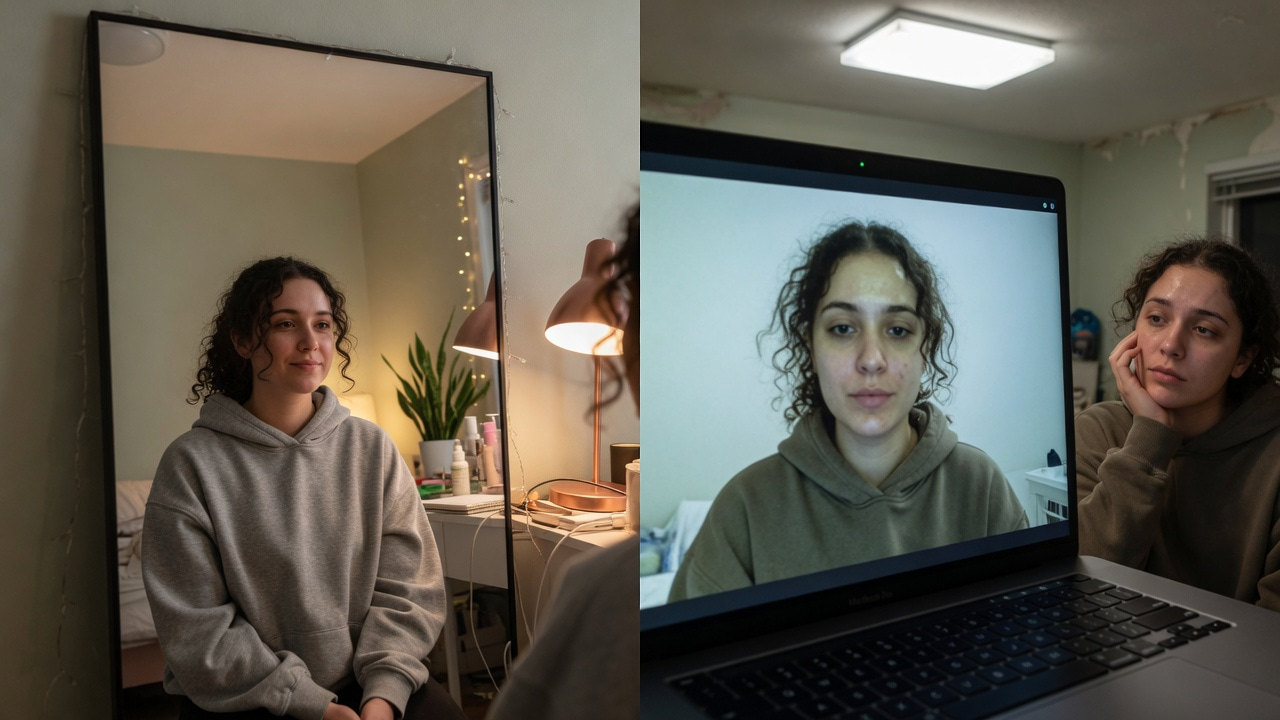
You can walk into a coffee meeting and feel fine — then open Google Meet, see your own tile, and feel a cold drop in confidence. Same face. Same morning. Completely different verdict.
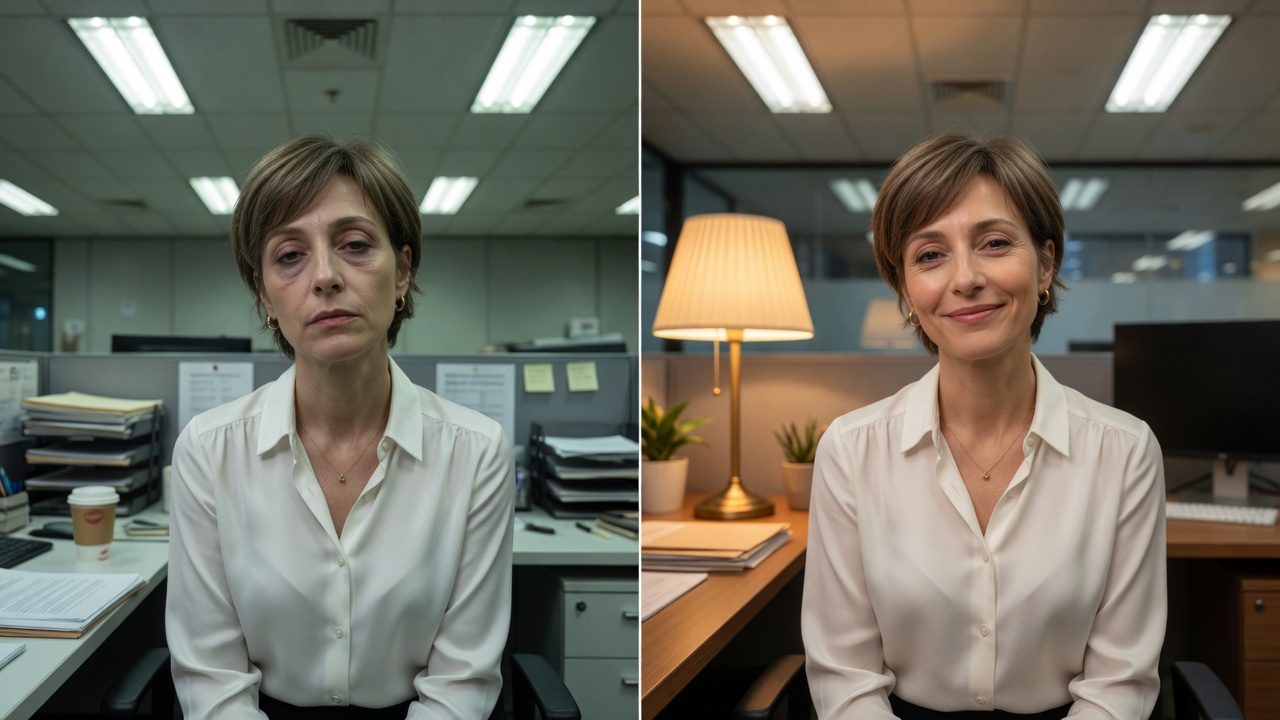
Harsh overhead light versus flattering front light on the same face.
That gap is not vanity. It is physics plus cheap sensors, and it is quietly shaping who leaves the camera on, who gets heard in hybrid teams, and who walks into a video interview already apologizing for their face.
This article explains why the camera lies, what actually fixes it, and how Imagera GlowCam helps you show up as the person people meet offline.
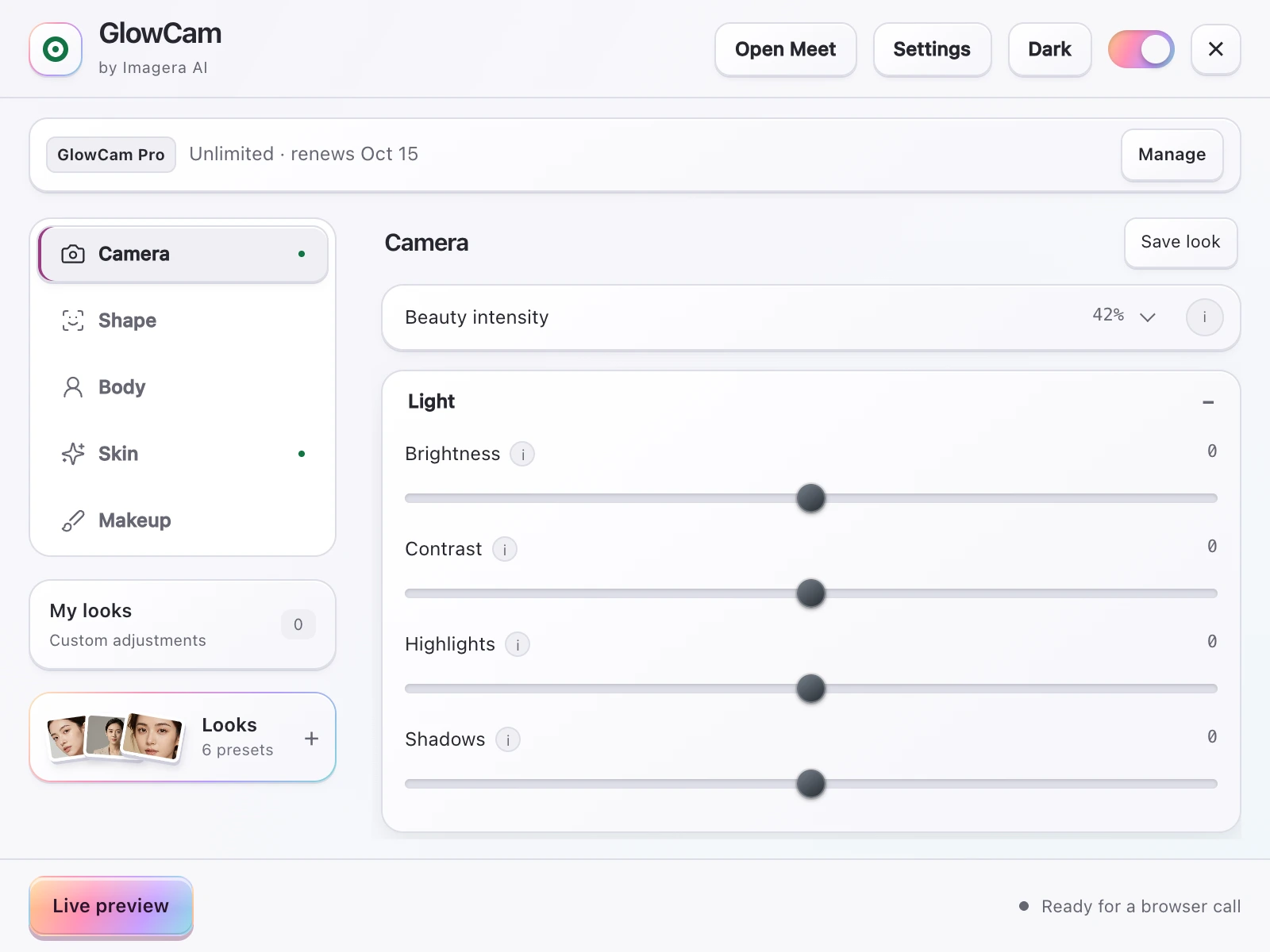
Screenshot of the GlowCam extension's controls. The filter runs on your own device, inside the browser tab of your call.
Quick answer: You usually look "worse" on camera because a single flat lens, wide-angle distortion, and one fixed frame remove the depth, motion, and 3D symmetry your brain relies on in person, plus the mere-exposure effect makes your true (non-mirror) face feel unfamiliar.
Why do you look different on camera than in a mirror?
A mirror shows a flipped image you see constantly, so it feels "right," while a camera captures your true, unflipped face, which can look strange simply because you rarely see it. Short phone lenses (under 35mm) sit close to your face and exaggerate whatever is nearest the camera, so a nose can look wider, and a static frame loses the micro-movements that read as attractiveness in real, moving 3D interaction.
Can editing tools fix how you look on camera?
Yes, meaningfully. In 2026, Imagera can upscale a soft selfie to 4K or 8K, correct wide-angle distortion, and even relight faces in under 60 seconds per shot, closing much of the flat-lens gap. Balanced lighting and clean 4K detail restore the even illumination and fine symmetry that a cramped phone lens flattens, so the result reads closer to how you actually look in person.
The “mirror is kind, webcam is cruel” problem
Mirrors are continuous, well-lit (usually), and you control the angle without compression. Webcams are different animals:
- Wide-ish laptop lenses up close stretch features — nose larger, face rounder, jaw less defined.
- Overhead office light digs trenches under eyes and along the jaw (the famous double-chin shadow).
- Tiny sensors crush dynamic range; shadows go muddy; skin goes grey.
- Video compression smears texture into “tired” and “old” more than a still photo would.
- Self-view trains you to hate micro-movements nobody else is studying.
Plastic surgery clinics even coined language around “Zoom dysmorphia” — people seeking procedures after months of staring at a distorted self-tile. You do not need a procedure to refuse a bad mirror.
What people type into search (the real demand)
High-intent queries sound like embarrassment, not product categories:
- “why do I look so bad on Zoom”
- “webcam makes me look fat / older”
- “I look fine in person ugly on FaceTime”
- “how to not look tired on video interview”
- “fix double chin on camera interview”
Underneath: I need this job / this client / this team to take me seriously, and my laptop is sabotaging me.
Free fixes that close half the gap
1. Light in front of your face
If one thing is non-negotiable, it is this. A desk lamp with a shade beats most software. Backlight from a window turns you into a silhouette; ceiling cans paint permanent under-eye hollows.
2. Camera slightly above eye level
Looking up into a laptop is a double-chin machine. Stack books. One inch of height changes the story of your jaw and eyes.
3. Sit a little farther back
Extreme close-ups maximize lens distortion. Chest-up with breathing room is kinder.
4. Chin slightly forward, neck long
Interview coaches teach this constantly: create space under the jaw. It is posture, not surgery.
5. Clean the lens
A greasy webcam makes everyone look older. Microfiber. Ten seconds.
Do these before you buy anything.
Where free fixes stop
You can nail angle and still have:
- Genetic dark circles the lamp cannot fill
- Redness or texture the sensor exaggerates
- A hotel room you cannot redesign
- A 7 AM final-round after four hours of sleep
- Zero interest in learning full makeup
That is not failure. That is when a live professional look tool earns its place.
How Imagera GlowCam fixes the “camera tax”
GlowCam is Imagera’s real-time beauty filter for video calls — a Chrome extension that improves your outgoing feed on browser Google Meet, Zoom, Teams, Webex, Whereby, and Discord.
Designed for the “I look worse on camera” job:
- Even skin without plastic blur
- Under-eye brighten for the shadow the sensor invents
- Optional light makeup if you skipped the routine
- Background calm so the room stops competing
- Presets: Natural, Meeting, Polished — save your own
- On-device by design — your camera is not uploaded to Imagera for filtering
Keep it invisible. The goal is “this is how I look when the lighting is fair,” not “this is a filter.”
3-day trial, no credit card. Pro from $24.99/month (yearly available).
GlowCam · Chrome Web Store
Interview, pitch, promotion: why the fix is strategic
Hiring research and practitioner lore both circle the same idea: first impressions load fast, and visual cues color how competence is heard (often discussed as a halo or horn effect). You cannot delete bias from the industry in one morning.
You can stop a bad webcam from manufacturing a horn effect — making you look less energetic, less senior, or less “put together” than you are across a table.
That is the honest pitch for caring about camera:
- Job seekers — more airtime for answers, less self-view panic
- Founders — partners feel energy instead of fatigue
- Hybrid employees — camera-on culture stops feeling like punishment
- Sales — buyers transfer “sharp on video” to “sharp as a vendor”
Looking good is not the whole game. Looking accidentally wrecked is an unforced error.
A 6-minute “I hate my tile” rescue
| Minute | Action |
|---|---|
| 0–1 | Face a lamp; kill harsh overhead if possible |
| 1–2 | Raise laptop; wipe lens |
| 2–3 | Open call in Chrome; enable camera |
| 3–4 | GlowCam → Meeting; under-eye low only |
| 4–5 | Turn head; if shimmer, reduce |
| 5–6 | Hide self-view if it spirals; eyes to lens on join |
What not to do
- Max every slider until you look airbrushed
- Stack Zoom Touch Up and a third-party at full strength
- Change your entire face shape between interview rounds
- Buy a cinema camera before you own a $20 light
- Shame yourself for caring — camera-on work made this part of the job, like email made writing part of the job
The color and glare problems most people never diagnose
Geometry and brightness get all the attention, but two quieter failures wreck otherwise well-lit calls: wrong color balance and reflective glare. Neither is fixed by raising your laptop or adding a lamp — in fact, adding the wrong lamp makes them worse.
Mixed color temperature is the sneaky one. Your webcam runs a single automatic white balance for the whole frame. When a warm ceiling bulb (around 2700K) fights a cool window (around 6500K), the sensor splits the difference and picks a compromise that flatters neither. The visible result: one cheek reads orange, the other reads blue-grey, and your skin looks blotchy in a way no amount of brightness fixes. This is why people who "added a light" sometimes look worse — they introduced a second color temperature the camera now has to average against.
| Symptom on your tile | Likely cause | The actual fix |
|---|---|---|
| One side warm, one side cold | Mixed bulb + window light | Match sources, or curtain one off |
| Skin reads flat orange | Warm bulb + auto white balance overcorrecting | Cooler daylight bulb or manual WB |
| Grey, lifeless despite good light | Camera exposing for a bright background | Meter for your face, darken the wall behind |
Glasses glare is a framing problem in disguise. A front light — the fix everyone recommends — is precisely what bounces off lens coatings straight into the camera as a white disc over your eyes. Raising the light slightly and pushing it off to about 30 degrees usually kills the reflection while keeping your face lit. Tilting the earpieces of your glasses up a few degrees so the lenses angle downward also works, and nobody on the call can tell.
Backlight clipping is different from "being a silhouette." The page covers window backlight turning you dark. The subtler version: a bright wall or lamp behind you that isn't blinding, but is bright enough that the camera meters for it. Your face then sits in the sensor's noisy lower range, and compression turns that noise into the grey, "tired" texture you're blaming on your skin. Give the wall behind you less light than your face, and the same camera suddenly renders you cleanly.
Once color balance and glare are handled, a live tool like Imagera GlowCam has far less harshness to work against — it's correcting a fair image, not fighting a color cast it can't see the cause of. Diagnose the room first; the software does its best work on an already-honest signal.
Related guides
| Topic | Link |
|---|---|
| Dark circles specifically | Look less tired on video calls |
| Camera-on dread | Camera-on culture |
| Investor presence | Look fundable on a Zoom pitch |
| Product | GlowCam |
Key takeaways
- The camera lies with geometry and sensors — not with your worth.
- Light and height fix more than any app alone.
- GlowCam removes remaining harshness for work calls when kept natural.
- First impressions on video are career infrastructure in 2026.
- Invisible polish > obvious filter.
Close the mirror–webcam gap this week
Day 1–2: Only light + height. Photograph self-view; compare to mirror.
Day 3–4: Add GlowCam under-eye + mild skin at low strength.
Day 5: Hide self-view on a real call.
Day 6–7: Lock preset; stop daily fiddling.
You are not “aging in Zoom.” You are fighting lenses, overhead light, and compression. Fix the physics, then polish lightly. GlowCam.
Who feels the camera tax hardest
People who look fine in coffee meetings and harsh on laptop tiles — candidates, remote leads, anyone building “Zoom dysmorphia” from self-view. Fair imaging restores confidence without surgery or filters that scream filter.
Zoom face is a systems problem
“Zoom face” is not one bug. It is a stack:
- Geometry (angle, distance)
- Illumination (direction, color temperature)
- Optics (small sensors, wide fields)
- Compression (what networks throw away)
- Psychology (self-view loops)
Fixing only psychology (“just be confident”) fails when the image is objectively harsher than life. Fixing only software while sitting in a silhouette also fails. The stack is the point.
A 30-day experiment (for people who “hate how they look”)
Week 1: Light + height only. Journal confidence on camera-on meetings.
Week 2: Add GlowCam under-eye low. Note whether you leave camera on more.
Week 3: Save a Meeting preset; stop adjusting daily.
Week 4: Do one high-stakes call (interview, customer, skip-level) with the system locked.
Most people discover the dread was not their face — it was unpredictability.
For partners and spouses who say “you look fine”
They see you in room light with two eyes and a brain that fills gaps. The hiring manager sees a 480p tile. Both can be right. Build for the tile when the tile decides outcomes.
Closing
You are not broken. The camera is biased toward shadows and distortion. Correct the bias with physics first and GlowCam second — then spend your nerves on the conversation.
Where to open next
| Goal | Link |
|---|---|
| GlowCam product | GlowCam |
| Pricing | Pricing |
| Still headshots | AI Headshot |

Geometry fix: eye-level camera and front lamp close the camera tax.
Closing the mirror gap in practice
The camera invents age with wide lenses, overhead light, and compression. Treat those before any beauty stack.
| Offline look | Webcam distortion | First fix |
|---|---|---|
| Fine under desk lamp | Grey / dead | Front light |
| Sharp jaw in mirror | Heavy jaw on tile | Raise laptop |
| Rested IRL | Dark tunnels | Face-height light + under-eye low |
| Natural skin | Plastic filter | Lower strength |
14-day challenge: days 1–3 light/height only; 4–7 add under-eye low; 8–14 lock preset and stop daily fiddling. Journal camera dread 1–10 — it usually falls when surprise dies.
Try GlowCam — start your free trial
This guide is about Imagera GlowCam — a real-time, on-device webcam beauty filter for Google Meet, Zoom, Microsoft Teams, and more in Chrome. Use the links below to convert from reading to installing.
| Goal | Action |
|---|---|
| Start free (3 days, no card) | Open GlowCam product page |
| Install the extension | Chrome Web Store — GlowCam |
| Compare plans | Pricing |
| Decision / alternatives | Snap Camera alternative · Zoom Touch Up alternative |
What you get on a work call: natural skin + under-eye polish, optional makeup, background calm, and saved presets (standup / client / interview). Processing is designed to stay on your device.
Convert now: Get GlowCam — free 3-day trial → install once → save a low-strength Work-Natural preset → join your next high-stakes call looking like yourself on a good day.