Yes — Zoom has a built-in beauty filter called Touch Up My Appearance, but it is a single on/off slider that softens your whole image at once. If you want to look better on Zoom without looking airbrushed, you need something more precise. GlowCam is a natural AI beauty filter that runs right inside Chrome and works on the Zoom web client — giving you real-time skin retouch, subtle makeup, and background control while keeping you looking rested and real, not plastic.
Below is exactly how Zoom's native option compares, why "natural" is the whole point in 2026, and how to set up a better filter in a couple of minutes.
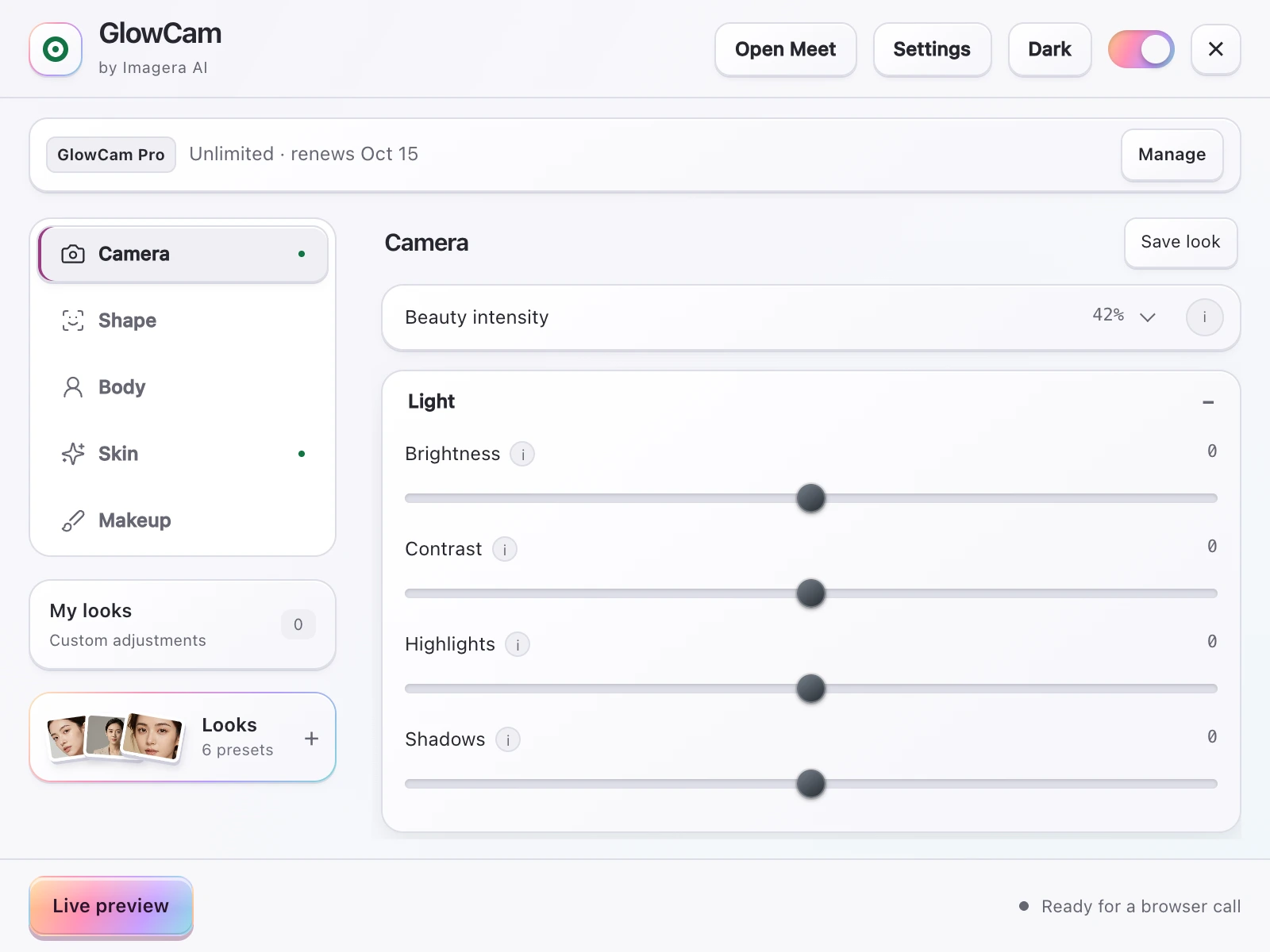
Screenshot of the GlowCam extension's controls. The filter runs on your own device, inside the browser tab of your call.
1.Does Zoom Have a Beauty Filter?
Zoom does. It's under Settings → Video → Touch Up My Appearance, and there's a matching Adjust for Low Light option next to it. Touch Up applies a light blur across your face to soften skin texture. In newer builds you get a small slider so you can dial the strength up or down.
It's genuinely useful, but it has real limits:
- It's one global control. Everything gets softened by the same amount. You can't clean up a single blemish, brighten tired under-eyes, or even out your tone without smearing the rest of your face.
- Too much looks fake. Push the slider up and detail disappears — skin goes waxy, eyes lose definition, and you land squarely in "filtered" territory.
- It's only skin. No makeup, no framing help, no way to fix a distracting background beyond Zoom's own blur.
For a quick daily standup, Touch Up is fine. For an interview, a client pitch, a webinar, or anything on camera where you actually want to look your best, a blunt slider isn't enough.
2.Why "Natural" Beats "Airbrushed" in 2026
The biggest shift in on-camera beauty right now is a hard turn away from the heavily-filtered look. The filter-dysmorphia backlash is real: people are tired of faces that look sculpted and poreless, and audiences increasingly read a super-smoothed face as a distraction — or worse, as trying too hard.
The look that works now is rested, not retouched. You want to seem like you slept well and have good lighting, not like you ran your face through a Photoshop action. That means:
- Keeping skin texture while cleaning up the things that actually bug you.
- Brightening under-eyes and evening out tone instead of blurring everything flat.
- Makeup and color so subtle that nobody can tell you're wearing a filter.
This is where a modern AI beauty filter earns its keep. Instead of one smoothing pass, GlowCam understands your face frame by frame and adjusts each feature independently — so the result reads as you on a good day, not you behind a filter.
3.A Better Zoom Beauty Filter: GlowCam
GlowCam is a Chrome browser extension. You install it once, and it enhances your webcam feed in real time before it reaches your video call. On Zoom, use it with the Zoom web client (join in the browser) rather than the desktop app.
Here's what you get beyond a single slider:
Skin retouch, tuned. Smoothing, blemish and pimple cleanup, even tone, a soft glow, gentle warmth, and under-eye brightening — each on its own slider. Fix the specific thing that bothers you and leave the rest of your face looking like skin.
Virtual makeup that tracks your face. Lipstick, blush, teeth whitening, and eye brightening that follow your movements naturally. Great for jumping on a call without a full makeup routine, and subtle enough that it never announces itself.
Background blur or replace — no green screen. GlowCam handles your background on-device, so you can blur a messy room or drop in a clean backdrop without Zoom's sometimes-glitchy segmentation and without any extra hardware.
One-tap presets. Start with Natural, Meeting, or Polished, then fine-tune with per-feature sliders if you want. Most people set it once and forget it.
Pro touches. GlowCam Pro adds hair color and subtle, natural face and feature reshaping — restrained adjustments that stay firmly on the "still obviously you" side of the line.
Want the full feature breakdown and setup steps? See the GlowCam overview.
4.It Runs 100% On Your Device — Nothing Uploaded
This is the part that matters most for work calls. GlowCam processes your webcam feed entirely on your own computer. Your video is never uploaded to a server and never stored anywhere. The enhanced image is generated locally and handed straight to Zoom.
That has two big advantages:
- Privacy. Your face and your room stay on your machine. Nothing about how you look on a call leaves your laptop.
- No lag, no GPU. Because there's no round-trip to the cloud, the filter is genuinely real-time. It runs smoothly on ordinary laptops — you don't need a gaming rig or a dedicated graphics card.
There's no OBS to configure and no virtual camera to wire up. You install the extension, join Zoom in the browser, and it's already working.
5.How to Set It Up on Zoom
- Install the GlowCam extension in Chrome.
- Join your meeting using the Zoom web client (join from the browser link, not the desktop app).
- Open GlowCam and pick a preset — Natural is a safe default for work.
- Nudge individual sliders (skin, under-eye, warmth, background) until it looks like your best real self.
- Optionally turn off Zoom's own Touch Up My Appearance so the two aren't stacking.
There's a free 2-day trial with no card required, so you can test it on a few real calls before deciding.
6.GlowCam vs. Touch Up My Appearance
| Zoom Touch Up My Appearance | GlowCam | |
|---|---|---|
| Control | Single global slider | Per-feature sliders + presets |
| Skin | One-pass smoothing | Smoothing, blemish cleanup, even tone, under-eye brighten |
| Makeup | None | Lipstick, blush, teeth whitening, eye brightening |
| Background | Zoom's own blur only | On-device blur or replace, no green screen |
| Reshape / hair | None | Subtle reshape and hair color (Pro) |
| Where it runs | Inside the Zoom app | Chrome extension, on-device |