Imagera AI - AI content creation platform for generating images, cloning voices, creating avatars, and enhancing videos. Privacy Policy | Terms

    IMAGERAAI
    Feature

    Beauty Filter for Google Meet: The Complete Guide

    Add a real-time beauty filter for Google Meet with GlowCam by Imagera AI. On-device skin smoothing, makeup, reshape and backgrounds. 7-day free trial.

    By Imagera Team9 min readJune 16, 2026Updated: June 16, 2026
    Share:
    Beauty Filter for Google Meet: The Complete Guide

    TL;DR

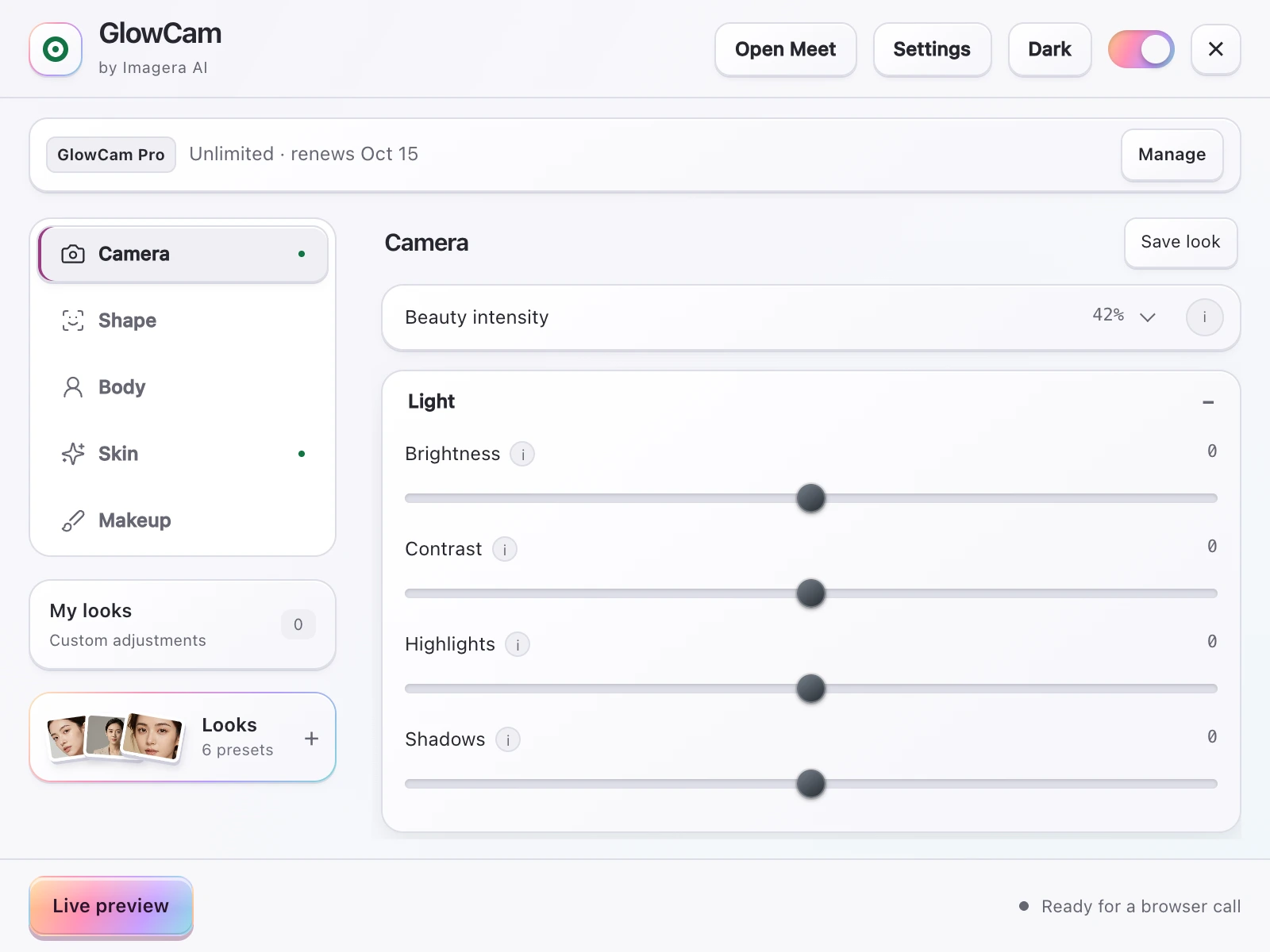
    Google Meet only offers background blur and a basic on/off touch-up. GlowCam by Imagera AI is a Chromium extension that adds controllable, on-device skin smoothing, makeup, backgrounds, plus PRO hair recolour and face reshaping — running 100% locally so your webcam feed is never uploaded. It works the same across Meet, Zoom, Teams, Webex, Whereby and Discord. 7-day free trial, no card; then $19.99/mo or pay-per-use credits.

    ~13.8% of women vs ~5.5% of men report feeling 'very' to 'extremely' fatigued after video calls (studyfinds.org, speakwiseapp.com)
    57% of workers aged 25-34 report video-call exhaustion (studyfinds.org, speakwiseapp.com)
    49% say on-camera meetings are more tiring than audio-only (studyfinds.org, speakwiseapp.com)
    Microsoft Teams Maybelline app offers ~12 looks and maps 70+ facial points (pcworld.com, techcommunity.microsoft.com)
    Snap Camera was discontinued January 25, 2023 (help.snapchat.com)
    Durham University (2023): video backgrounds with plants or bookshelves rated highest for trustworthiness and competence (scienceofpeople.com)

    Google Meet has quietly become the default room where careers, deals and first impressions happen. But the camera in your laptop is rarely kind, the lighting in most home offices is worse, and Meet's own appearance controls are deliberately minimal. If you have ever joined a call and immediately flinched at your self-view, you are not imagining it. A proper beauty filter for Google Meet can close the gap between how you look on a tired Tuesday afternoon and how you actually want to show up.

    This guide explains exactly what Google Meet offers natively, how that compares to the built-in beauty tools in Zoom and Microsoft Teams, why on-camera appearance affects how you feel during calls, and how GlowCam by Imagera AI adds professional-grade beautification to Meet without sending a single frame of your webcam anywhere.

    1.What Google Meet offers natively

    Google Meet is not a blank slate. Inside any call, the Apply visual effects panel (the sparkle icon in your self-view) gives you a few useful tools:

    • Background blur and background replacement with a small library of preset images.
    • Filters and styles — fun, occasional effects rather than everyday grooming.
    • Limited appearance touch-up — a light, single-strength smoothing pass on your skin.

    For a quick standup, that is genuinely enough. The problem starts when you want control. Meet's touch-up is essentially on or off. You cannot dial smoothing to taste, you cannot brighten tired under-eyes, you cannot add a hint of lipstick or warm up your complexion, and there is nothing for reshaping or hair. The moment your needs go beyond "soften slightly and blur the kitchen behind me," you have outgrown the built-in tools.

    2.How the built-in filters compare across platforms

    It helps to be accurate here, because the major platforms are further along than people assume. Each has shipped real appearance features:

    PlatformBackground blur/replaceSkin / touch-upMakeup & studio effectsReshapeHair recolour
    Google MeetYesLimited touch-up (on/off)NoNoNo
    ZoomYes"Touch Up My Appearance" smoothingStudio effects: eyebrows, lip colour, filtersNoNo
    Microsoft TeamsYes"Touch Up My Appearance"Maybelline Beauty app (Modiface, ~12 looks, 70+ face points)NoNo
    Cisco WebexYesLimited touch-up / lightingNoNoNo
    GlowCam (extension)Yes (blur, replace, brighten, presets)Smoothing, blemish cleanup, even tone, glow, warmth, under-eyeLipstick, blush, teeth whitening, eye brighteningFace slim, nose slim, jaw/chin V-line, lip plump, eye enlarge (PRO)Hair recolour, keeps shine & strands (PRO)

    Microsoft Teams ships both "Touch Up My Appearance" and a Maybelline Beauty app powered by Modiface, offering around 12 looks and mapping more than 70 facial points. Sources: pcworld.com, techcommunity.microsoft.com.

    Zoom offers "Touch Up My Appearance" for skin smoothing alongside studio effects for eyebrows, lip colour and filters. Source: support.zoom.com.

    The honest takeaway: Teams and Zoom users already have decent makeup-style options inside their apps, while Google Meet and Webex remain the most bare-bones for appearance. Whereby and Discord (web) offer background blur but, as far as we can confirm, no built-in beauty or skin filter — so state that cautiously.

    GlowCam's advantage is not that the built-ins do nothing. It is that GlowCam is one cross-platform extension that behaves identically everywhere — Meet, Zoom web, Teams (teams.microsoft.com and teams.live.com), Webex, Whereby and Discord web — and it adds two categories the platform makers do not: hair recolour and facial reshaping. You learn one set of controls once, then carry your exact look into every meeting regardless of which app the host picked. That consistency matters more than it sounds: most people now bounce between two or three meeting apps in a single week, and tuning a different built-in panel in each one — or rediscovering that one of them has nothing useful at all — is exactly the kind of small friction that pushes people to give up and just look tired.

    Compare GlowCam to the Zoom Touch Up My Appearance alternative or see the Microsoft Teams beauty filter approach.

    3.A note on Snap Camera

    Many people who want a "filter for Meet" originally relied on Snap Camera. It is worth being clear: Snap Camera was discontinued on January 25, 2023, according to help.snapchat.com. It also required a separate desktop application plus a virtual camera device — a clunky setup that broke regularly with browser updates. GlowCam needs none of that: it is a browser extension that works directly on your real webcam feed. If you are migrating, see the Snap Camera alternative.

    4.Why this matters: appearance anxiety is real

    Caring about how you look on camera is not vanity — the research links it directly to fatigue. People who are unhappy with their on-camera appearance are more likely to experience video-call exhaustion, driven by the "self-focused attention" the self-view window creates.

    Roughly 13.8% of women versus 5.5% of men report feeling "very" to "extremely" fatigued after video calls; 57% of workers aged 25-34 report video-call exhaustion; and 49% say on-camera meetings are more tiring than audio-only. A Scientific Reports (2025) study found that turning off self-view reduced cognitive load and fatigue. Sources: studyfinds.org, speakwiseapp.com.

    There is a practical reading of this data. The self-view drains you partly because you are monitoring flaws in real time. When you are confident in what you see — even-toned skin, brighter eyes, a tidy background — that self-monitoring loop quietens, and the call feels less taxing. A well-tuned beauty filter is not just cosmetic; it can lower the cognitive tax of being on camera all day. It is also why the goal should be a light, believable pass rather than a heavy mask: the aim is to stop the distracting flinch at your own face, not to look like a different person. GlowCam's Natural and Meeting presets are deliberately tuned for that — enough polish that you stop staring at the self-view, subtle enough that nobody on the call thinks twice.

    5.How to add a beauty filter to Google Meet with GlowCam

    Setting up GlowCam takes a couple of minutes and works on any Chromium browser (Chrome, Edge, Brave, Arc):

    1. Install the extension from the Chrome Web Store.
    2. Sign in with your Imagera AI account (email and password, or Google). Your 7-day free trial starts with no credit card required.
    3. Open Google Meet and start or join a call. GlowCam attaches to your webcam feed automatically.
    4. Pick a Look — Natural, Meeting or Polished — as a starting point, then fine-tune.
    5. Adjust to taste: skin smoothing, even tone, glow, warmth and under-eye brightening; add lipstick, blush or teeth whitening; tweak your background.

    Because everything runs on your real camera before Meet ever sees it, there is nothing to select inside Meet's own settings — GlowCam is your camera now. The master on/off toggle instantly restores your raw feed, which is handy if a colleague asks "wait, is that a filter?" and you want to demonstrate the before/after.

    6.Everything GlowCam can do on Meet

    This is where GlowCam pulls clearly ahead of any single platform's built-in tools:

    • Skin: smoothing, blemish and pimple cleanup, even tone, glow, warmth, brightness, fair/lighten, and dedicated under-eye brightening.
    • Makeup: lipstick, blush, teeth whitening and eye brightening — all tracked to your face so they stay put as you move and talk.
    • Reshape (PRO): subtle face slim, nose slim, jaw and chin V-line, lip plump and eye enlarge.
    • Hair (PRO): recolour your hair while keeping natural shine and individual strands — something no built-in offers.
    • Background: blur, replace, brighten, custom colour and ready-made presets. Learn more in our guide to background blur for video calls.
    • Looks: Natural, Meeting and Polished presets, plus the ability to save your own and reuse it anywhere.

    For makeup specifically, our virtual makeup for video calls page goes deeper on how the face-tracking holds up during movement.

    7.Privacy: 100% on-device

    This is the part that matters most for work calls. GlowCam runs entirely on-device using WebGL and MediaPipe. Your webcam feed is never uploaded, transmitted or stored — the beautification happens locally in your browser before the video reaches Google Meet. There is no cloud round-trip, no discrete GPU requirement and no heavy neural upscaling, so it runs on ordinary laptops. You can read the specifics on the privacy page.

    This is a genuine differentiator for regulated and security-conscious teams: because nothing leaves the device, there is no third-party server processing your face, no extra data-processing agreement to worry about, and nothing for IT to flag as an outbound video stream. One honest caveat: Google Meet is the platform we fully end-to-end test. The other supported apps use the same on-device webcam technique, but Meet is where our testing is most thorough.

    8.Look better before you even touch a filter

    A beauty filter works best on top of good fundamentals — and these basics are free:

    • Camera height: position your camera at or slightly above eye level. A laptop on a couple of books does wonders. (Source: med.stanford.edu)
    • Resolution: use a 1080p or higher webcam where possible; more detail gives the filter cleaner input. (Source: iphonelife.com)
    • Lighting first, smoothing second: add a soft front-facing light before you crank up skin smoothing. Good light means you need far less retouching.

    A Durham University (2023) study found that video backgrounds featuring plants or bookshelves were rated highest for trustworthiness and competence. Source: scienceofpeople.com.

    So the highest-impact setup is simple: eye-level 1080p camera, a lamp in front of you, a plant or bookshelf behind you (or GlowCam's background tools faking one convincingly), and a light, tasteful beauty pass on top. For a deeper walkthrough, read how to look better on video calls and our roundup of the best webcam filters for 2026.

    9.Pricing

    GlowCam starts with a 7-day free trial and no credit card. During the trial you get full access to Skin, Makeup and Background tools. After that, it is $19.99/month or pay-per-use credits if you only need it occasionally. The PRO tier unlocks hair recolour and facial reshaping. You sign in with a single Imagera AI account, so your saved Looks follow you across every supported platform.

    10.The bottom line

    Google Meet's native effects are fine for a quick blur and a soft touch-up, and Teams and Zoom have pushed further with their own touch-up and makeup tools. But if you want consistent, controllable, professional beautification — the same polished look in Meet, Zoom, Teams, Webex, Whereby and Discord — plus hair recolour and reshaping no platform offers, a dedicated extension is the cleaner path. And because GlowCam is fully on-device, you get all of it without your webcam feed ever leaving your machine.

    Stop dreading your self-view. Start your free 7-day GlowCam trial at imagera.ai/glowcam and look like your best self on your next Google Meet call.

    Frequently Asked Questions

    Does Google Meet have a built-in beauty filter?
    Google Meet offers background blur and replacement, fun filters/styles, and a limited appearance touch-up that is essentially on or off. It does not let you control smoothing strength, add makeup, reshape features or recolour hair. For that level of control you need a dedicated tool like GlowCam.
    How do I add a beauty filter to Google Meet?
    Install the GlowCam extension from the Chrome Web Store, sign in with your Imagera AI account to start the free trial, then open Google Meet. GlowCam attaches to your webcam automatically — pick a Look (Natural, Meeting or Polished) and fine-tune skin, makeup and background. There is nothing to configure inside Meet itself.
    Is my webcam feed private with GlowCam?
    Yes. GlowCam runs 100% on-device using WebGL and MediaPipe. The beautification happens locally in your browser before the video reaches Google Meet, and your webcam feed is never uploaded, transmitted or stored. There is no cloud processing involved.
    How is GlowCam different from Meet, Zoom and Teams built-in tools?
    Teams has Touch Up My Appearance and a Maybelline (Modiface) app, and Zoom has Touch Up My Appearance plus studio effects, but each only works inside its own app. GlowCam is one cross-platform extension that behaves identically across Meet, Zoom, Teams, Webex, Whereby and Discord, and adds hair recolour and facial reshaping the built-ins do not offer.
    Will a beauty filter help with video-call fatigue?
    It can. Research links on-camera appearance unhappiness to fatigue caused by self-focused attention from the self-view window — 49% of people say on-camera meetings are more tiring than audio-only (studyfinds.org, speakwiseapp.com). Being confident in your appearance can reduce the self-monitoring that drains you during calls.
    Is GlowCam a replacement for Snap Camera?
    Yes. Snap Camera was discontinued on January 25, 2023 (help.snapchat.com) and required a separate desktop app plus a virtual camera. GlowCam is a browser extension that works directly on your real webcam with no extra software, making it a cleaner Snap Camera alternative.
    How much does GlowCam cost?
    GlowCam includes a 7-day free trial with no credit card required, giving full access to Skin, Makeup and Background tools. After the trial it is $19.99/month or pay-per-use credits. The PRO tier adds hair recolour and facial reshaping.
    What can I adjust with GlowCam on Google Meet?
    Skin smoothing, blemish cleanup, even tone, glow, warmth, brightness and under-eye brightening; lipstick, blush, teeth whitening and eye brightening; background blur, replace, brighten and presets; plus PRO face slim, nose slim, jaw/chin V-line, lip plump, eye enlarge and hair recolour. A master on/off toggle instantly restores your raw feed.

    Imagera Team

    AI Content & SEO Specialist

    The Imagera AI team consists of AI researchers, content strategists, and SEO experts dedicated to helping creators produce high-quality AI content.

    Areas of Expertise:

    AI Image GenerationAI Voice RecreationAI Avatar CreationContent Marketing

    Ready to Create with Imagera?

    One subscription, 20+ professional AI tools — images, video, music and voice.