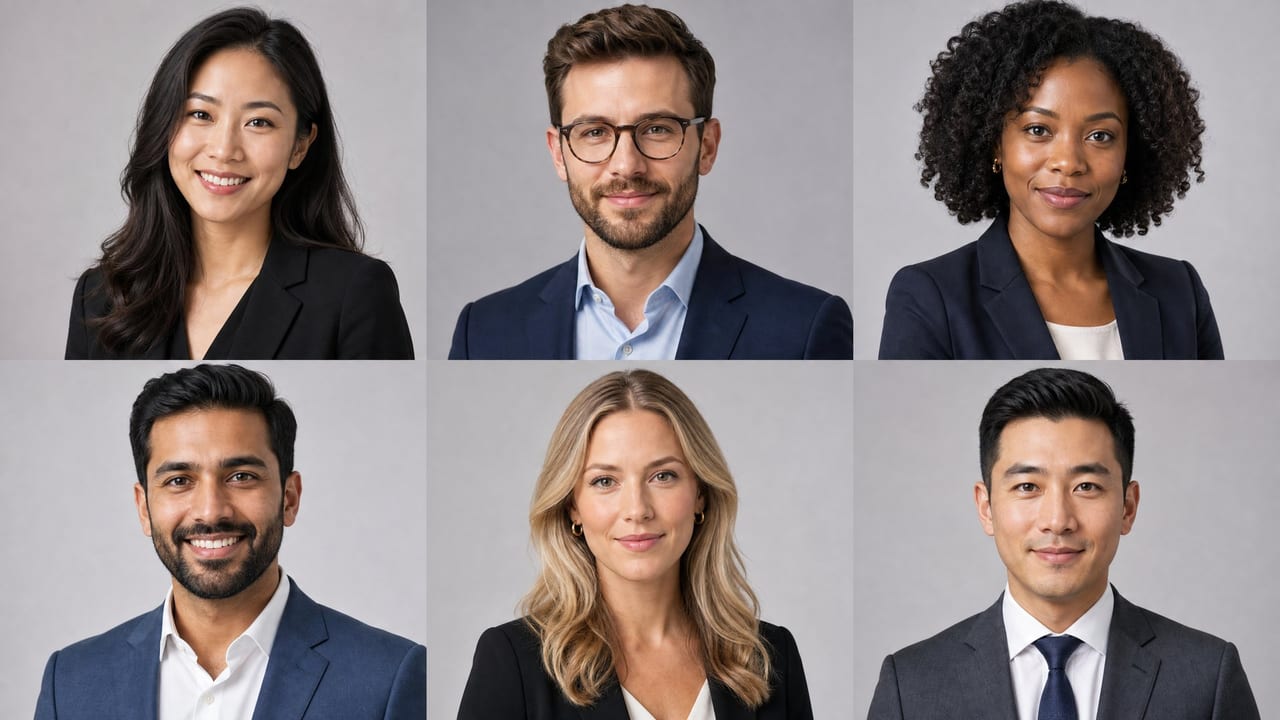
Team headshots are professional portraits that represent every member of your organization on websites, LinkedIn profiles, press releases, and marketing materials. Done well, they signal credibility, build human connection with clients, and reinforce a cohesive brand identity — all at a glance. The challenge is getting every employee to look polished and consistent, especially when your team is spread across cities, time zones, and hiring cohorts.
This guide covers what team headshots are, why they matter, how to make every portrait match, what to wear, what they cost, and how Imagera's professional headshot tool turns a few selfies from each person into a coordinated set — without a group photo shoot.
Quick answer: Team headshots are consistent, professional portraits of an entire staff, and Imagera can generate them from a single uploaded selfie per person in under 60 seconds each, no studio or photographer required.
1.How much does an AI team headshot session cost compared to a photographer?
A traditional group shoot means booking a photographer, renting a studio, and coordinating 2-3 hours of scheduling across a team of 20+ people. With Imagera, each person uploads 1 photo and gets 4K headshots from 5 credits, generated in under 60 seconds. A 50-person company can finish in one afternoon instead of booking separate shoot days.
2.Are AI-generated team headshots consistent enough to look professional?
Yes. Imagera applies the same lighting, background, and 4K framing to all 100+ team members, so every portrait matches even when staff work in different offices. That uniform look gives your team page and directory a cohesive, polished feel, and each person keeps their own likeness while sharing one consistent studio style, something that's hard to achieve when everyone submits their own phone selfies.
3.What Are Team Headshots and Why Does Every Company Need Them?
Team headshots are individual professional portraits that, when displayed together, tell a unified visual story about your organization. A mismatched collection of selfies, casual vacation photos, and decade-old portraits sends an unspoken message: this company doesn't sweat the details. Polished, consistent headshots communicate the opposite.
Beyond aesthetics, headshots do real business work. Your "About Us" page is often one of the most-visited pages on a company website — visitors want to know who they'll actually be working with. On LinkedIn, profiles with professional photos receive significantly more connection requests and messages than those without. In press kits and media pitches, editor-ready portraits make it easy for journalists to feature your team without back-and-forth requests for photos.
For client-facing teams — sales, consulting, customer success — a great headshot is often the first impression a prospect has of the person they're about to trust with their business. And the impression forms fast: research from Princeton found that people form a judgment about a face's trustworthiness and competence in roughly a tenth of a second, before they read a single word of a bio. A well-lit, consistent set of team headshots is doing quiet persuasion work on every page it appears.
There's also a brand-consistency dividend. A Lucidpress study of more than 200 organizations found that presenting a brand consistently across all touchpoints can lift revenue by up to 33%. Your team page is one of those touchpoints, and a roster where every portrait shares one background, lighting, and crop reads as a company with standards.
4.What Does a Team Headshot Tool Actually Do?
It helps to separate what a modern AI headshot tool does from the myths around AI images. Imagera's professional headshot tool does not invent a fictional person or paste your face onto a stranger. It builds each portrait from that individual's own uploaded selfies, preserving their real facial identity while upgrading the parts of a photo that make it look professional rather than snapped: the lighting, the background, the business attire, the crop, and the finish.
In practice, for a whole team, that means:
- Each person uploads their own photos. Everyone contributes a few clear selfies from wherever they are — home, a hotel, a satellite office. Nobody has to travel to a studio.
- You apply one shared style. A single preset — the same background, lighting style, and head-and-shoulders crop — is used across every person, so the roster looks coordinated instead of like a patchwork.
- Several looks come from one upload. A single set of selfies can produce multiple variations, so you're not locked into one outfit or setup the way you are at a sitting.
- Files export at high resolution. One portrait stays sharp from a tiny directory thumbnail all the way up to a full-width About-page banner.
What it deliberately does not do is just as important. Imagera won't fabricate a specific real office, invent a logo on a wall behind you, or add a badge or embroidered name that you can't verify. Team headshots should reflect reality, not manufacture affiliations. If you need a real branded backdrop or a genuine ID badge, photograph it and let Imagera refine the lighting, framing, and background around it.
5.How Do You Get Consistent Headshots Across a Whole Team?
Consistency is the hardest part of team headshots, and it's the element most companies get wrong. True consistency means matching background, lighting, crop, color grading, and overall mood across every single portrait — whether your team has five people or five hundred.
In a traditional photography setup, you achieve this by booking every employee for the same photographer, on the same day, in the same studio setup. That works — but it's expensive, time-consuming, and falls apart the moment you hire someone new or a remote employee can't travel in. Every new office and every new hire means finding, booking, and waiting on another local photographer, and the more spread out your team is, the more the "same day, same studio" model breaks down.
The more scalable approach is to use an AI-powered headshot tool that applies identical style parameters to each person's photo. Every employee uploads a few casual photos, and the tool outputs portraits that share the same background, lighting model, and finish. Because the look is set by the tool rather than improvised on a shoot day, everyone matches regardless of city, camera, or schedule. The result is a grid of headshots that genuinely looks like it came from a single coordinated shoot.
To keep a set truly consistent, decide these variables once and apply them to everyone:
- Background: a single soft neutral — light grey, off-white, or a muted brand-aligned tone — is far easier to match across dozens of people than a blurred office, which varies subtly per portrait.
- Attire formality: agree on business-professional (suit-and-tie for finance, law, and consulting) or smart-casual (a blazer for tech and agencies), and hold everyone to that level.
- Crop: a head-and-shoulders frame from roughly mid-chest up, with each person's eyes about a third down from the top.
- Expression: a relaxed, genuine expression across the board — either everyone smiles or everyone keeps a calm, composed look, but not a random mix.
6.Step-by-Step: Building a Matching Set for Your Team
Here's the actual workflow for turning individual selfies into a coordinated team roster with Imagera.
- Agree on the standard first. Before anyone uploads, decide the background color, attire level, and whether the team smiles or stays composed. Write it in a short one-paragraph brief and send it with the request. This single decision does most of the work of making the set look intentional.
- Each person uploads a few selfies. Everyone adds up to four clear photos of themselves from slightly different angles. More variety across the uploads produces a stronger, more faithful likeness. Recent photos in neat, solid-colored tops give the truest result — even though the tool applies professional attire, a clean starting point helps.
- Everyone picks the same style and quality tier. Choose the shared look (for example, a corporate or professional preset), plus the quality tier and resolution suited to where the photos will live. The higher quality tier is tuned for the most faithful likeness, which matters when your portrait will represent you to clients.
- Generate and review the set together. Portraits are generated and saved to each person's history, ready to download. Review the roster side by side and regenerate any outliers so backgrounds and lighting line up across every face.
- Export at high resolution and place per platform. Download a high-resolution file for each person, then crop to each destination's ratio — a tight square for LinkedIn, a slightly wider crop for the About-page grid, and the full-resolution file for press kits.
Because the whole process runs in the browser and costs Imagera credits rather than a per-person sitting, you can run five people or fifty through the same steps, and add new hires to the set one at a time later without redoing anyone.
7.What Should Employees Wear for Team Headshots?
Attire is one of the biggest variables that can make or break visual consistency. The right answer depends on your brand, but there are a few principles that apply universally.
Stick to solid colors or subtle patterns. Loud prints, bold graphics, and busy textures distract from the face and age quickly. Navy, charcoal, white, and soft earth tones photograph cleanly and read as professional without being stuffy. Be especially careful with thin stripes and small checks — they can create a shimmering moiré effect at the small sizes used for profile thumbnails and directory grids.
Match the formality level to your brand. A law firm's team should probably wear suits. A creative agency might go with smart-casual — blazers over a clean tee, for example. The key is that everyone on the team lands at roughly the same formality level so the grid looks intentional.
Avoid logos and brand marks. Even your own company logo on a polo shirt can look cluttered in a tight headshot crop. Clean, logo-free clothing keeps the focus on the person.
Avoid pure white and pure black. Both can misbehave on screen — pure white tends to blow out under lighting, and pure black can flatten into a shapeless block. Mid-tone jewel and neutral colors flatter most skin tones and hold detail.
If you're using an AI headshot tool, attire matters less in the source photo because the tool can apply professional styling — but starting with a reasonably neat, solid-colored top still produces the best output.
8.How Much Do Professional Team Headshots Cost?
Traditional team headshot photography typically costs between $75 and $300 per person when you factor in the photographer's day rate, studio rental, and post-processing time; established corporate photographers often charge $150–$350 per employee, plus $150–$500 in travel and setup for on-location shoots. For a team of 20, that's easily $1,500 to $6,000 — before you account for rescheduling, travel for remote employees, or the cost of reshooting when you onboard new hires.
AI-powered headshot tools have changed the math dramatically. Instead of paying per person per session, Imagera headshots run on credits — a fraction of a per-person sitting — and one upload can produce several looks. More importantly, the cost doesn't compound every time someone joins the team or updates their look, and there's no repeat travel fee for each office location.
There's also a hidden cost in traditional shoots that rarely gets budgeted: coordination time. Getting 20 people to show up to the same place on the same day, in the right clothes, with their hair done, is a genuine project management challenge. AI tools eliminate that overhead entirely.
8.1Team Headshots: AI vs. a Traditional Shoot
Competitor prices below are typical US market figures; the Imagera column is expressed in the credits the tool actually runs on.
| What you're comparing | Imagera | Traditional photographer |
|---|---|---|
| Cost per employee | Runs on Imagera credits — a fraction of a per-person sitting | $150–$350 per employee, before travel |
| Distributed / multi-office teams | Everyone uploads from wherever they are, one shared preset | $150–$500 travel and setup, repeated at each location |
| Turnaround | Minutes, generated from a laptop | Days to book, shoot, then wait for retouched edits |
| New hires | Generate a matching headshot on day one, any time | Schedule a return visit or separate mini-session |
| Looks per person | Several styles from one upload | One sitting, limited outfit changes |
| Whole-team consistency | Same background, lighting, and crop for the entire roster | Varies by session, location, and lighting on the day |
9.Can AI Generate Professional Team Headshots That Actually Look Real?
Yes — when done correctly, AI-generated headshots read as studio photography. The quality bar has risen to the point where many companies now use AI portraits on their main website and LinkedIn without them looking out of place.
The key is using a tool built specifically for professional portraits, not a general-purpose image generator. Portrait-focused generation understands the nuances that make a headshot look natural: the way soft studio light wraps around a face, the slight depth-of-field blur that separates a subject from a background, and the color grading that makes skin tones look warm rather than waxy.
Imagera's professional headshot tool is built exactly for this use case. Each team member uploads a handful of reference photos — casual selfies work fine — and Imagera produces a set of polished, studio-quality portraits with consistent lighting, background, and finish across the whole team. Because every portrait is built from that person's own selfies, it stays recognizably them: the face on the About page is the face that shows up to the meeting. It's the fastest way to get every employee a headshot that looks like it belongs on a considered, professional "About Us" page.
10.Who Are Team Headshots For? Common Use Cases
Team headshots aren't only for the Fortune 500 About page. A few concrete scenarios where a coordinated set pays off:
- Fully-remote and hybrid companies. When your team has never been in one room, a group shoot is a non-starter. Each person uploads selfies from home and generates a portrait in the shared preset — the logistics that make multi-office shoots expensive simply disappear.
- Fast-growing startups. Hiring every month means the team page is perpetually out of date between annual shoots. A rolling, per-hire workflow keeps it current without waiting to batch enough new faces to justify a reshoot.
- Professional-services firms. Law firms, agencies, consultancies, and accounting practices are judged on their people. A consistent, conservative set of attorney or partner-style portraits reinforces credibility on bio pages, directory listings, and pitch decks.
- Real-estate teams and brokerages. Agents need bright, trustworthy portraits across yard signs, listings, and profile pages — and a whole brokerage benefits from one on-brand look across the roster.
- Sales and customer-facing teams. When a prospect looks up the person they're about to talk to, a clean headshot shapes the first impression before the call even starts.
- Conference and speaker rosters. Event pages, speaker bios, and press kits all expect a professional portrait; a matching set across your leadership reads as a coordinated brand.
11.Team Headshots for Distributed and Remote Companies
Remote work broke the traditional team-shoot model, and it's worth calling out separately because it's where the AI approach earns its keep. In a distributed company, there is no single day when everyone is in the same city, so the old "book one photographer for one day" plan is impossible without flying people in.
With an upload-your-own-selfies workflow, geography stops mattering. Every employee contributes a few photos from wherever they are, generates a headshot in your shared company preset, and lands in the same visual family as colleagues they've never met in person. New offices, contractors, and international hires all fit the same process. The result is a team page that looks like a single coordinated shoot despite being assembled from selfies taken on a dozen different phones in a dozen different cities.
12.A Note on Privacy and Consent for Team Headshots
Running employees' faces through any AI tool is a data-governance decision, so treat it like one. Facial data can fall under biometric-privacy laws: Illinois' Biometric Information Privacy Act (BIPA) regulates collecting a scan of face geometry and requires written notice and consent, with statutory damages of $1,000 per negligent and $5,000 per intentional violation. The EU's GDPR similarly treats biometric identification as a special category that needs explicit consent.
The safe pattern is straightforward: get employee consent and have each person voluntarily upload their own photos rather than a manager submitting images on their behalf. Imagera builds every headshot from that individual's own uploaded selfies and keeps their real likeness, which fits an opt-in, consent-first workflow well. Make participation voluntary, document consent, and let people generate their own portrait.
13.How Do You Update Team Headshots When Staff Changes?
Staff turnover is the silent killer of visual brand consistency. A company that did a beautiful, coordinated headshot shoot three years ago now has a mix of those original portraits plus LinkedIn profile photos, Zoom screenshots, and whatever the new marketing coordinator could find on short notice.
The solution is to build headshots into your onboarding process rather than treating them as a one-off project. Set a standard: every new hire submits three to five photos within their first week, and those photos go through the same AI tool with the same style settings used for the rest of the team. The new employee's headshot lands in the same visual family as everyone else's, automatically.
This also means you're never waiting to hit a critical mass of new hires before justifying a reshoot. One new person, ten new people — the process and the cost are essentially the same, because generating a single matching portrait takes minutes and a few credits rather than a return studio visit.
For departing employees, maintain a simple archive of approved headshots so you can quickly remove or replace portraits on the website without leaving broken image placeholders.
14.Tips for Best Results
A few things separate a team set that looks deliberate from one that looks improvised:
- Ask for four varied selfies per person. Slightly different angles give the tool more to work with and produce a more faithful likeness than a single straight-on shot.
- Use recent photos. A portrait should match how someone looks now, not two haircuts ago. Ask for photos taken within the last year.
- Fix the background color across the whole team, not per person. A single neutral tone is the easiest way to make a roster read as one shoot.
- Standardize the crop and expression. Decide mid-chest-up framing and a shared expression style up front so the grid feels cohesive.
- Generate a couple of variations, then pick the best. Because several looks come from one upload, review options and keep the one that best matches the set.
- Export high-resolution once, crop per platform after. Keep the master file and crop copies for LinkedIn, the website, and email signatures — don't re-export at low quality for each.
15.Common Mistakes to Avoid
- Mixing backgrounds across placements. Using a grey background on the website and a white one on LinkedIn for the same person dilutes the cohesive impression you worked to create. Keep it identical everywhere.
- Letting attire drift. A grid where half the team is in suits and half is in t-shirts looks accidental. Set a formality level and hold to it.
- Over-retouching until people don't look like themselves. The whole value of a headshot is recognition. A portrait that flatters someone into a different person backfires the moment they walk into a meeting — keep it a faithful, current likeness.
- Skipping consent. Don't quietly run employees' photos through a tool. Make it opt-in, document consent, and let each person upload their own images.
- Treating headshots as a one-time project. Without an onboarding step, the set decays with every new hire. Build the refresh into your process.
- Ignoring the small sizes. A portrait that looks great full-width can lose the person's face in a tiny directory thumbnail. Check how each headshot reads small.
16.What Are the Best Practices for Using Team Headshots Across Platforms?
Getting great headshots is only half the job — using them correctly across different platforms is what actually moves the needle on brand perception.
Size and crop for each platform. LinkedIn profile photos display at a 1:1 square ratio and are shown quite small in feed contexts, so a tight crop from the shoulders up works best. Website "About Us" grids often use a slightly wider crop — mid-chest up — to give each portrait more breathing room. Press kit photos should be the highest resolution you have, uncropped, so journalists can frame them however they need.
Keep backgrounds consistent across all placements. If your headshots use a light gray background, don't swap to a white background for the website version and gray for LinkedIn. Inconsistency across placements dilutes the cohesive impression you worked to create.
Update regularly. A headshot that's more than three to four years old starts to feel dated — especially if someone's appearance has changed significantly. Build an annual or biannual headshot refresh into your brand calendar, not just a reactive update when someone complains their photo looks old.
Use the same photo everywhere for each person. An employee who uses their professional headshot on LinkedIn but a casual photo on the internal Slack directory creates a fragmented experience for clients and colleagues who interact with them across contexts. Encourage — or require — consistent photo use across all professional platforms.
17.See it in action — real Imagera output
These are real, unedited results from the Imagera ai headshot — the exact tool this guide covers.