 You can complete this on Imagera without installing software: upload a real source file, describe the change, confirm credits up front, generate, and review before you publish. Remove a Watermark From Your Own Photo (No Upload) — this guide covers the steps, quality checks, and when to open related tools.
Quick answer: Yes. With Imagera you can remove a watermark from a photo you own entirely in your browser, with no file upload to a third party, and export a clean image in seconds while keeping full 4K resolution.
How does Imagera remove a watermark from my own photo without uploading it?
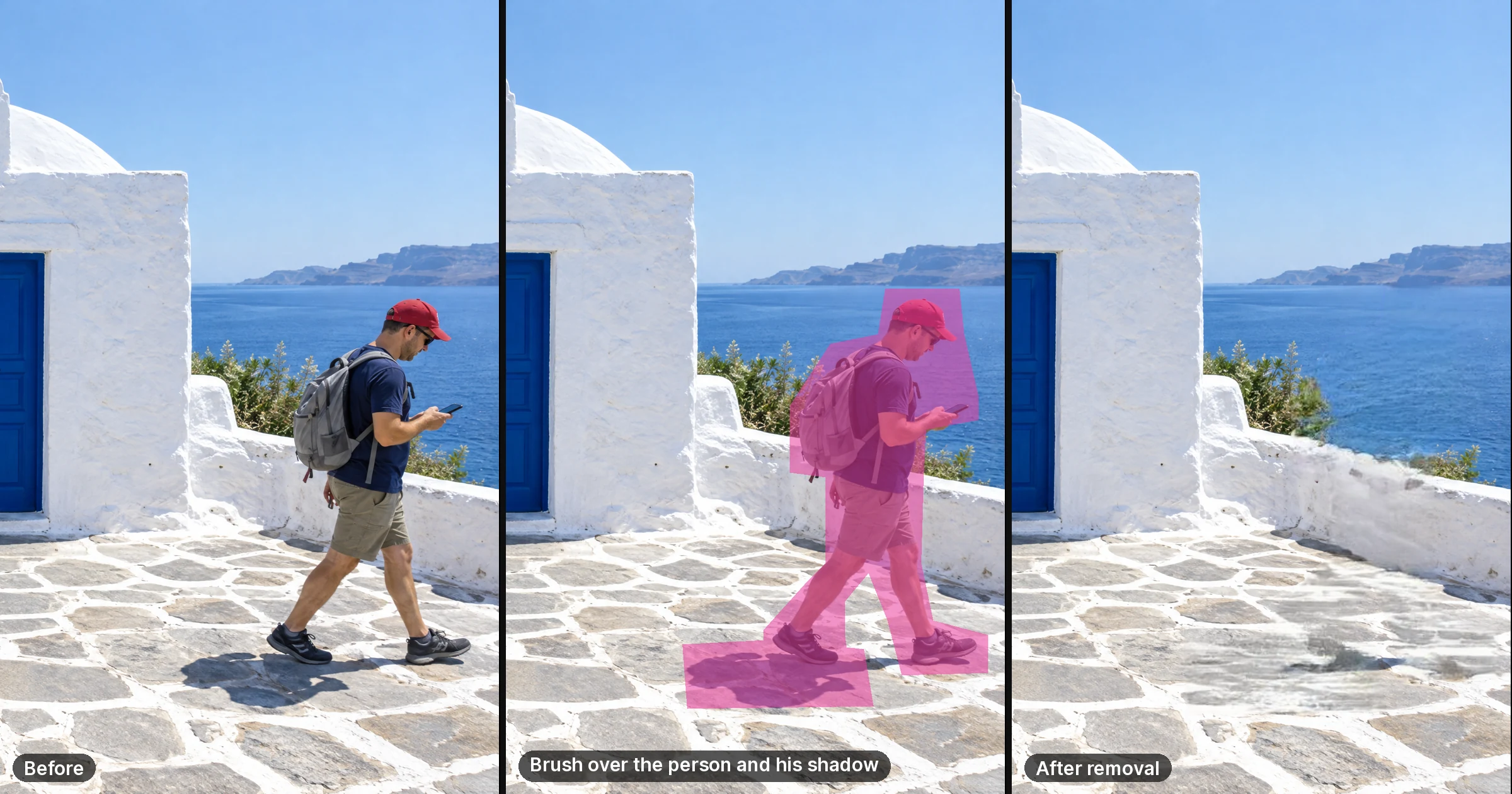
For your own watermark or a mark you are authorized to remove, use the free on-device object-removal workflow. Brush over the area, run the edit, and check the fill for repeated textures or damaged details. Local removal does not use generation credits. Optional cloud editing or upscaling is a separate quoted operation.
Is it legal to remove a watermark, and how clean are the results?
You should only remove watermarks from images you own or are licensed to edit; removing marks from others' work can violate copyright. On your own photos, Imagera reconstructs clean backgrounds smoothly in a single pass, handles 100+ formats, and exports at 4K or 8K. A watermark signals ownership, so editing your own files stays firmly within your rights.
How Do I Remove a Watermark From a Photo I Own Without Uploading It?
Paint over the watermark using Imagera's free object eraser, and the tool fills the painted area with matching background content — entirely inside your browser. Your photo is never sent to a server, never stored, and never used to train any AI model. The whole process takes under a minute, and you download the clean image directly to your device.
That is the short answer. The rest of this guide covers the step-by-step method, the legal question everyone is quietly wondering about, why most watermark removers quietly upload your file (and what that means for your privacy), and when the free in-browser approach is the right tool versus when you need something more powerful.
Why Most Watermark Removers Are a Privacy Problem You Didn't Expect
When you search for a free watermark remover, nearly every result is a cloud tool. You upload your image, their server runs an inpainting model, and you download the result. That pipeline has one consequence most users never think about: your photo — including any embedded GPS coordinates, device serial number, and timestamp — is now on a stranger's server.

Cloud watermark removers vary wildly in how long they hold onto your file. Independent reviews of popular tools found retention ranging from one hour (Pokecut, Removal.ai) to 24 hours (MagicEraser.org) to up to 30 days (free-background-remover.com stores on AWS S3). Watermarkremover.io's own privacy policy states it reserves the right to retain data "for the period necessary to fulfil the purposes outlined in its Privacy Policy." That language leaves the door open to extended retention.
Several tools also received criticism in 2024 for logging EXIF metadata and embedding tracking pixels in processed results — even when no account was created, according to reporting cited by Alibaba's product-insights research on AI watermark removal tools. A 2024 IAPP Privacy and Consumer Trust survey found 68% of consumers are concerned about their privacy online — and photo uploads are one of the highest-anxiety categories, because the file contains far more than an image (IAPP Privacy and Consumer Trust Report).
The architecture of an in-browser tool like Imagera's eraser is different in kind, not just degree. Your file never leaves your browser tab. There is no upload request to intercept, no server to breach, no retention policy to read or trust. If you want to verify this yourself, open your browser's developer tools (F12 → Network tab), run the eraser, and watch: no outbound file transfer appears. For a deeper walk-through of that verification method, see our guide on how to tell if an image tool actually processes locally.
Is It Legal to Remove a Watermark From a Photo?
The short answer: removing a watermark from a photo you own is completely legal. If you took the photo, commissioned it, or hold the rights to it, you can edit it in any way you choose — including erasing any stamp, text, date, or logo you added yourself.

The legal boundary is clear and well established under U.S. law. DMCA Section 1202 prohibits removing "copyright management information" from someone else's copyrighted work. Violating it can expose a person to civil damages of up to $25,000 per violation (RemoveWatermark.org legal overview). But that restriction applies to other people's images, not your own.
Common legitimate reasons people remove watermarks from their own photos:
- Photographer's proof watermark: You received a preview with a studio watermark, have now paid for the full-resolution file, and want to clean up an archived copy.
- Date or camera stamp: Many cameras burn a visible timestamp into the JPEG — removing it on your own photos is standard photo editing.
- Your own draft logo: You added a placeholder watermark during a presentation and now want the clean version for print.
- Scanned document text: A scanned form or certificate arrived with a "DRAFT" or "VOID" overlay you need to remove for a legitimate archival copy.
If the watermark is on an image you did not create and do not have a license to edit, leave it in place. The rest of this guide assumes you are working with your own content.
How to Remove a Watermark From Your Photo (Step by Step)
This method works for text watermarks, diagonal stamp overlays, corner logos, and date burns. It takes under two minutes on a standard photo.

-
Open the tool. Go to Imagera's free object eraser. No account or sign-up is needed. The page loads the processing model into your browser — after that, you can disconnect from the internet if you prefer and the tool will still work.
-
Upload your photo. Click the upload area or drag your image onto the canvas. The file loads directly into your browser's memory and is never sent to a server.
-
Paint over the watermark. Use the brush to paint a mask over the watermark area. Cover the entire text or logo plus a small margin of surrounding pixels (roughly 5–10 px). The more accurately you trace the edges, the cleaner the fill.
-
Run the eraser. Click the "Remove" button. The in-browser model analyses the surrounding pixels and fills the painted region with matching colour, texture, and tone.
-
Check the result. Zoom in to inspect the filled area. If any watermark text is still faintly visible, paint over it again and run a second pass — fine lettering sometimes needs two passes.
-
Download your clean image. Click "Download." The result saves directly to your device. Nothing is stored on Imagera's servers because nothing was sent there to begin with.
Tip for diagonal watermarks: Work in segments rather than painting the full diagonal in one stroke. Paint a short section, remove it, then paint the next segment. This gives the fill algorithm a larger canvas of clean surrounding pixels to sample from, producing a more natural result.
How Do Most Watermark Removers Compare to an In-Browser Tool?
The table below maps the key differences across the axes that matter most when your photo contains personal content or you are working with sensitive images.

| Feature | Most cloud watermark removers | Imagera free eraser |
|---|---|---|
| Uploads your photo to a server | Yes | No — never leaves your browser |
| Stores your file after processing | Yes (1 hour to 30 days, varies by tool) | No storage possible |
| Works offline after page load | No | Yes |
| Requires sign-up or account | Many require it | No |
| Adds its own watermark to the result | Several free tiers do | No |
| Logs EXIF/GPS metadata from your file | Possible (received with upload) | No — file is never received |
| Could use your photo for AI training | Possible under broad ToS language | No — tool never receives file |
| File size limit | Typically 5–10 MB | None imposed by upload cap |
The difference is architectural. A cloud tool can promise to delete your file in one hour — but it still received it, and the deletion is a policy, not a technical constraint. An in-browser tool cannot receive something that was never sent.
Can I Erase Text or a Stamp From an Image in the Browser?
Yes — and "in the browser" here means the AI inpainting model itself runs locally, not just the interface. Imagera's eraser uses a WebAssembly-compiled model that runs inside your browser tab using your device's CPU. When you click "Remove," the computation happens on your machine, not on a cloud server.

This approach handles several common stamp-removal scenarios well:
- Corner date stamps (e.g., red or white "12/25/2024" burned by a camera): Paint a tight mask around the numerals. The fill samples the surrounding pixels — typically sky, grass, or a plain wall — and the result is clean.
- Diagonal "SAMPLE" or "DRAFT" overlays on documents: Works best when the text is semi-transparent and the underlying image content is still recoverable. Fully opaque black text on a complex background is harder and may need two passes.
- Corner or edge logo watermarks: Logos on plain or lightly textured backgrounds erase cleanly. Logos that overlap a busy subject (faces, fine detail) may require a light touch and iterative passes.
For watermarks overlaid on very complex backgrounds — or when you need AI-generated replacement content rather than a pixel fill — the paid Imagera cloud studio offers generative inpainting at full resolution. That is the honest capability ceiling for the free tool: it fills based on surrounding pixels; it does not synthesise new content.
How Do I Remove a Watermark Without Adding Another Watermark?
Many free cloud watermark removers add their own branding to the output image — effectively replacing one unwanted mark with another. This is a common monetisation tactic: the free tier watermarks results, and the paid tier delivers clean downloads.
Imagera's free eraser does not add any mark to your downloaded image. The output is the clean, unbranded result of the inpainting operation. There is no paid tier required to get a watermark-free download.
If you encounter a tool that watermarks its own output and you want to remove that secondary watermark, run Imagera's eraser on the result — the same brush-and-fill method applies.
Can Watermark Removal Run Privately on My Device?
Yes — and this is the core architectural guarantee. Because the inpainting model is compiled to WebAssembly and loaded into your browser, it runs on your device's processor, not on a remote server. Once the page and model have finished loading (usually 5–15 seconds on a standard connection), you can toggle your Wi-Fi off. The eraser will continue to work. That offline behaviour is the strongest possible proof that no upload is occurring.
This matters beyond simple convenience. The 2025–2026 period saw a wave of high-profile AI training controversies that made mainstream users acutely aware of what happens to uploaded content. Meta began training on EU and UK public posts and images with a May 27, 2025 opt-out deadline, with no equivalent opt-out available for U.S. users (TCAI opt-out guide). LinkedIn activated AI training on user data by default on November 3, 2025, including data dating back to 2003 (Tuta/LinkedIn AI training). These incidents created a reasonable baseline scepticism about what "free" tools do with uploaded content.
The only technically unambiguous answer to "will my photo be used for AI training?" is: a tool that never receives the file cannot train on it. That is what in-browser processing provides.
For more context on how to verify any tool's privacy claims yourself, see is it safe to upload photos to online editors — and if you are working with a passport or ID photo, the guide on removing metadata from a passport or ID photo privately covers the additional risks specific to document images.
Related tools on Imagera
Remove Your Watermark Now — No Upload Required
Open Imagera's free in-browser eraser, paint over the watermark on your own photo, and download the clean result in under a minute. No sign-up. No upload. Nothing saved on any server.
For heavy-detail work — large inpainting areas, complex backgrounds, or batch processing — the Imagera cloud studio offers AI-powered generative fill at full resolution. But for a straightforward watermark on a photo you own, the free in-browser tool handles it completely.