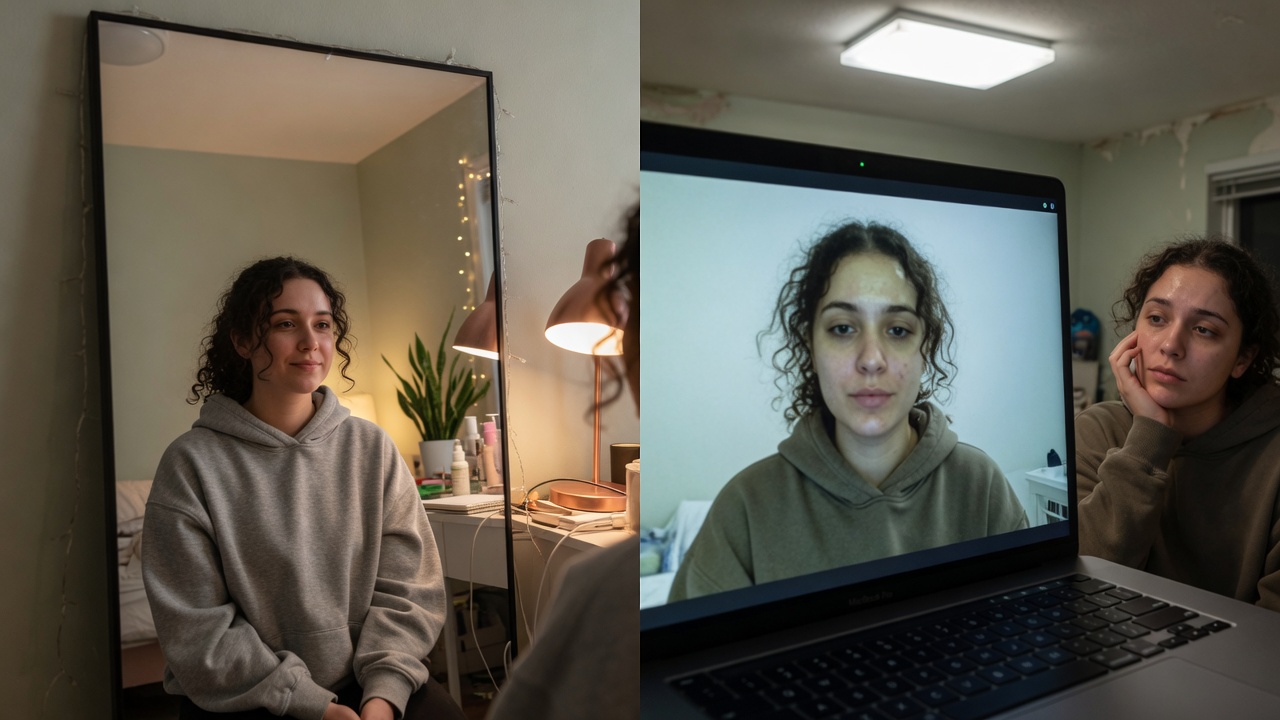
You can have a clean deck, a tight narrative, and still lose the room in the first ten seconds of a Zoom pitch — not because your ARR is wrong, but because the partner is watching a harsh laptop rectangle of a founder who looks exhausted, backlit, or apologetic about their apartment.

Credible client-facing presence for pitch and diligence calls.
Fundraising over video is not “the same meeting with a webcam.” Partners say they want energy and conviction. On a call, energy is mostly visual before it is verbal. You are not being vain for caring. You are packaging trust.
This guide is for founders and operators who pitch on Zoom, Meet, or Teams and want the unfair camera tax removed — so the story can do its job.
Real Imagera output: raw webcam cleaned up for a high-stakes pitch call — sharper, better lit.
Quick answer: To look fundable on a Zoom pitch in 2026, upgrade your webcam feed to a clean, evenly lit 4K frame, stabilize eye-level framing, and record a polished 60-second intro clip with Imagera so investors judge your idea, not your lighting.
1.How can you look more professional on an investor video call?
Fix 3 things first: light your face from the front, raise the camera to eye level, and clean the background. Imagera can upscale a grainy webcam still to 4K, remove clutter, and generate a crisp founder headshot in under 60 seconds. The opening moments of a call set the tone, so a sharp, well-composed frame lets your message land before you say a word.
2.Why does video quality affect how investors judge your pitch?
Investors sit through a lot of decks, and a blurry, 720p feed can read as unpreparedness before you even speak. A clear, well-lit picture signals that you sweat the details. Imagera sharpens footage to 4K and generates a 30-second polished intro reel, so your first impression works for you instead of against you.
3.The hidden job of your face on a pitch
Investors run stacked calendars. Between calls they decide, quickly:
- Does this person look like they can survive a hard quarter?
- Do they seem prepared, or chaotic?
- Do I want another hour with them?
None of that is written on slide three. It is read off posture, eyes, skin under bad sensors, and whether the background screams “I improvised this from a laundry chair.”
Looking good here does not mean looking like a influencer. It means looking like someone who already runs a real company: rested enough, deliberate enough, easy to trust on screen.
4.What “fundable on camera” actually is
| Signal | What partners feel | How you create it |
|---|---|---|
| Even light on face | Clarity, competence | Lamp/window in front — never a bright window behind |
| Eye-level lens | Authority, equality | Laptop on books; no up-the-nose angle |
| Calm background | Preparedness | Wall, tidy shelf, or soft blur — not novelty worlds |
| Rested under-eyes | Stamina | Sleep if you can; light + subtle live polish if you cannot |
| Stable audio | Respect for their time | Headset beats a $400 webcam in a noisy room |
| Consistent look across calls | Reliability | Same framing and same mild preset every partner meeting |
5.Why founders look worse on pitch week
Pitch week is sleep debt, hotel Wi-Fi, and six “quick intros” a day. Laptop cameras punish exactly that:
- Overhead lights dig dark circles
- Wide laptop lenses distort when you sit too close
- Compression greys out skin
- You stare at your own tile and spiral
Built-in “touch up” sliders are one blunt soft-focus. Push them and you look airbrushed. Leave them and you look like the all-nighter you just pulled.
That is the gap Imagera GlowCam is built for: a professional live look on your outgoing camera — skin, under-eye, optional light definition, background calm — private on your device, across browser Meet, Zoom, Teams, and more.
6.How GlowCam changes the pitch-day outcome
GlowCam is a Chrome extension from Imagera. You install once, open your call in the browser, and your outgoing video already carries a natural Meeting or Natural preset.
What it solves for founders (outcomes, not tech theater):
- You look like you slept, even when you did not
- Your skin does not steal attention from the ask
- A messy hotel room does not become the meeting’s subplot
- The same presence follows you from Meet diligence to Zoom partner call
- You can kill the look in one toggle if you ever need raw camera
What it is not: dog ears, cartoon skins, or a promise that capital is “bought” with cheekbones. Capital follows trust. Trust is easier when the medium is not fighting you.
Trial: 2 days, no credit card. Pro: from $24.99/month (yearly available). Skin, makeup, background in trial; hair color and subtle reshape on Pro.
GlowCam product · Chrome Web Store
7.Pitch-safe settings (the only rule that matters)
If a partner would notice the filter before your face, you are too high.
- First intro / coffee chat: Natural, very low
- Formal partner meeting: Meeting preset, under-eye mild
- Board update: Same look every month — consistency > novelty
- Demo day marathon: One saved preset; re-check light only when you change rooms
Never debut a dramatic jaw change mid-process. Relationships notice discontinuities.
8.A 15-minute pre-pitch ritual that compounds
- T−15 — Join early, camera on you only. Fix light.
- T−12 — GlowCam → Meeting. Speak 20 seconds. Watch for shimmer.
- T−10 — Close Slack, calendar popups, messy tabs.
- T−5 — Water, shoulders down, one deliberate smile into the lens.
- T−0 — Eyes near camera on “thanks for the time,” not glued to self-view.
Do this every time. Looking ready becomes automatic — like knowing your numbers.
9.The ethics of “looking good” in fundraising
There is research and folk wisdom about attractiveness and the halo effect: people who look put-together get faster credit for competence. That bias is unfair. You cannot abolish it from a single Zoom.
What you can do is refuse to let a $30 laptop camera invent a horn effect — making you look less capable than you are because of shadows and sensors. That is not cheating diligence. That is refusing a broken mirror.
Use polish the way you use a clean deck template: presentation infrastructure.
10.Co-founder dual pitch
Agree offline:
- Same light quality on both tiles if side-by-side
- Both mild polish or neither — mixed “one filtered, one raw” feels uneven
- Who owns share-screen so faces do not jump
Visual unity is part of the team story.
11.Bandwidth, time-of-day, and the async pitch nobody prepares for
Most pitch-appearance advice assumes a clean connection at a flattering hour and a live audience. Real raises break those assumptions constantly. Three under-discussed scenarios decide more meetings than framing does.
When your bandwidth drops mid-pitch. Video codecs sacrifice your face first: the moment upload speed dips, the platform lowers resolution and frame rate to keep audio alive. You go soft, then blocky, then frozen on a bad frame — often during the ask. Do not fight this by turning up any polish; heavier processing gives compression more to mangle. Instead, hardwire ethernet if you can, close cloud backups and other tabs before joining, and keep a plain wall behind you. Complex or animated backgrounds cost bitrate that should be spent on your face. If the partner freezes on your tile, a calm background degrades far more gracefully than a busy one.
Time-of-day changes what your camera sees. A window that flatters you at 10 a.m. becomes a hard side-shadow by 4 p.m. Founders running six intros across a day often look progressively worse — not because they tire, but because the light rotates around them. Do a quick light check whenever the clock or the room changes, not just once in the morning. Keep a small front lamp that stays constant regardless of the sun, so your 5 p.m. partner meeting reads the same as your 9 a.m. coffee chat. Imagera GlowCam holds a saved preset steady across those calls, but it cannot rescue a face lit from a hard back angle — physical light comes first, then a subtle live polish.
Async and forwarded video is the pitch you never see land. Increasingly, an associate records your call or you send a Loom-style update, and it gets forwarded to partners and LPs who were never on the line. That footage is judged without your voice carrying the room. Two implications:
| Async pitch reality | What to do |
|---|---|
| A single bad frozen frame becomes the thumbnail | Look composed continuously, not just during the ask |
| Viewers scrub and skip | Keep framing and look identical start to finish |
| No live rapport to soften a tired appearance | Fix light and rest before recording, not after |
For async or recorded updates, keep any live polish lower than you would for a live call — replays let people freeze-frame and inspect, and consistency reads as competence. Save a dedicated low-strength preset for anything that might be recorded or forwarded, and treat it like a document you are handing over: it will be viewed cold, more than once, by people forming their first impression of you without you in the room.
12.Related reading
| Goal | Guide |
|---|---|
| Why camera lies | Why you look worse on camera than in person |
| Camera-on anxiety | Leave the camera on without dreading it |
| Job interviews | Look good on a video interview |
| Product | GlowCam |
13.Key takeaways
- Partners feel energy before they process ARR.
- Light and eye-level framing are non-negotiable.
- GlowCam removes the “all-nighter face” tax without looking fake when kept low.
- Consistency across the raise beats one glam call.
- Looking fundable is packaging trust — not replacing traction.
14.Pitch-week presence checklist
48h out: Test Meet/Zoom path, save Pitch-Natural (no experimental reshape).
Morning of: Front light, eye-level cam, soft blur if hotel chaos.
T−5: Co-founder match — both mild or both off.
Live: Hide self-view; energy lives in voice and eyes.
Post-call: Debrief narrative, not pores.
Partners remember conviction. GlowCam only removes the unfair laptop tax: imagera.ai/glowcam.
15.Who this pitch guide is for
Founders and operators on Zoom diligence, angel updates, and partner meetings where first visual seconds set trust. Not influencer glam — board-ready rest and clarity.
16.What investors feel in the first minute (and how to design for it)
Partners rarely open with “your unit economics look off.” They open with a human scan: Do I trust this person enough to keep listening? On video that scan is almost entirely face, voice, and whether the room feels intentional.
Design the first minute like a product onboarding:
- Join early — lateness reads as chaos even when the deck is perfect.
- Stable tile — no frantic light adjustments after “hello.”
- Warm greeting into the lens — not into your own face.
- One calm sentence before screen share — let them see you as a human CEO, not only slides.
- Then share — once presence is established, the deck can work.
GlowCam belongs in steps 1–3: already on, already subtle, already forgotten by you so you can perform the greeting.
17.Fundraising formats and look intensity
| Format | Look intensity | Why |
|---|---|---|
| Cold intro / coffee Zoom | Very low | Relationship first |
| Partner committee | Low–medium | Serious but human |
| Data room walkthrough | Low | Content is screen |
| Demo day multi-pitch | Locked preset | Consistency under fatigue |
| Crisis update | Low, honest | Over-polish can feel tone-deaf |
18.The “deck vs face” split attention problem
When you share slides, your face shrinks. Many founders look great on the title slide and then disappear into a dark corner of the tile. Before share:
- Pull the lamp closer
- Confirm you are still lit when the slide takes the canvas
- Keep GlowCam on so the small tile still reads alive
19.Practice reps that matter more than another slide revision
Record three 90-second pitch opens with camera on. Watch at 1.5× without audio. Ask only: Do I look like someone who can lead through a down round? If the answer is “tired founder in a cave,” fix light and look before you rewrite the narrative again.
20.Closing for founders
You already invest in storytelling coaches and data rooms. Investing in a fair camera presence is the same category: remove friction between your real capability and the partner’s perception. GlowCam is the fast path when pitch week steals sleep.
21.Where to open next
| Goal | Link |
|---|---|
| GlowCam product | GlowCam |
| Pricing | Pricing |
| Still headshots | AI Headshot |

Browser-based pitch stack ready for investor video meetings.
22.Pitch-week field notes
Co-founder rule: both mild or both off — mixed looks feel uneven.
Hotel diligence: soft blur + face lamp + no experimental reshape.
Deck share: re-check light when you start screenshare; faces go flat.
| Moment | Visual job |
|---|---|
| First 10 seconds | Rested, deliberate, easy to trust |
| Hard questions | Still, not fidgeting with settings |
| Ask | Clear eyes, not self-view spiral |
Ethics: stay in “good sleep and lighting” range. Misrepresentation kills diligence trust faster than a harsh webcam.
GlowCam · 2-day trial
23.Try GlowCam — start your free trial
This guide is about Imagera GlowCam — a real-time, on-device webcam beauty filter for Google Meet, Zoom, Microsoft Teams, and more in Chrome. Use the links below to convert from reading to installing.
| Goal | Action |
|---|---|
| Start free (2 days, no card) | Open GlowCam product page |
| Install the extension | Chrome Web Store — GlowCam |
| Compare plans | Pricing |
| Decision / alternatives | Snap Camera alternative · Zoom Touch Up alternative |
What you get on a work call: natural skin + under-eye polish, optional makeup, background calm, and saved presets (standup / client / interview). Processing is designed to stay on your device.
Convert now: Get GlowCam — free 2-day trial → install once → save a low-strength Work-Natural preset → join your next high-stakes call looking like yourself on a good day.