Software feature launch videos
Introduce a new capability with concise copy and interface-inspired motion. Supply real screenshots so the direction has an accurate starting point.
Imagera AI - AI content creation platform for generating images, cloning voices, and enhancing videos. Privacy Policy | Terms
Feature Showcase Ad
An AI feature showcase video maker for the things you’ve built. Turn your brief and images into a visual direction, a visual reference and a multi-shot ad with sound.
In Sandbox · Review the price before generating
From brief to result
Feature Showcase Ad is an AI workflow in Imagera Sandbox that turns a product brief and optional image, video or audio references into a visual reference and a showcase video in your selected format. An LLM writes the creative direction and generation prompts for each run. You can guide the style, include music, review the estimated cost and open the saved workflow in Canvas.
The look comes first
Your brief guides the character or product, palette, backgrounds, lighting and shots. The visual reference can be a single photograph for live action or a design board when requested. The example shows a character and motion sheet.
Show software, a physical product or a before-and-after transformation. Add your own references, or let the workflow create the imagery from your description.
Explore the 4K sheet ↗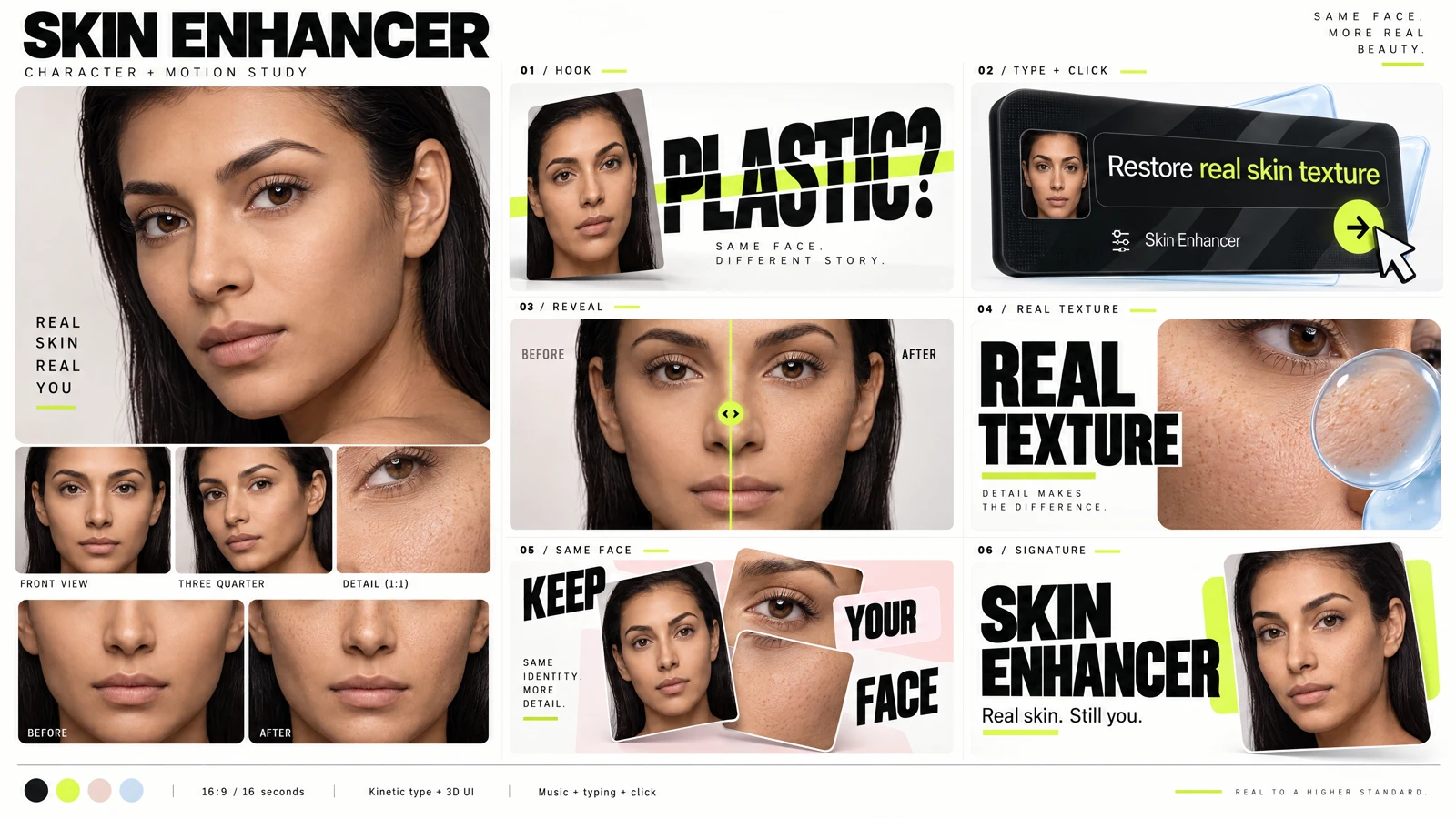
The workflow
Make an editable copy, adjust its steps and share it through Canvas.
Name one feature, its audience and the result to demonstrate. Add product images, screenshots, an image pair or a short style reference.
An LLM develops the visual treatment and writes the image prompt. The image step creates a reference suited to your subject and style.
A new video prompt uses the reference to create a multi-shot ad. Download the reference and film, inspect the creative review, and refine the saved Canvas workflow.
Use cases
Introduce a new capability with concise copy and interface-inspired motion. Supply real screenshots so the direction has an accurate starting point.
Build a reveal around a matching image pair. Keep the framing, identity and lighting consistent so viewers can understand the actual change.
Create a landscape clip for a product page or launch announcement. Use short readable titles and a strong closing frame that works with sound off.
Your style, each time
The workflow does not reuse the example’s character, palette or wording. The LLM plans the copy, scenes, transitions and sound from your brief and media. A style reference can guide the motion while your product stays the subject.
Generated text, interfaces and speaking shots can need corrections. The final review points out possible issues; inspect the full video before publishing. The example above includes finishing edits.
Media generation uses credits. Writing uses your message allowance. Check the estimate in Sandbox and see plans and credit packs for account options.
Create your showcaseQuestions, answered
A feature showcase video introduces one product capability through a short visual story: the problem, the feature in action and the result. It can combine product imagery, concise typography, interface-inspired motion and music for a website tile, feature announcement or ad.
Yes. Add product images, screenshots or a matching before-and-after pair in Sandbox. The workflow uses them with your brief to generate a visual reference, then a showcase video. Check generated interface details and claims against your real product before publishing.
No. Describe the feature, audience, outcome and desired style. An LLM develops the creative direction and writes separate image and video prompts. You can inspect the direction and prompts in the results and edit the saved workflow in Canvas.
No. The workflow stages are reusable, but the creative direction is generated from your brief and reference media. You can specify colors, backgrounds, typography and pacing, or provide a short style video. Live-action briefs use a single photographic reference; you can explicitly request a design board. A product-only brief does not need a human character.
The workflow generates a 4K visual reference and a video in your selected aspect ratio and resolution. Choose portrait framing for reels or landscape framing for a wider ad. It also saves the direction, prompts and an advisory creative review. Completed assets remain available even if a later step fails.
Music and sound effects are enabled by default and can be switched off. Describe the mood or add an audio reference to guide the sound. If your brief requests speech, the director can plan a speaking shot, but pronunciation and lip synchronization need review in the finished video.
Yes. Upload a short style reference to guide pacing, type movement, transitions and depth. The reference and generated clip must fit the model’s duration limits; the form checks these before running. Use media you have permission to reference.
Review the workflow estimate in Sandbox before creating an ad. Media steps use credits and writing steps use the message allowance. The quote comes from current model settings and pricing; longer videos and different generation settings can change the cost. The pricing page explains plans and credit packs.
Yes. Change the brief and references to make another showcase. Each run generates its own direction, visual reference and video. Open the saved workflow in Canvas to adjust individual steps and use the existing workflow API for your integration.
The Skin Enhancer example is a generated ad concept with finishing edits. It demonstrates the intended visual style, not a recorded product session or a guarantee of identical output. Upload real screenshots when interface accuracy matters, and review the finished ad before using it.
Feature Showcase Ad
Bring your brief. Add your references. Review your quote.