AI Image Generator
ImageMake the face or body you swap in
For advanced users — bring your own LoRA for a consistent style or character.
Imagera AI - AI content creation platform for generating images, cloning voices, creating avatars, and enhancing videos. Privacy Policy | Terms
Upload a body photo and a head photo. The whole head moves across, hair and hairline included, matched to the body's skin tone and light. Compare the result with your originals before using it in your project.
From 15 credits per swap
A head swap moves the whole head from one photo onto the body in another: face, hair, hairline and ears, not only the facial features. The body, pose, clothes and background stay as they were, and the new head is matched to their skin tone and light. That is the difference from a face swap, which keeps the old hair around a new face.
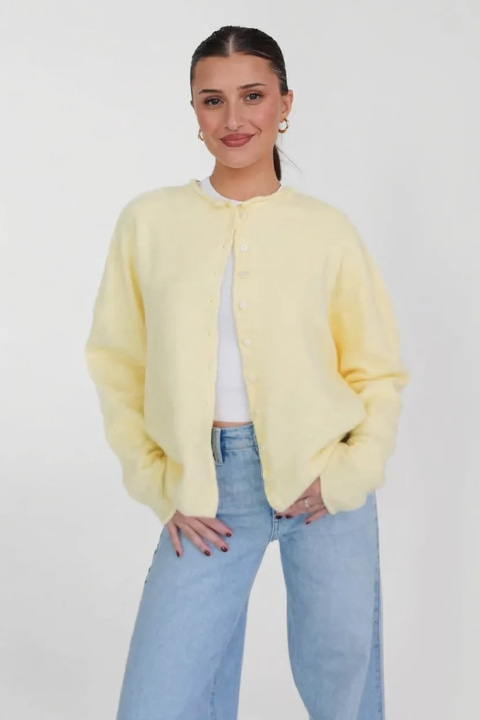
1. Body photo
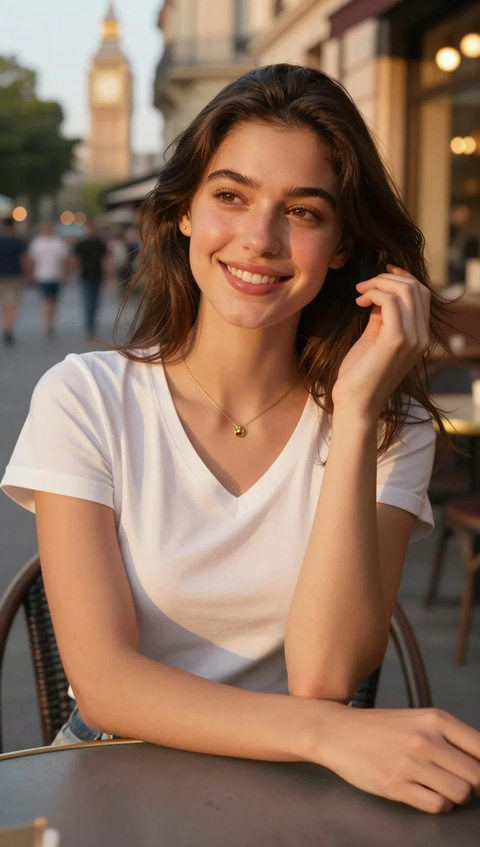
2. Head photo
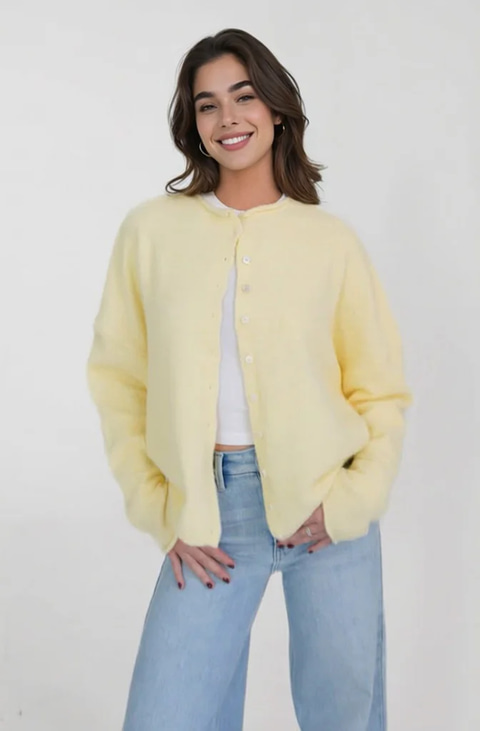
3. Result
Step 1
The picture you want to keep: pose, outfit, background.
Step 2
A clear, front-facing shot of the person whose head and hair you want.
Step 3
The instruction is already written. Check the hairline and neck seam at full size.
E-commerce brands, content creators, and creative professionals face the same challenge: getting the right face on the right body at the right price.
Hiring models, booking studios, and coordinating photoshoots costs thousands per session. E-commerce brands need dozens of shots per product line.
Different demographics require different model imagery. Running separate photoshoots for each market segment multiplies costs and delays launches.
Traditional photography workflows take weeks — scheduling, shooting, retouching, and revisions. Fast fashion and seasonal drops can't wait.
Products on mannequins or flat-lays get lower engagement than on-model shots. But not every brand can afford professional model photography.
Using different photographers and models across catalog creates visual inconsistency. Brands need standardized imagery without standardized costs.
Photoshop head-swaps require hours of manual masking, color matching, and edge blending by skilled retouchers. Most results still look "off."
Upload a body shot and a face reference. AI handles alignment, skin tone matching, lighting adaptation, and edge blending in seconds — not hours. From 15 credits per swap, from any browser, on any device. No Photoshop skills needed.
Powered by cutting-edge AI technology that delivers unmatched quality and performance
The head is replaced as one piece, so hair, hairline and ears follow your face reference, not only the facial features. Check the hairline and neck seam at full size before you use the result.
Ask the editor to fit the head to the target pose. References with similar angles need less reconstruction; review gaze and head tilt in the output.
Ask the editor to match skin tone and color temperature across the neck seam. Use similarly lit references and inspect the blend at full size.
No manual masking, no point selection, no alignment tools. Upload two images, click process, done. AI handles everything.
Nothing to install. Process from any browser on any device. Works on mobile, tablet, and desktop.
Every head swap result includes full commercial licensing. Use in e-commerce catalogs, marketing campaigns, or client work.
6 professional industries where AI head swap saves time, cuts costs, and unlocks creative possibilities.
Replace mannequin heads with model faces across entire product catalogs. Standardize model imagery without booking multiple photoshoots. One face, hundreds of products.
Standardize team headshot backgrounds, lighting, and framing without re-photographing every employee. Update headshots when team members change roles or join.
Create storyboard concepts, pre-visualization, and composite shots for film and advertising production. Test casting concepts before expensive shoots.
Artists and designers combine face references with body compositions for concept art, editorial illustration, album covers, and creative campaigns.
Professional retouchers use head swap for family photo corrections, group shot fixes, and client requests where the wrong pose was captured.
Create localized ad creative for different demographics and markets. Adapt existing campaigns for new audiences without reshooting. A/B test model imagery.
Responsible use: Always obtain proper consent when using another person's likeness. Imagera's terms of service prohibit non-consensual deepfakes, impersonation, and deceptive content creation.
What each one replaces, and which to use when the hair has to change.
| Feature | Head swap | Face swap |
|---|---|---|
| What is replaced | The whole head: face, hair, hairline, ears and jaw | The facial features only |
| Hair | Comes from the head photo | Stays as it was in the target photo |
| Head shape and ears | Come from the head photo | Stay as they were in the target photo |
| Photos you upload | Body photo + head photo | Target photo + face photo |
| Works best when | The two people have different hair or head shapes | The two heads already look alike |
| Check in the result | Neck seam, hairline and light direction | Face edges and skin tone at the jaw |
If the two people have different hair, a face swap leaves the old hairline around a new face and the result reads as a mask. A head swap moves the head as one piece. Use it for catalog photography, portrait sets and client projects, and check identity, hair, lighting and the neck seam before approving a result.
A face swap and a head swap are different operations, not better and worse versions of one. The example above is a head swap: the hair in the result comes from the head photo.
The makers of Imagera
Imagera is a unified AI creation platform for images, video, voice and avatars. Outputs ship at up to 16K resolution with no watermark and a commercial license included — choose from 180+ media models in a single workspace.
This is a real result. Get the same quality on your file — plans start at $19.99/mo.
15 credits per image on most tools · Plans start at $19.99/mo
Yes. A head swap replaces the whole head, so the hair, hairline and ears come from the head photo while the body, pose and background stay. A face swap changes only the facial features and keeps the old hair. Imagera's head swap runs in the browser, 15 credits at 1K, 20 at 2K per image.
AI Head Swap An AI head swap replaces the whole head in one photo, hair included, with the head from a second photo, and blends the neck join, skin tone and light so the result reads as one photograph.
Use a head swap when the two people have different hair or head shapes; use a face swap when only the facial features should change.
Questions
Everything you need to know about AI head swap for professional use
AI head swap replaces the whole head in one photo, hair included, with the head from a second photo, and keeps the body, pose, clothes and background of the first. Upload the body photo and the head photo, press Generate, then check the hairline, the neck seam and the lighting in the result.
Upload two images: first the body photo (the scene you want to keep), then the head photo (the person whose head goes onto it). The Head Swap button opens Imagera Typeset 3 (Edit) with a working instruction already written: keep the body, pose, clothing, lighting and background of the first image, and replace the head with the person from the second, matching skin tone, light direction and edges. There is no masking or alignment step; edit the instruction only if you want something specific, then press Generate.
Head swap is widely used in: e-commerce product photography (placing model faces on mannequin bodies), corporate headshot standardization, creative compositing for art and design, fashion catalog production, content creation for marketing materials, and family photo corrections. Always ensure you have proper consent for any faces used.
A head swap on Imagera Typeset 3 (Edit), the model the Head Swap button opens, costs 15 credits at 1K, 20 at 2K per image, so ten swaps at the default size is 150 credits. Other edit models in the model picker are priced differently, and the Generate button shows the exact cost before you run. Buy credits as a pay-as-you-go pack that never expires or on a monthly plan for the best rate per credit: credit packs from $39.99, plans from $19.99/mo.
Imagera charges from 15 credits per image, depending on the output size and the model you pick. For a catalog or portrait project, compare outputs using the same source pair, inspect hair and the neck seam, and check current terms and quotes before choosing a tool.
No. Imagera head swap runs entirely in the cloud. Any device with a web browser works — laptops, tablets, even phones. Nothing to install and nothing to download first. Upload two images, get your result.
JPG, PNG or WebP, up to 10 MB each. Upload the body photo first and the head photo second; a run takes up to 3 pictures. The result downloads as PNG or JPEG at 1K or 2K.
For a client project, evaluate the actual output against your brief: identity, hair, angle, lighting and delivery size. Imagera provides a two-image workflow with engine selection and a credit quote before you generate. Use references you have permission to edit.
Yes. E-commerce is one of the primary use cases. Replace mannequin heads with model faces, standardize your catalog with consistent model imagery, or adapt product shots for different market demographics. AI handles skin tone, lighting, and pose adaptation automatically. Full commercial rights included.
Imagera is designed for legitimate professional use — e-commerce photography, creative compositing, content production, and artistic work. Always ensure you have proper consent to use someone's likeness. Head swap technology is a standard tool in photography studios and production houses. Our terms of service prohibit misuse including non-consensual deepfakes and impersonation.
The selected Imagera engine uses your target and reference photos with instructions to match skin tone, lighting and edges. Results depend on the source pair and settings. Check the full-size output against both originals before approving it for a project.
Currently, Imagera head swap is for still images (photos). For video face work, check our Face Enhancer tool which handles video face enhancement and restoration. Video face swapping is on our product roadmap.
The whole head, hair included. That is the difference between a head swap and a face swap: a face swap maps features onto the head that is already in the photo, so the original hairline, hair and ear shape stay put and the result often reads as a mask. Imagera replaces the entire head — hair, hairline, ears and jaw — then rebuilds the join at the neck and matches skin tone and lighting to the body image. It is the right tool when the two people have different hair, and the wrong one if you only want to change an expression.
A face swap transfers facial features onto an existing head, keeping that head's hair, shape and angle — cheap, fast, and convincing only when the two heads already look alike. A full head swap replaces the head as one object, so hair, skull shape and ear position all come from your face reference. Head replacement also requires the neck join and lighting to fit the target scene. State any hairstyle requirements in the optional instructions and review the completed output.
It runs in the browser on any device, phones included, so there is no head swap app or desktop program to install. Upload the body image and the head image and press Generate. Processing time depends on the model and your source images. Runs are priced per swap in credits, 15 credits at 1K, 20 at 2K, with commercial rights included. You can review completed generations in your history.
Add the photo you want to keep as the first image and a photo of the new head as the second, then press Generate. There is no cut-out or masking step as in a photo editor: the model replaces the head, hair and neck join in one pass and relights them to match the body photo. If something is off, add one line to the instruction, for example "keep the original hair length" or "match the warm indoor light", and run it again for 15 credits.
Nothing, to start: the Sandbox loads a working instruction that keeps the body, pose, clothing, lighting and background of the first image and replaces the head with the person from the second, matching skin tone, light direction and edges. Add a short sentence only for what you want changed, such as the hairstyle to keep, the expression or the direction of the light. Refer to the pictures as the first and second image so the model knows which is the body and which is the head.
Auto skin-tone matching • Edge blending • Any browser, any device
From 15 credits per swap
Head swap results vary based on image quality, lighting, and angle similarity. Always ensure proper consent when using another person's likeness. From 15 credits per swap. Images are processed in the cloud and not permanently stored.
Browser-based AI tool to swap heads between photos, hair included. Upload a body photo and a head photo and review the output. From 15 credits per image.
Upload a body image (the scene) and a face image (the face to swap in). AI automatically handles alignment, scaling, skin tone matching, lighting adaptation, and edge blending. Review the credit quote, generate, then inspect the result before downloading.
No. A head swap moves the whole head, hair included; a face swap changes only the facial features and keeps the old hair. Imagera quotes per image: 15 credits at 1K, 20 at 2K.
Yes — when used responsibly. Professional use cases include e-commerce photography, corporate headshots, creative compositing, and marketing. Always obtain consent for any faces used. Imagera prohibits non-consensual deepfakes and impersonation in our terms of service.
Yes — e-commerce is a primary use case. Replace mannequin photos with model faces, standardize catalog imagery, adapt products for different markets. Full commercial rights included with every swap.
No. Imagera runs entirely in the cloud. Any device with a web browser works — laptops, tablets, phones. Nothing to install. Upload two images, get your result.
Complete your workflow
These pair with Seamless Head Swapper. Every tile says what the tool actually does — without leaving this page.
Make the face or body you swap in
Rescue a soft or melted face
Retouch anything by typing it
Kill the AI look in one pass
Blow it up to print resolution
Look camera-ready on every call, live
AI upscaling to 1080p/2K/4K. Ultra-high resolution. Batch process up to 5 images.
Add freckles, pores, scars, tattoos. Remove blemishes. Fix plastic AI skin instantly.
Remove flyaway hair and fix fine imperfections with surgical AI precision.
Change the words, color or font of text baked into a photo, poster or screenshot.
Explore our guides and resources to get the most out of this tool
When a face swap is not enough, how to pick the hair photo, and how to fix a pasted-on look
Match the angle, light and neck width, run the swap, then check the seams in four steps
Turn a head to three-quarter or profile, or face it to the lens, before a swap
Swap faces in videos with AI — no download, works in your browser
Generate better face and body reference images for head swapping
Write prompts for seamless AI head swap results
Turn a few selfies into a polished professional headshot
Compare Imagera face swap vs Hedra lip-sync and avatar tools
Add photorealistic camera characteristics to make face-swapped images look naturally shot