Seedance 2.530-second single takes with native audio
One continuous shot, sound included, three ways in. Every spec, every credit price and twenty copy-ready prompts for the longest single take on Imagera — all on this page.
What is Seedance 2.5?
Quick Answer:
Seedance 2.5 is an AI video model on Imagera that writes one continuous take of up to 30 seconds in a single pass — no stitching — with natively synchronized audio, at up to 1080p. It runs in three modes: text to video, image to video with optional first and last frames, and reference to video with up to 50 reference files.
Every clip below came out of our own runs. Each shows the exact prompt, the settings and what those settings cost in the Sandbox today. Tap a clip to play it with sound.
Our run · 6 Oct 2026Text to video
Seedance 2.5 — A surfer threads a glowing turquoise barrel at sunset as spray explodes behind her.
Prompt
One continuous shot at golden hour: a surfer in a plain black wetsuit with no logos crouches low inside a towering turquoise barrel wave, the sun blazing through the curling lip so the water glows like glass, spray exploding behind her as she races toward the opening. The camera tracks alongside from the water at board level, then lifts as she bursts out into the light. Roaring surf, wind and spray on the soundtrack.
Seedance 2.5 — A monk chants while turning a copper prayer wheel at Himalayan dawn.
Prompt
In a high Himalayan monastery courtyard at first light, a Tibetan monk in maroon and saffron robes slowly turns a massive copper prayer wheel with both hands. The camera dollies forward across worn flagstones, then cranes upward past fluttering prayer flags toward snow peaks. Side-lit gold on metal and breath-steam. He chants in a deep resonant voice; the wheel creaks, wind-bells chime, and distant horns sound.
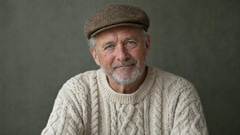
Seedance 2.5 (Reference) — One reference still becomes a walking shot: same face, cap and sweater, with the dog and flock moving around him.
Input: Reference image (an Imagera still of an invented person)
Prompt
The weathered grey-bearded man from the reference image, same face, cream cable-knit sweater and tweed flat cap, strides along a windswept clifftop above the Atlantic at golden hour, whistling as a black-and-white sheepdog drives a small flock past him. The camera tracks alongside at shoulder height, then slowly cranes up to reveal the sea cliffs, low sun raking across wet grass, sea spray glowing.
Settings
1080p · 5 s · 16:9 · Ultra Fast · sound on · 1 reference image
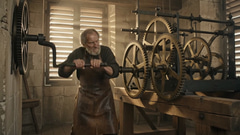
Seedance 2.5 Edit — The clockmaker's outfit changed and the light turned to candlelight; his motion and the camera kept.
Input: Source clip, first frame (one of our own clips)
Prompt
Change the clockmaker's clothes to a deep green velvet waistcoat over a white shirt and turn the light to warm candlelight. Keep his movements, the clock mechanism and the camera exactly the same.
A text prompt (up to 30,000 characters on Standard). Seedance 2.5 (Image): 1 start frame required, 1 optional end frame. Seedance 2.5 (Reference): up to 30 images, 10 video clips and 10 audio clips (1 on Ultra Fast).
Output
480p, 720p, 1080p · 4–30 s, any whole second · 1:1, 4:3, 3:4, 16:9, 9:16, 21:9 or adaptive · native sound, on by default
Credits at default settings
75 credits · 480p · 4 s · 16:9 · Standard
Median render time
4 min 44 s from submit to finished file — n = 5 jobs in our logs, 2026-08-07 to 2026-10-09; all five at 1080p, 5 s, Ultra Fast, all our own sample runs.
What we saw in our runs
Between 29 September and 6 October 2026 we ran Seedance 2.5 five times through the Sandbox, every run at 1080p, 5 seconds, 16:9 and Ultra Fast (735 credits each at today's prices). Three clips passed our review and are shown above. The prayer-wheel run kept the copper engraving crisp through a dolly and a crane move, and the reference run carried the shepherd's face, flat cap and cable-knit sweater from one still into a walking shot while the dog and the flock moved around him.
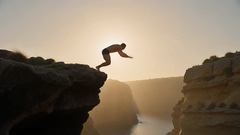
Two runs failed review. One printed brand-style lettering on a fighter's shorts although the prompt asked for plain clothing; in the other, a masked wrestler's leap off the top rope came back as a blur of gold cape with no readable face. From submit to finished file the five runs took a median of 4 min 44 s.
Known limits
The longest run is 30 seconds. For more, continue a clip with Seedance 2.5 Extend.
Output tops out at 1080p in text, image and reference modes; only Seedance 2.5 Edit and Seedance 2.5 Extend go to 4K.
Every run differs: Seedance 2.5 and Seedance 2.5 (Image) take no seed, and Seedance 2.5 (Reference) accepts one on Ultra Fast only.
Seedance 2.5 (Image) takes first and last frames and Seedance 2.5 (Reference) takes references; they are separate models, so one run uses one or the other.
Seedance 2.5 (Reference) takes 10 audio references on Standard but 1 on Ultra Fast; an audio reference needs an image or video reference with it, and reference footage runs ~30 s at most.
In our runs, lettering appeared on clothing even when the prompt asked for none, and fast action can lose a face: ask for plain clothing and keep fast-moving subjects large in frame.
What is Seedance 2.5?
Seedance 2.5 is a video generation model available on Imagera that writes one continuous take of up to 30 seconds in a single pass, with natively synchronized audio. It runs in three modes — text to video, image to video, and reference to video — and you can try all three in the Imagera Sandbox.
How long can a single video be?
Up to 30 seconds in one continuous pass — no stitching between cuts. You can pick any whole second from 4 to 30, and the price scales per second, so shorter drafts cost proportionally less.
What resolutions does it support?
480p, 720p, 1080p, with 480p as the Sandbox default. 1080p is the top size in text, image and reference modes; Seedance 2.5 Edit and Seedance 2.5 Extend go to 4K.
Does it generate sound?
Yes — synchronized audio (dialogue, effects, ambience) is generated natively alongside the video by default, and you can switch it off. Audio adds no extra credits.
Seedance 2.5 specs at a glance
Modes
Text to Video · Image to Video · Reference to Video
Longest single take
30 seconds in one pass — no stitching between cuts
Durations
Every whole second from 4 to 30 (default 4 s; price scales per second)
Resolutions
480p · 720p · 1080p (default 480p)
Aspect ratios
1:1, 4:3, 3:4, 16:9, 9:16, 21:9, or adaptive (the model decides; default 16:9). Image mode starts on adaptive, so the start frame sets the shape unless you pick a ratio.
Audio
Native synchronized audio — dialogue, effects and ambience, generated with the video. On by default, can be switched off. No extra credits either way.
Prompt length
Up to 30,000 characters — full shot lists fit
Frames (Image mode)
1 start frame required, optional closing frame — max 2 images, 30 MB each. The clip animates the full way between them.
References (Reference mode)
Up to 30 images, 10 video clips and 10 audio clips on Standard (1 audio clip on Ultra Fast) — 50 files total. Call them out as @Image1, @Video1, @Audio1.
Reference file rules
Videos up to 200 MB each, combined footage under ~30s. Audio up to 15 MB, ~2–30s clips; an audio reference needs at least one image or video reference alongside it.
Delivery speeds
Standard (default) and Ultra Fast — Ultra Fast is priced higher at every resolution
Extras
On Standard speed: an optional live web results lookup and a mature-content filter, both toggleable per run
What is Seedance 2.5? Three modes, one model
Text to Video
Seedance 2.5
Half-minute cinematic video with native synced audio
Writes a full 30-second scene in a single pass — no stitching, no drifting characters between cuts. Native synchronized audio covers dialogue, effects and ambience, and camera language, physics and multi-subject staging all hold across the whole take. Up to 30 seconds at 720p. Built for trailers, product films and story-driven ads that need to run longer than a loop.
Image to Video
Seedance 2.5 (Image)
Turn one still into a 30-second cinematic take
Give it a starting frame — and optionally a closing frame — and it animates the whole way between them with native synchronized audio, holding your subject's look and lighting for the full run. Up to 30 seconds at 720p. Ideal for stretching a single product shot, portrait or illustration into a finished clip.
Reference to Video
Seedance 2.5 (Reference)
Up to 50 references — images, video and audio
Feed it up to 30 images, 10 video clips and 10 audio clips at once — 50 files in total — and call them out in your prompt as @Image1, @Video1, @Audio1. Lock a character's face from photos, borrow motion from a clip, and match rhythm to a track, all in one generation. Up to 30 seconds at 720p. The tool for brand assets and recurring characters that have to look identical every time.
Pricing in credits
Standard speed
The Sandbox default.
Resolution
4s
5s
10s
15s
20s
25s
30s
480p
75
90
180
265
355
445
530
720p
160
200
400
600
795
995
1195
1080p
400
500
1000
1495
1995
2490
2990
Ultra Fast
Priced higher at every resolution.
Resolution
4s
5s
10s
15s
20s
25s
30s
480p
115
140
280
420
560
695
835
720p
240
300
600
895
1195
1490
1790
1080p
590
735
1470
2200
2935
3670
4400
All prices are in credits, read from the same price list the Sandbox charges by, and always land on multiples of 5. Price scales with duration and resolution: the default run (4 s at 480p, Standard) is 75 credits and the full 30-second take at 1080p is 2,990 credits on Standard speed. Sound adds nothing; in Reference mode, reference videos add credits per second of footage.
Credits come in packs — see credit packs. No subscription required.
The problem with stitched clips
Most AI video tops out around 5–15 seconds, so anything longer becomes a stitching job: generate, cut, regenerate, and hope the character, light and pacing survive each seam. They usually do not — faces drift, the grade shifts, and the soundtrack gets bolted on in post.
Seedance 2.5 attacks exactly that: one pass writes the whole take — up to 30 seconds — so camera language, physics and your subject hold from the first frame to the last, and the audio is generated in sync rather than added afterwards.
Prompt library
Copy any of these into the Sandbox as a starting point — each one exercises something this model is specifically good at.
Text to Video
7 prompts
Describe one continuous camera journey — not a cut list. Name the audio you want; it is generated in sync.
A lone astronaut trudges slowly across crimson sand dunes at golden hour, footprints trailing behind. Slow dolly push-in, volumetric backlight, gentle wind lifting fine dust. Cinematic photorealistic, 16:9.
The starter prompt from the Imagera prompt library.
A serene beach at sunset with waves gently crashing on the shore, palm trees swaying in the breeze, and seagulls flying across the orange sky
A simple single-scene establishing shot.
30-second single take: a barista opens a small café at dawn. She flips the sign, steam rises from the first espresso, morning light slides across the counter as the camera drifts from the doorway to a close-up of the cup. Ambient sound: grinder hum, soft street noise, a bell over the door. No cuts.
Exercises the full 30-second single pass plus ambient audio.
Product film, 21:9: a matte-black wristwatch rotates on a stone plinth. Macro orbit, hard rim light tracing the bezel, dust motes in a single beam. At 10 seconds the second hand ticks in sync with a low percussive score. Cinematic, shallow depth of field.
Widescreen 21:9 with a timed, synced audio beat.
Two chess players in a rain-lit train carriage. One says, 'Your move.' The other smiles and topples her own king. Handheld two-shot, then a slow push past the window as the city lights streak by. Dialogue clearly audible over the rain and rail rhythm.
Dialogue plus multi-subject staging.
Vertical 9:16 ad: a runner crests a foggy hill at sunrise, breath visible, footsteps and heartbeat building in the mix. Camera tracks alongside, then arcs to a front low-angle hero shot. Warm backlight, photorealistic, energetic pace.
Vertical format with audio-driven pacing.
A paper boat rides a rain-swollen gutter stream through a neon-lit night market, camera skimming the water's surface behind it. It survives a mini waterfall at a drain edge and beaches on a grate. Physics-accurate water, reflections of stall signs, street chatter and rain in the audio bed.
Pushes physics and camera language across one take.
Image to Video
6 prompts
Upload a start frame (and optionally a closing frame). The clip keeps its look and animates the full way between them.
The subject in the image gradually turns their head toward the camera and smiles. Soft handheld tracking, shallow depth of field, warm window light. No other motion in the frame.
The starter prompt from the Imagera prompt library.
Animate the bottle in the image: condensation beads slowly roll down the glass, a soft studio light sweeps left to right, and the label catches a highlight at the midpoint. Lock the camera; keep the background and label text exactly as in the still.
Controlled product motion that preserves the source look.
Starting from the provided frame, the camera pulls back slowly to reveal the full workshop around the craftsman, wood shavings drifting in the light shaft. Ambient sounds of sanding and a distant radio. End on a wide static shot.
A single start frame with camera and ambience direction.
Use the first image as the opening frame and the second image as the closing frame. Transition between them as one continuous dolly move through the corridor, lights flickering on section by section, footsteps echoing.
First-and-last-frame arc in one continuous move.
Bring the illustrated character to life: she blinks, brushes hair from her face, and the painted clouds behind her drift slowly. Keep the exact art style, line weight and palette of the source image throughout all 15 seconds.
Stretches a single illustration into a finished clip.
The dish in the photo steams gently as a hand enters frame and drizzles sauce in a spiral. Macro top-down, then a slow 30-degree tilt to a hero angle. Sizzle and kitchen ambience in the audio. Nothing else changes.
Single-subject motion with everything else locked.
Reference to Video
7 prompts
Attach up to 50 files and address each one in the prompt — @Image1, @Video1, @Audio1 — saying what it contributes.
@Image1 is our founder, @Image2 and @Image3 show our product from front and side. She walks through a sunlit studio holding the product, presents it to camera and says, 'This took us three years.' Keep her face exactly as in @Image1 and the product's proportions from @Image2. 16:9, warm daylight.
Face lock plus product lock in one generation.
Recreate the camera move from @Video1 — the slow rising crane shot — but over the city skyline in @Image1 at dusk. Match the pacing and grade of @Video1; add distant traffic and wind in the audio.
Borrow motion from a clip, apply it to a new scene.
Cut a rhythmic product montage of the sneaker in @Image1 through @Image6, with every camera hit landing on the beat of @Audio1. Studio black background, single hard spotlight, 9:16 vertical.
Beat-matched montage — audio references need at least one image or video reference.
Use @Image1 as the first frame and @Image2 as the last frame. Between them, the character from @Image3 crosses the bridge in a storm, coat snapping in the wind. Continuous take, no cuts.
First/last-frame control emulated inside Reference mode.
@Image1 through @Image8 are the same mascot from different angles. Animate it doing a victory dance in the office from @Image9, moving like the dancer in @Video1, timed to @Audio1. Keep the mascot's colors and proportions identical in every frame.
Multi-angle character lock — the mode's signature trick.
Match the speaker in @Image1 to the voice in @Audio1: she delivers the line to camera in a bright podcast studio, lips synced to the track, gentle push-in over 10 seconds. Frame 16:9, soft key light from camera left.
Pairing a voice reference with a face reference.
Continue the scene from @Video1: after the car door closes, the driver from @Image1 pulls away down the coastal road. Same lens, same color grade, same engine tone continuing from the clip's audio.
Continuation of existing footage — combined reference video stays under ~30s.
Getting the most out of Seedance 2.5
Write it as one continuous take, not a cut list
The model's edge is a single 30-second pass with no stitching. Describe a camera journey — "drift from the doorway to a close-up" — instead of "scene 1 / scene 2".
Draft at 480p, finish at 720p or 1080p
A 5-second draft at 480p is 90 credits against 200 at 720p and 500 at 1080p on Standard speed. Iterate the prompt cheaply, then re-run the keeper at the size you need.
Test prompts on the 4-second rung
It is the cheapest run the model can do — 75 credits at 480p on Standard speed, which is also the Sandbox default.
Direct the soundtrack in the prompt
Audio is generated natively and synced by default. Put dialogue lines in quotes, name the ambience, and time the beats ("at 10 seconds the hand ticks in sync") instead of adding music in post.
Crop the still before uploading in Image mode
Image mode starts on adaptive, so the start frame dictates the output geometry. Frame your still exactly how you want the video framed.
Add a closing frame for a guaranteed ending
With a first and a last frame the model animates the entire arc between them — product reveals, before/after shots, A-to-B camera moves.
Address reference files by handle
@Image1, @Video1, @Audio1 — and say what each contributes ("face from @Image1, motion from @Video1, rhythm from @Audio1"). A file the prompt never mentions is wasted signal.
Lock a character with multiple angles
Up to 30 reference images fit in one job, so 6–10 shots of the same face or mascot from different angles is affordable — and is exactly what Reference mode is built for.
Budget your reference footage
All reference videos combined must stay under ~30 seconds (each clip up to 200 MB), and any audio reference needs at least one image or video reference alongside it.
First/last frames and references are separate workflows
You use one or the other in a single generation. Need both? In Reference mode, name a reference image as the first or last frame in the prompt.
Go long in the prompt
The cap is 30,000 characters — a full shot list with timing beats, light direction and sound cues fits easily, and the model holds it across the whole take.
Consistency comes from references, not seeds
Each run is unique — text and image modes take no seed, and Reference mode takes one only on Ultra Fast. When something has to look identical across runs, pin it with reference images instead of rerolling.
How it works
STEP 1
Open the Sandbox and pick the model
Open the Imagera Sandbox and select Seedance 2.5 — or the Reference variant if you are bringing files.
STEP 2
Pick a mode and write one take
Type a prompt, attach a start frame, or add reference files and address them as @Image1, @Video1, @Audio1. Describe a single continuous shot and the audio you want.
STEP 3
Draft short, then finish long
Test at 4 s/480p for 75 credits, then re-run the keeper at 720p or 1080p — up to the full 30-second take.
Use cases
Commerce
Product films
A half-minute hero film from a shot list — orbits, macro passes and a synced score, in one pass.
Marketing
Trailers & story ads
Story beats that need to run longer than a loop, with dialogue and ambience generated in sync.
Brand
Recurring brand characters
Lock a mascot or spokesperson from up to 30 reference photos so it looks identical in every clip.
Social
Beat-matched montages
Attach a track as @Audio1 and land every camera hit on the beat — vertical 9:16 included.
Creators
Stills brought to life
Stretch one product shot, portrait or illustration into a finished clip that keeps its exact look.
Post-production
Continuing existing footage
Feed a clip as @Video1 and extend the scene with the same lens, grade and sound.
Every fact and credit figure in this table is read from the same registry the studio uses. All 3 models share native synchronized audio.
Available via the Imagera API
Seedance 2.5 is available through the Imagera API as Seedance 2.5. The three modes map to three endpoints, billed per second in US dollars.
Seedance 2.5
POST /v1/queue/seedance-2-5
Writes a continuous take of up to 30 seconds in one pass, with natively synchronized audio, at 480p or 720p.
Seedance 2.5 (Image)
POST /v1/queue/seedance-2-5-image-to-video
Extends a still — optionally between a chosen first and last frame — into a single take of up to 30 seconds with synchronized audio.
Seedance 2.5 (Reference)
POST /v1/queue/seedance-2-5-reference-to-video
Builds up to 30 seconds of video from as many as 50 reference files — images, clips and audio — keeping characters and products consistent throughout.
Endpoint schemas, keys and quickstarts live in the developer docs.
IA
Imagera AI Team
Unified AI creation platform
Frequently Asked Questions
What is Seedance 2.5?+
Seedance 2.5 is a video generation model available on Imagera that writes one continuous take of up to 30 seconds in a single pass, with natively synchronized audio. It runs in three modes — text to video, image to video, and reference to video — and you can try all three in the Imagera Sandbox.
How long can a single video be?+
Up to 30 seconds in one continuous pass — no stitching between cuts. You can pick any whole second from 4 to 30, and the price scales per second, so shorter drafts cost proportionally less.
What resolutions does it support?+
480p, 720p, 1080p, with 480p as the Sandbox default. 1080p is the top size in text, image and reference modes; Seedance 2.5 Edit and Seedance 2.5 Extend go to 4K.
Does it generate sound?+
Yes — synchronized audio (dialogue, effects, ambience) is generated natively alongside the video by default, and you can switch it off. Audio adds no extra credits.
How many reference files can I use?+
In Reference mode: up to 30 images, 10 video clips and 10 audio clips on Standard speed (1 audio clip on Ultra Fast), capped at 50 files total. You address each one in the prompt as @Image1, @Video1 or @Audio1 and say what it contributes.
Can I set the first and last frame?+
Yes. Image mode takes a required start frame and an optional closing frame (up to 30 MB each) and animates the entire arc between them. Reference mode is a separate workflow, but it can emulate the same control — name a reference image as the first or last frame in the prompt.
How much does it cost in credits?+
The Sandbox default — 4 seconds at 480p on Standard speed — is 75 credits, the cheapest run there is. The full 30-second take at 1080p is 2,990 credits on Standard. Ultra Fast is priced higher at every resolution (5 seconds at 1080p is 735 credits), and every price lands on a multiple of 5 credits.
Which aspect ratios are available?+
1:1, 4:3, 3:4, 16:9, 9:16, 21:9, or adaptive, where the model decides. Image mode starts on adaptive, so the start frame dictates the output geometry unless you pick a ratio: crop your still first.
Can I reproduce a result exactly?+
No — each run is unique: text and image modes take no seed, and Reference mode takes one only on Ultra Fast. When something must look identical across runs (a face, a mascot, a product), pin it with reference images in Reference mode instead.
Can I use it through the API?+
Yes — as Seedance 2.5 (seedance-2-5), with sibling endpoints for the image and reference modes. Same credit prices as the studio. See the developer docs at imagera.ai/developers.
Try Seedance 2.5 now
Pick it from the model rail, paste a prompt from this page, and watch one continuous take come back with its own soundtrack.