Quick answer: AI upscaling uses machine-learning models to enlarge an image or video while adding realistic detail, letting Imagera turn a small, soft source into a sharp 4K result (8K and beyond for still images) far cleaner than old pixel-stretching methods.
1.How much can Imagera upscale my image or video?
Imagera commonly boosts resolution 2x or 4x in one pass, taking a 1080p source to 4K (3840x2160) or pushing photos toward 8K and beyond. Many single-image jobs finish in under a minute, and the model reconstructs edges, textures, and fine detail from the surrounding image rather than simply doubling existing pixels, so the upscale looks natively sharp instead of blurry.
2.Why does AI upscaling beat traditional resizing?
Traditional bicubic resizing only averages nearby pixels, so a 4x enlargement stretches the same limited data across sixteen times the area and still looks soft. Imagera's AI instead predicts plausible new detail, sharpening 2x-4x enlargements without jagged edges. Because learned super-resolution reconstructs texture instead of just interpolating it, it holds up far better for print, e-commerce, and 4K delivery.
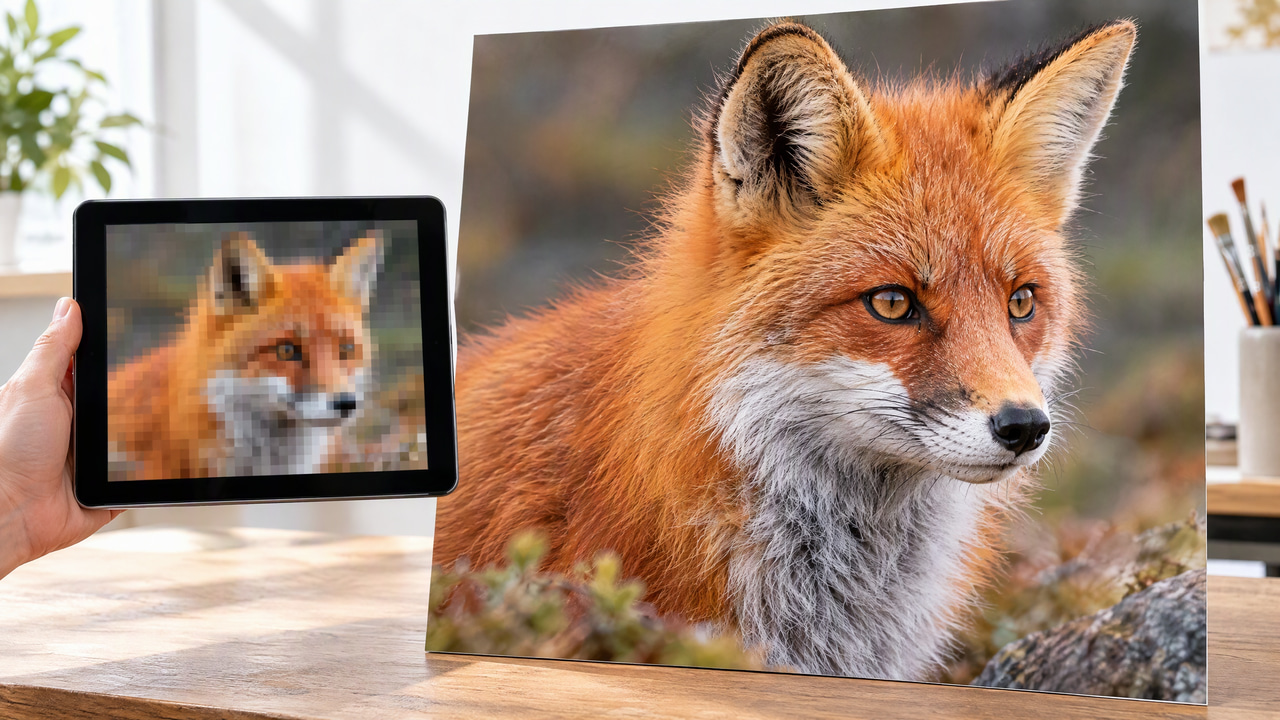
Real Imagera output: a low-res image upscaled with fine detail.
3.Definition
AI upscaling is the process of increasing an image's resolution — making it larger and adding perceived detail — using machine learning. Unlike traditional resizing methods such as bilinear or bicubic interpolation, which simply average nearby pixels and tend to produce soft or blurry results, AI upscaling reconstructs plausible new pixel data. The goal is not merely a bigger file but a version that looks as though it were captured at the higher resolution, with sharper edges, cleaner textures, and fewer visible artifacts.
In the broader field of computer vision, upscaling sits within a family of image restoration and enhancement tasks that also includes denoising, deblurring, artifact removal, and colorization. What these problems share is that they are "inverse problems": the model is given a degraded observation and asked to estimate the underlying high-quality image that most plausibly produced it. Upscaling is the specific case where the degradation is a loss of spatial resolution — the original scene was sampled onto a grid with too few pixels to capture its detail. Because many different high-resolution images could downscale to the same low-resolution input, upscaling is mathematically ill-posed: there is no single correct answer, only a distribution of plausible ones. Machine learning is valuable here precisely because it learns, from millions of examples, which of those plausible reconstructions look most like real photographs.
It is important to internalize what this means in practice. An AI upscaler does not "recover" detail that was lost — that information is genuinely gone. Instead, it synthesizes new detail that is statistically consistent with the low-resolution evidence and with everything the model learned during training. This distinction shapes both the power and the limitations of the technology, and it explains why results are often striking for natural textures like skin, foliage, and fabric, yet unreliable for content the model cannot infer, such as the exact characters in tiny text or the specific features of an unfamiliar face.
4.How It Works
AI upscaling models are trained on large collections of image pairs: high-resolution originals and downscaled low-resolution copies. During training, the model learns the statistical relationship between the two — how fine details, textures, and edges should appear when resolution increases. At inference time, you feed the model a low-resolution image and it predicts the missing detail based on these learned patterns.
Most modern upscalers are built on convolutional neural networks (CNNs) or generative architectures such as GANs (generative adversarial networks) and, more recently, diffusion models. GAN-based approaches use a generator that produces the enlarged image and a discriminator that judges realism, pushing the output toward convincing detail. Diffusion-based upscalers instead refine a noisy version of the enlarged image step by step, which can yield rich texture at the cost of more computation. Typical models offer fixed scale factors of 2x, 4x, or 8x, and many include modes tuned for photos, illustrations, or faces.
Because the model is inventing detail rather than retrieving it, the quality of the result depends heavily on the input. Heavily compressed, noisy, or very small images give the model less to work with, so many pipelines pair upscaling with denoising or artifact removal to produce cleaner enlargements.
Under the hood, a typical learning-based upscaler moves through several distinct stages. First comes feature extraction, where early convolutional layers analyze the low-resolution input and build internal representations of edges, gradients, and repeating textures. These layers are not looking at raw pixels so much as at learned patterns — a horizontal edge here, a diagonal gradient there, a patch of grass-like texture over there. Next comes nonlinear mapping, a deeper stack of layers, often organized into residual blocks that add their output back to their input to stabilize the training of very deep networks, that transforms these low-resolution features into the features a high-resolution version of the same region should have. Finally comes the reconstruction and upsampling stage, where the network actually increases the pixel count. A common and efficient technique here is the sub-pixel convolution, or "pixel shuffle," which produces several feature channels at low resolution and then rearranges them into a single higher-resolution grid, avoiding the checkerboard artifacts that older transposed-convolution approaches sometimes introduced.
What exactly is "learned" during training is the set of weights that govern all three stages, and the training signal comes from a loss function that compares the model's output to the true high-resolution image. The earliest deep upscalers optimized a simple pixel-wise loss — typically mean squared error or mean absolute error — which pushes each output pixel toward the average of all plausible correct values. This produces high scores on distortion metrics like PSNR (peak signal-to-noise ratio) but tends to look smooth and slightly blurry, because averaging over many plausible textures washes out high-frequency detail. To address this, modern systems combine several losses: a perceptual loss that compares deep features extracted from a separate pretrained network rather than raw pixels, so the output matches the original in terms of texture and structure; an adversarial loss from a discriminator that rewards outputs indistinguishable from real photographs; and sometimes a small pixel loss to keep colors and overall geometry anchored. This blend is why GAN-based upscalers produce crisp, believable texture that pure-distortion models cannot match. Diffusion-based upscalers take a different route: they treat the high-resolution image as the target of a gradual denoising process, learning to reverse a schedule of added noise while conditioning each step on the low-resolution input, which gives them exceptional texture diversity at the cost of running many sequential passes.
5.Types and Key Approaches
Not all upscaling is the same, and the differences between methods explain why results vary so widely. The major families are:
- Classical interpolation: nearest-neighbor, bilinear, bicubic, and Lanczos resampling. These are fast, deterministic, and built into virtually every image editor, but they only interpolate between existing pixels. They cannot invent new detail, so enlargements look soft. They remain useful as a baseline and for cases where fidelity to the original samples matters more than perceived sharpness.
- CNN-based super-resolution: the first wave of deep learning approaches, which learn a direct mapping from low- to high-resolution images. Optimized for distortion metrics, they produce clean, artifact-free results that can look a little smooth. They are computationally efficient and well suited to content where invented texture would be undesirable, such as diagrams or line art.
- GAN-based super-resolution: models trained with an adversarial discriminator to synthesize realistic high-frequency detail. These excel on natural photographs — skin pores, hair, foliage, fabric weave — where plausible texture reads as "real." The trade-off is that the invented detail is not guaranteed to match the true scene, and aggressive settings can introduce texture that was never there.
- Diffusion-based super-resolution: the most recent family, which iteratively refines a noisy enlargement conditioned on the input. These can produce the richest and most varied textures and handle severe degradation gracefully, but they are the most computationally expensive and can occasionally drift from the input's exact content on very small or ambiguous images.
- Face-specialized and content-aware upscalers: pipelines that detect specific regions — most commonly faces — and route them to models trained specifically on that content. Because faces are perceptually critical and highly structured, dedicated face-restoration models can reconstruct convincing eyes, teeth, and skin where a general-purpose model might smear them.
| Approach | Invents new detail? | Best for | Main trade-off |
|---|---|---|---|
| Classical interpolation | No, only averages existing pixels | Fast baselines, fidelity to original samples | Enlargements look soft |
| CNN super-resolution | Some, tuned for low distortion | Diagrams, line art, artifact-free output | Can look slightly smooth |
| GAN super-resolution | Yes, realistic high-frequency texture | Natural photos: skin, hair, foliage, fabric | Invented detail may not match the true scene |
| Diffusion super-resolution | Yes, richest and most varied texture | Severe degradation, demanding textures | Most compute-intensive, can drift on tiny inputs |
| Face / content-aware | Yes, region-specialized | Faces, eyes, teeth, and other critical regions | Needs detection and routing in the pipeline |
Many production systems are not a single model but a pipeline that combines these approaches: a denoising or artifact-removal pass to clean compression damage, a general upscaler for the bulk of the image, and a specialized pass for faces or text, sometimes followed by mild sharpening. Choosing the right family — or the right blend — is largely a matter of matching the method to the content and to how much invented detail is acceptable.
6.A Worked Example
Consider a common scenario: you have a 500 × 375 pixel product photo that was saved for the web years ago, and you now need it at roughly 2000 × 1500 for a printed catalog. A plain bicubic resize to those dimensions will hit the target pixel count, but each real pixel is being spread across sixteen output pixels, so edges look fuzzy and the JPEG compression blocks from the original become larger and more obvious. The image is bigger, but it is not better.
Now run the same file through a 4x AI upscaler. Internally, the model first extracts features from the 500 × 375 input, recognizing the crisp boundary of the product against its background, the specular highlight on a glossy surface, and the woven texture of a fabric label. The reconstruction stage then generates a 2000 × 1500 grid in which those edges stay sharp because the model has learned what a clean high-resolution edge looks like, the highlight resolves into a smooth gradient rather than a blocky patch, and the fabric gains believable thread-level texture. If the pipeline includes an artifact-removal step, the original compression blocks are cleaned up before enlargement, so they are not amplified. The result is a file that both hits the required dimensions and reads as if it were photographed at that size. The one caveat worth checking: any tiny printed text on the label — a model number or ingredient list — may be reconstructed as plausible-looking but incorrect characters, since the model is inferring letterforms it cannot actually read. For that reason, critical text is often re-typeset rather than trusted to upscaling.
7.Why It Matters
Upscaling solves a recurring problem: an image is too small for its intended use. An old family photo, a low-resolution web asset needed for large-format print, a compressed screenshot, or AI-generated art that lacks fine detail can all be enlarged without the blur that plain resizing introduces. This makes upscaling a practical step in workflows where source material cannot simply be re-shot at a higher resolution.
8.Common Use Cases
- Photo restoration: enlarging and sharpening old or low-resolution family photographs and scanned archives.
- Print preparation: converting web-resolution images to the higher pixel counts required for posters, banners, and packaging.
- E-commerce and product imagery: standardizing catalog photos to consistent, high-resolution dimensions.
- AI-generated art: adding detail to outputs from image generators that render at limited base resolutions.
- Media and video frames: improving stills or upscaling frames in older footage before delivery.
- Real estate and design: sharpening interior, architectural, or listing photos for large displays.
- Digital archiving and cultural heritage: museums and libraries enlarge scans of historical documents, artwork, and photographs to make fine detail legible and to future-proof collections for high-resolution displays.
- Marketing and advertising production: creative teams repurpose small stock or social assets for out-of-home placements, presentations, and hero banners where the original resolution would otherwise fall short.
- Surveillance and forensics review: analysts enlarge low-resolution frames to make details easier to inspect — with the important caveat that invented detail is not evidence and cannot be treated as a faithful record of what the camera actually captured.
9.How It Differs From Super-Resolution
The terms "upscaling" and "super-resolution" are often used interchangeably, and there is meaningful overlap. In practice, "upscaling" is the broader, more general term for any method that increases resolution — including simple interpolation. "Super-resolution" specifically refers to techniques, usually learning-based, that reconstruct genuinely new high-frequency detail rather than merely stretching existing pixels. Put simply: all super-resolution is a form of upscaling, but not all upscaling qualifies as super-resolution. It is worth noting that AI upscalers infer detail that is plausible rather than recover information that was truly lost — so results can differ from what the original high-resolution scene contained, especially for fine text or unique textures.
10.How It Differs From Denoising and Sharpening
Upscaling is frequently confused with two neighboring operations it is often paired with, but each solves a different problem. Denoising removes unwanted random variation — sensor grain, compression speckle — while keeping the image at its original resolution; it subtracts information that should not be there. Sharpening increases local contrast around edges to make an image appear crisper, but it adds no new pixels and cannot restore detail that the resolution never captured; over-applied, it produces harsh halos. Upscaling, by contrast, changes the pixel count and synthesizes new detail to fill it. The three are complementary: a well-built pipeline may denoise first to avoid amplifying grain, then upscale to add resolution and texture, and finally apply gentle sharpening for output. Treating upscaling as a substitute for the others — or vice versa — leads to disappointing results.
11.History and Evolution
Resolution enhancement long predates deep learning. For decades, the practical toolkit was classical interpolation — bicubic and Lanczos resampling — alongside "multi-frame" super-resolution research, which fused several slightly shifted low-resolution frames of the same scene to recover extra detail. Those methods were principled but limited: single-image enlargement stayed soft, and multi-frame approaches needed multiple aligned captures.
The turning point came with convolutional neural networks. Early deep single-image super-resolution models demonstrated that a network trained on image pairs could outperform interpolation by a wide margin, and researchers quickly refined the idea with deeper residual networks and the efficient sub-pixel upsampling that made high scale factors practical. The next leap was adversarial training: pairing a generator with a discriminator shifted the objective from minimizing pixel error to maximizing perceived realism, which is what finally produced crisp, photographic texture rather than smooth approximations. Subsequent work pushed these GAN-based systems to handle "blind" real-world degradation — unknown blur, noise, and compression — rather than the clean synthetic downscaling used in early benchmarks, which is what made them robust on everyday photos. Most recently, diffusion models brought a new generative paradigm to the task, trading heavier computation for exceptional texture quality and graceful handling of severe degradation. Each generation kept the same core insight while changing how the model is trained and how detail is synthesized.
12.Limitations and Trade-offs
- Invention, not recovery: the model estimates plausible detail; it does not restore the true original. On unique textures, fine print, and unfamiliar faces, the reconstruction can be convincing yet incorrect.
- Distortion versus perception: there is a well-documented trade-off between metrics that reward fidelity to the original (PSNR, SSIM) and those that reward realism. Sharper, more textured results often score worse on pixel-accuracy metrics, and vice versa. No single setting is optimal for every goal.
- Input quality dominates: extremely small, heavily compressed, or motion-blurred inputs give the model little to work with, and results degrade accordingly. Upscaling amplifies whatever is present, including flaws, unless a cleanup pass precedes it.
- Fabrication risk: aggressive generative upscaling can introduce texture, patterns, or facial features that were never in the scene. This is a genuine problem for any use where the image serves as a record of fact.
- Compute cost: diffusion and high-factor GAN pipelines are computationally intensive, and very large outputs consume significant memory and time, which matters at scale.
- Consistency across a set: running many related images through a generative upscaler can yield subtle stylistic drift between them, which is a consideration for catalogs or sequences that must look uniform.
13.Common Misconceptions
- "Upscaling recovers the lost detail." It does not. Detail that was never captured is gone; the model synthesizes a plausible replacement based on training data, not the true scene.
- "A higher scale factor is always better." Each doubling asks the model to invent more, and quality does not scale linearly. A modest 2x on a decent input often looks more natural than an aggressive 8x on a tiny one.
- "Upscaling and sharpening are the same thing." Sharpening only boosts edge contrast at the existing resolution; upscaling adds pixels and synthesizes new structure. They address different problems and are best used together, not interchangeably.
- "You can zoom in on a blurry photo to read a license plate or a face, like in the movies." Any text or features the model produces are inferred and cannot be trusted as an accurate record. Upscaled forensic imagery is an interpretation, not evidence.
14.Best Practices
- Start with the cleanest source you have. Work from the largest, least-compressed original available. Upscaling a file that has already been re-saved and re-compressed multiple times bakes in artifacts the model will amplify.
- Clean before you enlarge. Where possible, remove noise and compression artifacts first, so the upscaler adds detail rather than magnifying flaws.
- Match the model to the content. Use photo-tuned models for photographs, and prefer fidelity-oriented or interpolation methods for diagrams, screenshots, and line art where invented texture is undesirable.
- Choose a realistic scale factor. Aim for the resolution the output actually requires rather than the maximum available. Restrained enlargement usually looks more believable than the most aggressive setting.
- Inspect at 100 percent. Judge results by viewing them at full size, paying attention to faces, text, and repeating textures, which are where fabrication and artifacts most often appear.
- Re-typeset critical text. If an image contains numbers or wording that must be exact, do not rely on the upscaler to reproduce it — replace it with real text.
- Keep the original. Always retain the source file so you can re-process it later with different settings or a better model, since upscaling is a lossy, one-directional transformation.
15.Frequently Asked Questions
15.1Does AI upscaling actually recover lost detail?
No. Detail that was not captured at the original resolution cannot be recovered, because that information no longer exists in the file. What an AI upscaler does is synthesize new detail that is statistically consistent with the low-resolution input and with the patterns it learned during training. On natural textures the result can be remarkably convincing, but it is an informed reconstruction, not a retrieval of the true original.
15.2What is the difference between upscaling and super-resolution?
Upscaling is the broad term for any technique that increases an image's resolution, including simple interpolation. Super-resolution refers more specifically to methods — usually learning-based — that reconstruct genuinely new high-frequency detail rather than just stretching existing pixels. All super-resolution is upscaling, but plain interpolation is upscaling that is not super-resolution.
15.3How much can I enlarge an image before quality suffers?
It depends far more on the input than on the scale factor. A clean, moderately sized photo can often be enlarged 2x or 4x with excellent results, while a tiny, heavily compressed thumbnail may look poor even at 2x because there is little real detail for the model to build on. As a rule, use the smallest scale factor that meets your output requirement, and evaluate the result at full size rather than trusting a target number.
15.4Will upscaling fix a blurry or out-of-focus photo?
Upscaling and deblurring are related but distinct tasks. Adding resolution to a blurry image will make it larger without making it sharp, and can even enlarge the blur. Some pipelines combine upscaling with deblurring and denoising steps that improve softness to a degree, but heavy motion blur or severe defocus is difficult to reverse convincingly, and any recovered detail is inferred rather than true.
15.5Is AI upscaling suitable for print?
Yes, print preparation is one of its most common uses. Because posters, banners, and packaging require far higher pixel counts than web images, AI upscaling can bring a web-resolution source up to the dimensions a print job demands while keeping edges and textures crisp. For best results, start from the highest-quality source available, target the exact output resolution required, and re-typeset any critical text so it prints accurately.
15.6Which upscaling approach produces the most realistic results?
For natural photographs, generative approaches — GAN-based and diffusion-based models — generally produce the most realistic texture because they are trained to prioritize perceived realism over raw pixel accuracy. Fidelity-oriented convolutional models are cleaner and safer for content like diagrams or line art where invented texture would be a distraction. The "best" method is the one matched to the content and to how much synthesized detail is acceptable for the task.
16.Related Terms
17.Try It on Imagera
Enhance your images to a higher resolution with Imagera's AI Image Upscaler. Upload any image and get sharper, cleaner results at up to 8x the original resolution.