Almost nobody reads a page like this out of curiosity. You are here because there is one specific image and a decision attached to it: a candidate's headshot before you book the interview, a stock submission before you pay the contributor, a listing photo before you wire a deposit, a dating profile before you reply.
Getting it wrong costs you in both directions. Publish a generated photo as real and you spend credibility you cannot buy back. Reject a real photographer's work because a detector misfired and you have insulted a person over a number you never checked.
Two things decide whether a checker helps you, and neither is the headline accuracy figure on its marketing page:
- Which generator made the image. A score only means something against generators the tool has actually been tested on, and the 2026 crop moves faster than any published benchmark.
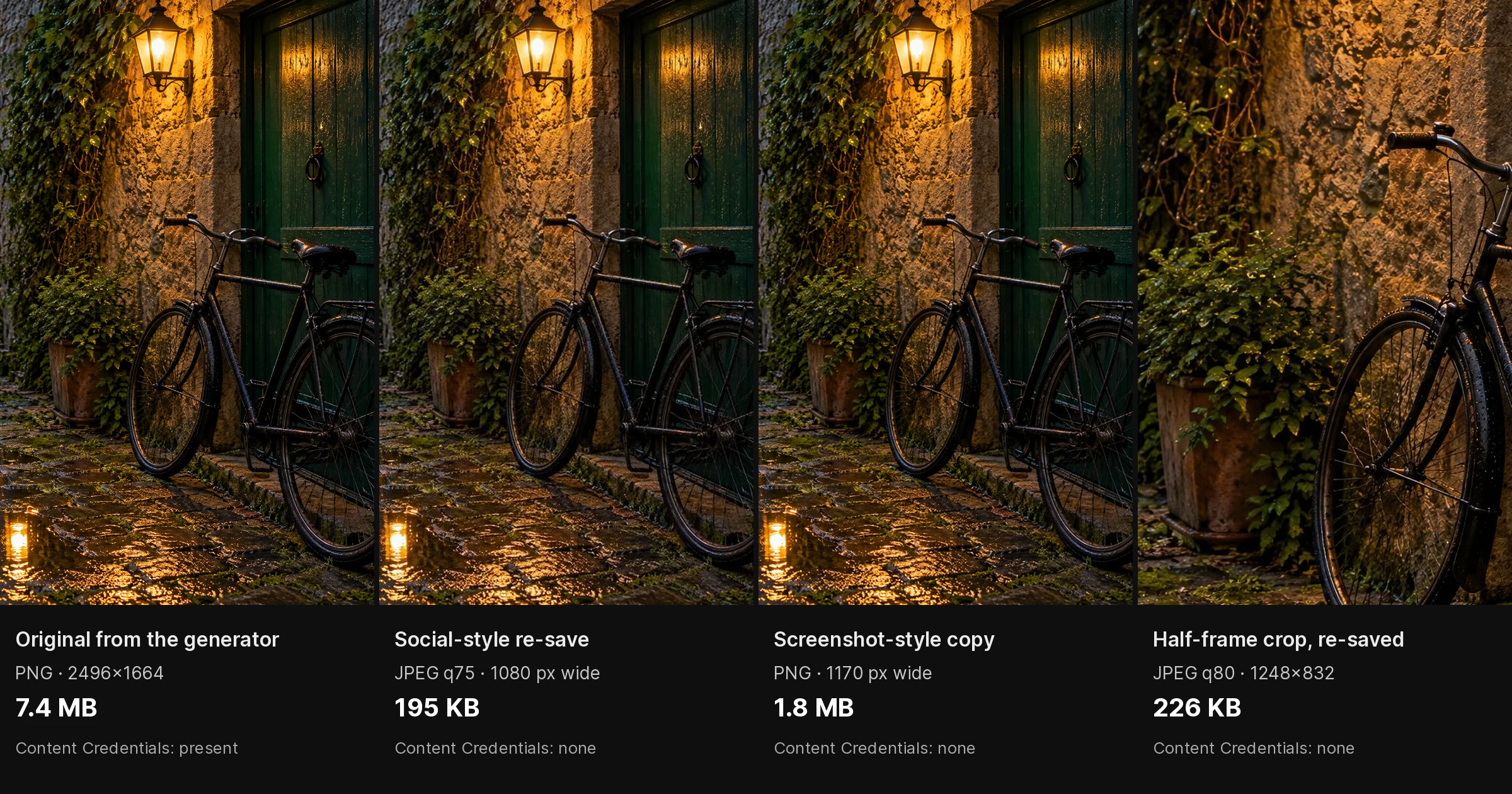
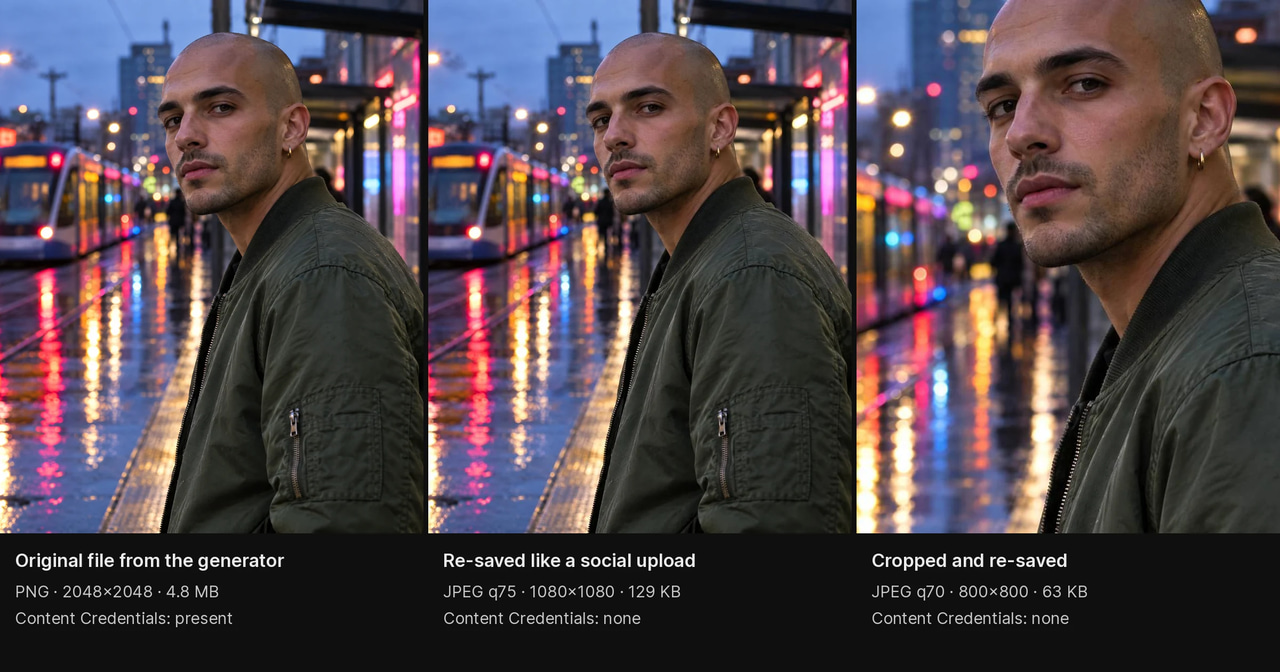
- What has happened to the file since. A screenshot, a re-save, or a trip through a social feed strips the statistical traces classifiers read.
This guide covers ten checkers with that in mind — what each is for, what its free tier actually gives you, and what independent, dated tests have shown it doing. Every number below names the test that produced it. Where no dated test exists, it says so instead of inventing one.
Updated 23 September 2026: the Google watermark check moved into the Gemini app, which now also reads Content Credentials (Google, 19 May 2026); EyeSift re-issued its comparison on 17 September 2026. Sources were re-read on that date and the dates below say which version each figure comes from.
Want a side-by-side of what five detectors check instead? That is the sibling piece — AI Image Detector Accuracy: 5 Tools Compared. This page is the by-use-case picker: which tool for which job, and what to do when they disagree.
1.What actually changed in 2026
1.1Detectors now publish coverage, not accuracy
The useful disclosure has shifted from "how accurate are you" to "which generators do you cover". SightEngine's image-detection documentation (read 2026-09-04; the page carries no publication date) lists the generator families its detector covers: DALL·E, Firefly, Flux, GPT image, Grok Imagine, Higgsfield, Ideogram, Imagen, Kling, Midjourney, Nano Banana, Qwen, Recraft, Reve, Seedream, Stable Diffusion, StyleGAN and Z-image. It publishes no accuracy percentage anywhere on that page.
That is the honest shape of the 2026 answer. A detector trained through 2024 knows the artefacts of 2024 models. The image in front of you may have come from something released this year. DeepfakeDetector.ai's roundup (updated 14 June 2026) refuses to publish accuracy percentages for exactly this reason, and states it directly: "Anyone claiming 100% is marketing to you, not informing you."
So when you read a percentage anywhere — including on this page — the first question is tested against what, and when.
1.2The two dated tests worth knowing, and their limits
AIMultiple's AI image detector benchmark (updated 14 May 2026) ran seven detectors over ten images: five stock photographs and five generated with ChatGPT. SightEngine, WasItAI and Hive Moderation performed best. Decopy produced false negatives. Illuminarty misclassified synthetic content as real — including a portrait of an elderly woman. The stated conclusion: "most perform no better than a coin toss." Ten images, one generator — directional, not definitive.
Undetectable.ai's test (published 24 February 2026) ran ten AI images past five detectors, counting a pass only at 90% AI confidence or above. TruthScan scored 10/10, AI or Not 8/10, SightEngine 7/10, WasItAI 6/10, Winston AI 3/10. Six of the ten images came from Nano Banana, two from ChatGPT, two from Midjourney. Read it with the obvious caveat attached: Undetectable.ai sells detection tools, so this is a vendor testing a field it competes in.
Notice where the two disagree. SightEngine is in the top group of one and mid-table in the other. WasItAI likewise. Ten-image tests do that, which is the strongest argument on this page for never acting on one score from one tool.
EyeSift's comparison (first published 16 July 2026, updated 17 September 2026) puts the same finding in one line: "Independent benchmarks keep finding detectors that excel on one dataset and fail on another."
2.Does it work on a photo of a person?
This is the question most people actually arrive with — a portrait, a selfie, a mirror selfie, an Instagram photo, a dating profile. It is also the hardest case for a classifier, for three separate reasons.
1. Retouched real people look synthetic. Beauty processing, studio lighting, skin smoothing and upscaling remove the sensor noise and pore-level texture that classifiers read as "camera". That is the false-positive direction, and it lands on real photographers and real people.
2. Portraits are where detectors have been caught failing. The specific miss recorded in AIMultiple's May 2026 run was a face: an elderly woman's generated portrait read as real.
3. The file you have is almost never the file that was made. Instagram, X and Facebook re-encode every upload; a screenshot re-encodes it again and drops the metadata. Classifier signal lives in exactly those compression-level traces. Fastio's comparison (read 2026-09-04; no date on the page) is built entirely around this — which detectors survive a JPEG save or a screenshot — and it is the right axis to judge on, even though no dated source publishes a defensible number for how much accuracy is lost.
What to do instead of trusting one score:
- Ask for the original file, not a screenshot. Off an iPhone that is usually a
.HEIC; off a camera, a JPEG with intact EXIF. Anything pasted from a chat app has already been recompressed. - Run a face-specific check as well as a general one. A face swap onto a real photo and a fully generated portrait are different artefacts, and general image detectors are not built for the first.
- Add one signal that is not a classifier — EXIF, C2PA credentials, or a reverse image search. Those keep working after compression has defeated the statistical read.
3.The ten checkers
3.11. Imagera AI Image Detection — start here when the file is sensitive
Where: AI Image Detection
What you get: an AI-probability score with a confidence level and a plain label for the file you uploaded. It takes JPEG, PNG, WebP and HEIC/HEIF, so an iPhone original goes in without being converted first — which matters, because converting it is itself a re-encode.
Free tier: none, deliberately. Imagera is pay-first: 15 credits per image, packs from $39.99 for 350 credits, and the studio shows the cost before you run it. The trade is the honest one — your file is not the price of a free public demo, which is the whole argument when the image is a candidate's photo or an unpublished news asset.
For faces specifically: AI Deepfake Detection is a separate mode at 15 credits, built for face swaps and identity substitution rather than "was this whole picture generated". On a portrait, run both.
Why start here: one upload, no account juggling across three sites, and it sits beside the text, video and audio detectors — so when the photo turns out to be one attachment inside a larger submission, you are not hunting a different vendor per file type. If the doubtful file is a clip, how to check if a video is AI-generated walks through that case.
Then get a second opinion. No checker settles anything alone, this one included. Run the same file through one of the nine below and act on agreement, not on either score by itself.
3.22. Hive Moderation — the free second opinion most people should use
What you get: a web demo that returns a likelihood score plus, usefully, a guess at which generator model produced the image. AIMultiple (14 May 2026) noted its detailed JSON responses and named-model output, and placed it in the best-performing group of the seven it tested.
Free tier: web demo only. API access needs an account.
Where it fails: the demo is a public tool — treat it as unsuitable for a file you would not want processed on someone else's infrastructure.
Best for: the independent second read on a general image, at no cost.
3.33. AI or Not — the fastest plain answer
What you get: a binary verdict with a confidence level, no jargon.
What dated tests show: 8/10 in Undetectable.ai's 24 February 2026 test at a 90%-confidence pass bar, second of five. DeepfakeDetector.ai (14 June 2026) ranks it third of eight and notes its free checks run on a credit system.
Where it fails: it is the tool most often reported flagging heavily edited real photos — the false-positive direction described above.
Best for: a quick read on a non-sensitive image, and for screening a batch before you look closely at anything.
3.44. SightEngine — coverage you can actually look up
What you get: an API-first detector, and the one public coverage list on this page worth reading before you trust any score — the generator families quoted at the top.
What dated tests show: best-performing group in AIMultiple (14 May 2026), including diffusion-type analysis; 7/10 in Undetectable.ai (24 February 2026). Those two placings are the disagreement worth remembering.
Where it fails: it is built for pipelines, not for one person with one file. There is no consumer-grade one-click product here.
Best for: platforms screening uploads at volume, and anyone who needs to know which generators a detector claims to cover.
3.55. WasItAI — free, no signup
What you get: a straightforward web check with a colour-coded confidence scale.
What dated tests show: best-performing group in AIMultiple (14 May 2026), where it correctly identified the real photographs; 6/10 in Undetectable.ai (24 February 2026). DeepfakeDetector.ai (14 June 2026) lists it as fully free with no signup.
Where it fails: mid-table on the vendor test, and there is no depth behind the verdict — you get a reading, not an explanation.
Best for: a genuinely free second opinion when you do not want to create an account.
3.66. TruthScan — top of the one vendor-run test
What dated tests show: 10/10 in Undetectable.ai's 24 February 2026 test, the only tool there to classify everything submitted at 97% confidence or higher, on a set drawn mainly from Nano Banana. It did not appear in AIMultiple's May 2026 benchmark, so there is no independent dated result to set against that.
Where it fails: one test, ten images, published by a competitor in the same market. A perfect score under those conditions is a reason to try it, not a reason to believe it.
Best for: adding to your shortlist when the suspected source is a very recent generator.
3.77. Illuminarty — generator identification, with a documented miss
What you get: a read on which generator family produced the image, plus region-level heatmaps showing which parts look generated or edited (EyeSift, 17 September 2026).
What dated tests show: this is the honest downgrade in this rewrite. AIMultiple (14 May 2026) scored it worst of the seven tested, with false negatives — synthetic content classified as real, including the elderly-woman portrait.
Where it fails: on the exact case most readers of this page have, a face.
Best for: a supporting signal on generator attribution once another tool has already flagged the image — not the tool you flag with.
3.88. Hugging Face open-source detectors — for technical users
What you get: hosted model demos and weights you can run yourself. Organika/sdxl-detector and umm-maybe/AI-image-detector are the two commonly used starting points.
Free tier: free and open source; hosted demo spaces have rate limits.
Where it fails: quality varies enormously between models and none of them carries a dated third-party benchmark. A model named after one generator family is telling you its training set, not its coverage.
Best for: developers who need detection inside their own pipeline, and anyone who wants a read from a model they can inspect.
3.99. Google SynthID in the Gemini app — a watermark check, not a classifier
What you get: a check for SynthID, the invisible watermark Google puts in content its own models make or edit. Since 20 November 2025 anyone can upload an image to the Gemini app and ask whether Google AI made it; Google's 19 May 2026 update extended the check to video and audio. Gemini's help page (read 2026-09-23) caps it at one file of up to 100 MB, videos under 90 seconds. The separate SynthID Detector portal is still a waitlist for early testers such as journalists (EyeSift, 17 September 2026).
Where it fails: Google's own help page states the limit plainly: if no watermark is found, the file "wasn't created or edited by Google AI, but it could have been created by other AI systems." Google says OpenAI, Kakao and ElevenLabs are adding SynthID to more of their output (19 May 2026), but that does not make a missing watermark evidence of a real photo.
Best for: ruling in a Google-made image quickly. Never for ruling one out.
3.1010. Content Credentials (C2PA) Verify — provenance, when it exists
What you get: if the file carries C2PA Content Credentials, you see the creation chain — which tool made it, what was edited, who signed it. If it does not, you get "no Content Credentials found".
Where to check: the Content Credentials Verify site, or the Gemini app, which has read C2PA Content Credentials since 19 May 2026 (on the web and Android; Google's help page says iOS is coming). Google also began embedding C2PA metadata in images from its Gemini image model in November 2025.
Where it fails: stripped by most re-encoding and by most social platforms, so a missing credential is not evidence of anything. We could not find a dated, complete list of which generators now sign their output, so this guide makes no claim about how widespread the tagging is. Check the file; do not assume the ecosystem.
Best for: the one non-classifier signal that survives when compression has defeated everything else. Always worth thirty seconds.
4.Also named in 2026 roundups
Not profiled above, but they come up in the dated comparisons and you will meet them in a SERP:
| Tool | Where it appears | What it is for |
|---|---|---|
| Winston AI | 3/10, Undetectable.ai (24 Feb 2026); built for editorial teams on its text suite, EyeSift (17 Sep 2026) | Bundled detection for people already on the platform |
| Reality Defender | EyeSift (17 Sep 2026) | Enterprise deepfake defence, not a one-file tool |
| Pangram Labs | Tops a benchmark Pangram ran itself, as cited in ddiy.co's undated 2026 roundup | A newer entrant; no independent dated test yet |
| DeepfakeDetector.ai | Ranks itself first, own roundup (14 Jun 2026); free monthly allowance, no card | Consumer checks with a real free quota |
| DeepAI / ZeroGPT / Decopy | DeepfakeDetector.ai (14 Jun 2026); Decopy false negatives in AIMultiple (14 May 2026) | Limited free consumer checks |
| Sensity AI | Long-standing deepfake vendor | Security and identity teams, video-first |
5.The layered check, when it actually matters
Each layer catches the previous layer's failure mode. Stop as soon as you have enough for the decision in front of you.
Layer 1 — two independent classifiers (about a minute). Imagera AI Image Detection plus one of the free tools above. Agreement is the signal. Disagreement is not a tie to be broken by picking the higher number; it means go to Layer 2.
Layer 2 — look at it yourself (two to three minutes). Hands and fingers, text on signs and clothing, earrings and glasses that do not match across the face, hairlines that meet skin too cleanly, skin that has no pores under magnification. The full list is in the visual tells guide.
Layer 3 — metadata (one to two minutes). Real camera files record make, model, focal length, ISO and often GPS. Presence of genuine camera EXIF is meaningful evidence toward "real". Absence is not evidence of anything — screenshots and every social platform strip it. While you are in the metadata, check for Content Credentials (Content Credentials Verify, or the Gemini app) and, if a Google tool is a suspect, ask Gemini for its SynthID check.
Layer 4 — context (three to five minutes). Reverse image search on Google Lens or TinEye. Account history and age. Other photographs of the same person or event from other angles: real events generate many images, generated ones usually arrive alone.
There is no percentage attached to those layers, and you should distrust any page that gives you one. What the layers buy you is independence — four signals that fail for different reasons is a far better position than one score at any confidence level.
6.Which checker for which job
| Your job | Start with | Why |
|---|---|---|
| One image, a real decision riding on it | Imagera AI Image Detection + one free second opinion | Pay-first, so a sensitive file is not the price of a demo |
| A portrait, selfie or profile photo | Imagera Deepfake Detection and image detection | Face swap and full generation are different artefacts |
| Photo, text and video in one submission | Imagera detection suite | One place per file type instead of a vendor each |
| A free read, no account | WasItAI, or Hive Moderation's demo | Both free; Hive also guesses the generator |
| The fastest plain yes/no | AI or Not | Binary verdict, no interpretation needed |
| Which generator made it | Hive Moderation first, Illuminarty as support | Illuminarty produced false negatives in AIMultiple's May 2026 run |
| Screening uploads at volume | SightEngine | Built for pipelines, and publishes what it covers |
| The image came from a Google tool | The SynthID check in the Gemini app | Watermark check — useful to rule in, never to rule out |
| Anything published or contested | Two classifiers, then EXIF, then reverse search | Independent failure modes beat one confident score |
| What five detectors check, side by side | AI Image Detector Accuracy: 5 Tools Compared | That is the comparison; this page is the picker |
7.Check your image
Imagera's detectors are pay-first — buy a credit pack, then scan. The studio shows the exact credit cost before you run it.
- AI Image Detection — 15 credits, JPEG/PNG/WebP/HEIC
- AI Deepfake Detection — 15 credits, for faces and identity swaps
- AI Content Detection — the full suite, every file type
- AI Text Detection — when the image arrived attached to written copy
- AI Video Detection — for clips and reels
- Pricing and credit packs — packs from $39.99 for 350 credits
Next step: open AI Image Detection, scan the file you actually have a decision riding on, then confirm it with one free checker from this guide before you act.
8.Sources
Everything dated on this page comes from these. First read on 2026-09-04; AIMultiple and DeepfakeDetector.ai were re-read on 2026-09-23 and still showed the versions cited here:
- AIMultiple — AI Image Detector Benchmark, updated 14 May 2026. Seven detectors, five stock photographs and five ChatGPT-generated images.
- Undetectable.ai — I tested 5 AI image detectors, 24 February 2026. Ten AI images, 90%-confidence pass bar. Vendor-published.
- DeepfakeDetector.ai — The 8 Best AI Image Detectors in 2026, updated 14 June 2026. Free-tier limits; publishes no accuracy figures by policy.
- EyeSift — Best AI Image Detectors in 2026, first published 16 July 2026, updated 17 September 2026. Tools compared by use case.
- Google — How we're bringing AI image verification to the Gemini app, 20 November 2025.
- Google — Making it easier to understand how content was created and edited, 19 May 2026. SynthID checks for video and audio; Content Credentials verification in Gemini.
- Gemini Apps Help — Verify AI-generated images, videos, and audio, read 2026-09-23. File limits and what "no watermark" means.
- ddiy.co — Best AI Image Detectors in 2026, no date on the page. Source for the Pangram Labs mention only.
- SightEngine — AI-generated image detection documentation. Source for the generator coverage list. No publication date on the page.
- Fastio — Best AI Image Detectors in 2026. Source for the post-processing framing. No publication date on the page.
Part of the AI Detection and Authenticity series. See also: AI Image Detector Accuracy: 5 Tools Compared | AI Art Detector Guide