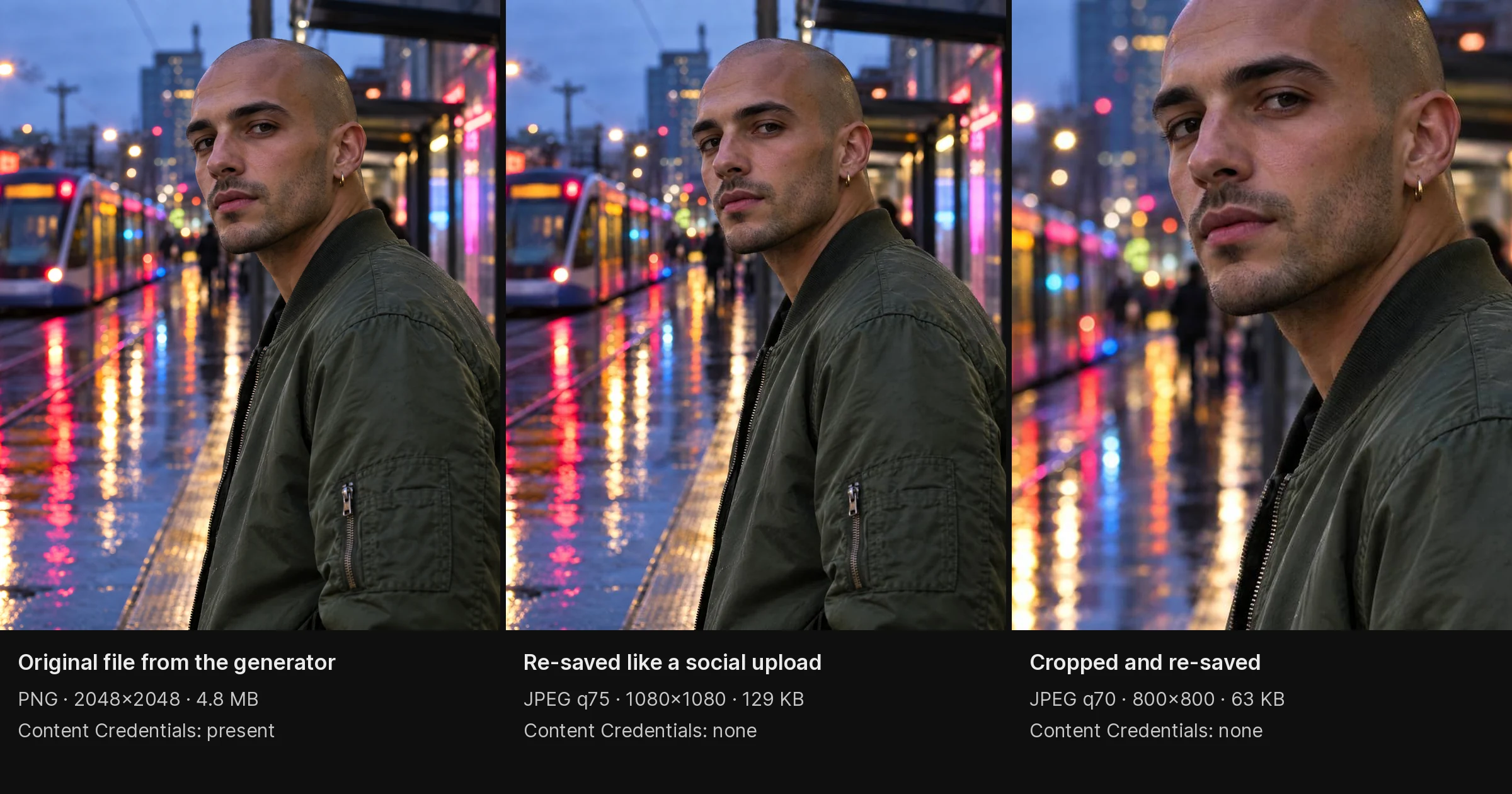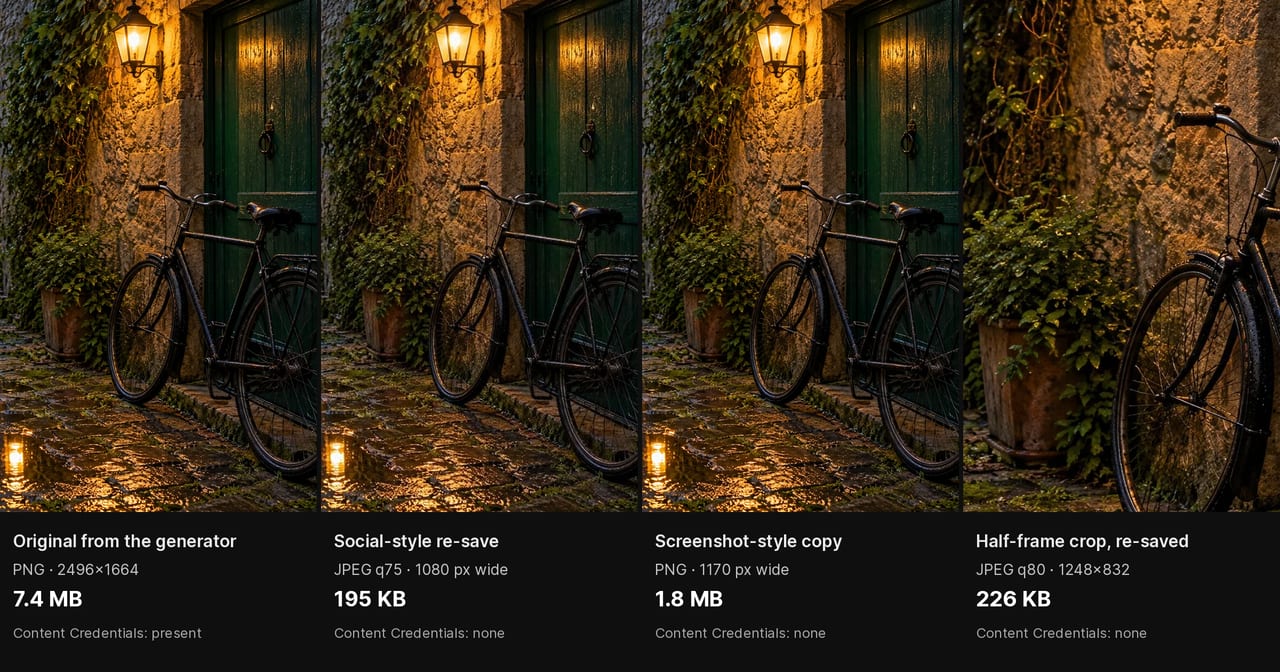
AI image detectors claim to identify machine-generated photos with high accuracy. How well they actually work depends on which generator made the image, what happened to the file afterwards, and when the detector was last trained.
This guide compares five widely used detectors — Hive, Illuminarty, AI or Not, SightEngine and GPTZero — by what they check and what they report, then shows you how to measure their accuracy on your own images. Imagera has not run a controlled benchmark of these tools, so there are no accuracy scores here: vendor figures are measured on each vendor's own test set and change as models are retrained, and a number measured on someone else's images says little about yours.
How AI Image Detectors Work
AI detectors analyze images for statistical patterns that differ between real photographs and AI-generated content:
Frequency analysis: Real photos have specific frequency distributions from camera sensors. AI images show different patterns in how pixel values transition across the image.
Noise fingerprinting: Camera sensors produce characteristic noise. AI generates either no noise or synthetic noise that differs from real sensor output.
Artifact detection: Each AI generator produces subtle artifacts — compression patterns, color distribution anomalies, texture inconsistencies — that trained classifiers can identify.
GAN fingerprinting: Many detectors maintain databases of "fingerprints" from specific generators, matching unknown images against known patterns.
The Detectors Compared
1. Hive AI
Best for: General-purpose detection at volume, on the web or through an API
What it reports: A confidence score that an image is AI-generated, and for many images a guess at which generator made it.
Strengths: API available for batch operations. Returns a confidence score rather than a bare yes or no.
Watch for: Heavily edited or re-compressed images, which weaken every statistical detector, and newer generators it has not been trained on yet.
2. Illuminarty
Best for: Estimating which specific generator created an image
What it reports: An AI probability and an estimate of the source model.
Strengths: Attempts to name the model used (a particular Midjourney, DALL-E or Stable Diffusion version, for example), which helps when you need a lead on where an image came from.
Watch for: Low-resolution or heavily cropped files give it less to work with, and like any classifier it is less reliable on new or uncommon generators that were not in its training data.
3. AI or Not
Best for: Quick checks by non-technical users
What it reports: A clear "AI" or "Not AI" verdict.
Strengths: The simplest interface of the group: upload and get an answer. No technical knowledge required.
Watch for: A binary verdict hides the tool's uncertainty. Treat it as one vote, not a conclusion.
4. SightEngine
Best for: Developers adding detection to an upload or moderation pipeline
What it reports: An AI-generated score through its API, alongside its other content-moderation checks.
Strengths: Built for integration into existing platforms and for batch processing.
Watch for: It is designed for developers, so casual users get less out of it, and usage-based pricing adds up at volume. Check SightEngine's site for current pricing.
5. GPTZero (Image Analysis)
Best for: Documents that mix text and images, such as coursework
What it reports: Text and image results from one document upload.
Strengths: One upload covers both the writing and the images in a document.
Watch for: GPTZero is built text-first, and image scanning is a secondary feature (see GPTZero and AI Images: What It Sees). For image-only checks, use a dedicated image detector.
Also Worth Knowing
Open-source detectors on Hugging Face: aimed at researchers and technical users. They can be customised and run on your own hardware with no per-image fee, but they need technical setup, and accuracy varies with the model and what it was trained on.
Content Credentials (C2PA): provenance, not statistical detection. When a file carries Content Credentials, a verifier such as the Content Authenticity Initiative's Verify tool shows who made and edited it. Adobe, Google and Microsoft are among the companies behind the standard, but most images carry no credentials, and re-saving a file can strip them.
How to Test AI Image Detectors Yourself
The only accuracy figure that means much for your work is one measured on images like yours. A small, careful test takes an afternoon:
- Build a labelled test set. Collect real photos you know are real, ideally straight from your own cameras and phones, and AI images from the generators you actually care about. Cover the subjects you check most often: portraits, products, documents, screenshots. Aim for at least 50 of each.
- Add real-world copies. Make a second copy of every file the way images travel in the wild: re-save it as a JPEG, screenshot it, crop it, and send it through a messaging app and download it again.
- Run every detector on every file. Record the raw score, not just the verdict, and note the date and each tool's model or version.
- Score each tool. Count the AI images it caught and missed, and the real photos it flagged and passed. Its detection rate is AI images caught divided by all AI images; its false-positive rate is real photos flagged as AI divided by all real photos.
- Compare clean and degraded files separately. A tool that is strong on clean files and weak on screenshots is a different tool from one that is steady on both.
- Retest every few months. New generators appear constantly and detectors are retrained, so results go stale.
| Record for each tool | Clean files | Re-saved, screenshotted or cropped copies |
|---|---|---|
| Detection rate (AI images caught) | ||
| False-positive rate (real photos flagged as AI) | ||
| Files it could not score |
Weigh the false-positive rate by what a wrong verdict costs. Flagging a real photo as AI can hurt a photographer, a student or a job applicant, so a tool that catches slightly fewer AI images but rarely accuses real ones may be the better choice.
How to Get the Most Reliable Results
Use Multiple Tools
No single detector is reliable enough to use alone. For important verification:
- Run the image through Hive AI for initial screening
- Check Illuminarty for generator identification
- Use C2PA Verify to check for content credentials
- Perform visual inspection for the common visual signs
Consider Image History
Detection accuracy drops significantly when images have been:
- Compressed (social media upload, messaging apps)
- Screenshotted (removes metadata, adds compression)
- Cropped or resized (changes frequency distributions)
- Filtered or edited (post-processing alters AI patterns)
- Post-processed for authenticity (noise, texture, compression deliberately added)
Check the Source
Context matters as much as detection:
- Does the account have a history of real photography?
- Is the image resolution consistent with a real camera?
- Does EXIF data show camera information?
- Can you find the image elsewhere via reverse search?
The Detection Arms Race
AI detection is fundamentally an adversarial problem. As detectors improve, generators adapt:
Current state (2026): Detectors do best on clean files from generators that were in their training data, and worse on newer models and on files that have been re-saved, screenshotted or edited. Post-processing that adds camera noise and compression lowers detection rates further, which is why a single detector verdict is weak evidence.
Where it's heading: C2PA content credentials may become the long-term solution. If all generators embed provenance data, statistical detection becomes less necessary. But adoption is voluntary, and many generators (including open-source models) don't participate.
For now, the most reliable approach combines multiple detection tools with human visual inspection and contextual analysis.
Who Needs AI Image Detectors
Stock photo platforms: Verify submissions meet "authentic photography" requirements. Tools like Hive API integrate directly into upload workflows.
News organizations: Verify user-submitted imagery. Combine detection tools with source verification and editorial judgment.
Academic institutions: Screen student submissions and research imagery. GPTZero's combined text-and-image document review is aimed at this use.
HR departments: Verify headshot authenticity in professional profiles. Visual inspection combined with one tool is usually sufficient.
Legal teams: Evidence verification. Multiple tools plus expert analysis recommended for legal proceedings.
Common Questions
Which AI image detector is most accurate?
There is no single answer. Accuracy depends on the generator, the subject and what happened to the file, and vendors report figures measured on their own test sets. Test the tools you shortlist on images like yours, using the method above, and use more than one detector for anything important.
Can AI detectors identify Midjourney images specifically?
Some try. Illuminarty and Hive estimate which generator made an image, but that guess is less reliable than the basic AI-or-not verdict, especially for new model versions. Treat a named generator as a lead to check, not as proof.
Do free AI detectors work well enough?
For a casual look, the free web checks many detectors offer (usually with daily limits) are a reasonable start. For decisions that affect people, such as publishing, hiring, grading or legal use, combine several tools with a provenance check and keep a record of the results.
Can AI detectors be fooled?
Yes. Compression, screenshots, cropping and post-processing such as added camera noise change the statistical patterns detectors read, which lowers detection rates. That is why detection should be combined with provenance checks and context. Learn more in How to Make AI Images Look Real.
Should I trust a single AI detector's result?
No. Every detector flags some real photos as AI and misses some AI images. Always combine at least two detection tools with visual inspection for reliable results. No tool should be treated as infallible.
Part of the AI Detection & Authenticity series. See also: Is This AI Generated? | AI Image Checker Tools | AI Art Detector Guide
Why do AI image detectors disagree on the same image?
Detectors disagree because each one was trained on a different mix of generators and uses a different statistical signal — frequency patterns, sensor-noise fingerprints, or generator databases. An image that trips one tool's noise analysis can pass another's frequency check, so two reputable detectors returning opposite verdicts on the same file is common rather than a malfunction.
The practical consequence is that a lone score is weak evidence. Every detector has some false-positive rate, meaning even genuine photographs are occasionally flagged as synthetic, and a single confident-looking percentage hides that uncertainty. Tools also age at different rates: a detector trained mostly on last year's generators loses accuracy against models released since, which is why the same file can read as likely AI on one service and likely real on another. That is exactly why the reliable workflow layers evidence rather than trusting a number — run at least two detectors, check for provenance data with a C2PA verifier, and add human visual inspection for the well-known tells. When the tools agree, confidence is high; when they split, the disagreement itself is the signal to slow down and verify the source rather than the pixels. Treat any single percentage as one weak vote, never a verdict.
How do compression and screenshots affect detection accuracy?
Compression, screenshotting, and resizing all reduce detector accuracy because they overwrite the exact statistical fingerprints these tools look for. A social platform re-encodes every upload, a screenshot strips metadata and adds a fresh compression layer, and cropping changes the frequency distribution — each step moves the image further from the clean file the detector was trained on.
This matters because almost no image in the wild is a pristine original. By the time a photo has been uploaded to a messaging app, forwarded, screenshotted, and re-shared, its sensor-noise pattern and compression signature have been overwritten several times, and detection accuracy on that degraded file drops below the headline numbers vendors quote on clean test sets. The table below summarises what common transformations do to the evidence a detector reads, and why source and context checks often outperform pixel analysis on real-world images.
| Transformation | Effect on the file | What it does to detection |
|---|---|---|
| Social upload re-encode | New compression layer, metadata stripped | Blurs the fine patterns detectors read |
| Screenshot | Removes EXIF, adds fresh compression | Loses metadata clues and adds new artifacts |
| Crop or resize | Alters frequency distribution | Shifts the frequency signal detectors rely on |
| Heavy filtering/editing | Overwrites original pixel statistics | Replaces the generator's statistical fingerprint |
| Repeated re-sharing | Stacks multiple compression passes | Each pass erases more of the evidence |
Because of this, verifying provenance and context is frequently more reliable than statistical scanning on heavily circulated images. Check whether the account has a genuine photography history, whether the resolution is consistent with a real camera, whether EXIF data survives, and whether a reverse image search surfaces the file elsewhere. On a clean original, run the file through two detectors and a C2PA verifier before drawing a conclusion; on a screenshotted or re-compressed copy, lean harder on source and context, because the statistical evidence has largely been erased.