Best OpusClip Alternatives (2026, Honestly Compared)
OpusClip built the market for AI-powered video clipping. It deserves credit for that. But the market it created has since filled with tools that are faster, cheaper, less watermarked, or simply better-suited to specific use cases — and plenty of creators searching for "opusclip alternative" are not looking for a hit piece on OpusClip, they are looking for an honest answer to a practical question: what is the right tool for what I actually need to do?
This post attempts to give that answer. It covers eight tools — OpusClip included, fairly — with a comparison table, per-tool breakdowns, and sub-intent sections targeting the specific things people are actually searching for: free tiers, no watermark, volume pricing, non-English support, and API access. No fabricated star ratings. No affiliate fluff.
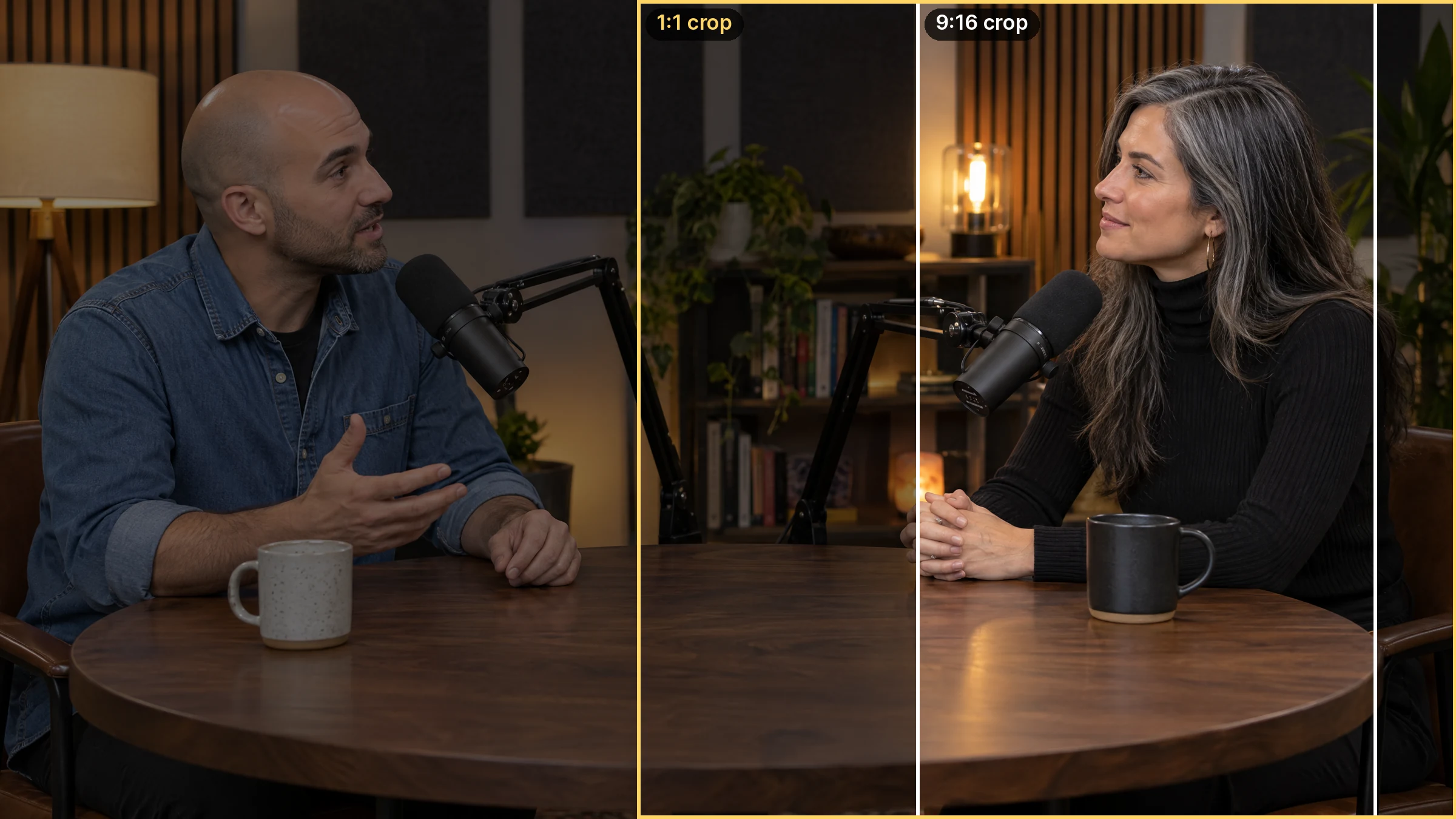
Illustration: generated 16:9 podcast frame of two invented hosts, with the 9:16 and 1:1 areas a clipping tool keeps outlined.
Quick answer: The best OpusClip alternatives are all-in-one platforms like Imagera that turn one long video into dozens of vertical clips, add captions, and reframe to 9:16 automatically, instead of relying on a single clip-detection tool. Imagera bundles clipping, editing, and 4K upscaling in one credit-based workflow.
What should I look for in an OpusClip alternative in 2026?
Prioritize accurate framing, readable captions, export size, and control over which moments become clips. In Imagera, check the clip tool's supported inputs and credit quote before submitting a job, then review each result for timing and framing. Successful generations use credits even if you decide not to publish the resulting clips.
Why choose Imagera over a single-purpose clipping tool?
Standalone clippers stop at 1 job: finding highlights. Imagera chains multiple steps (clip, caption, upscale to 4K) in one place, exporting 9:16, 1:1, and 16:9 versions from a single pass. Consolidating clipping, captioning, and upscaling into one credit-based tool means fewer apps to manage and a faster turnaround from raw footage to published short.
What is the best OpusClip alternative?
The direct answer depends on your situation. None of these is universally "the best" — pick by the job you need done:
| If you want… | Best pick | Why |
|---|---|---|
| A free starting point | Riverside Magic Clips or Vizard free tier | Genuine free usage to test the workflow |
| The best caption quality and polish | Klap or Submagic | Strongest visual caption styling out of the box |
| Occasional use without a subscription | Imagera AI Video to Reels | Credit-based, pay-as-you-go, no monthly lock-in |
| An editing-first workflow | Descript | Edits video like a text document |
| Team-scale repurposing | Munch or Vizard business tier | Built for volume and collaboration |
What follows breaks down each tool honestly so you can match one to your situation.
Comparison table: OpusClip and its 8 alternatives
| Tool | Best for | Pricing model | Free tier | Watermark on free | Languages | API |
|---|---|---|---|---|---|---|
| OpusClip | General-purpose AI clipping | Subscription (minute-based) | Yes (60 min/mo) | Yes | 20+ | Business plan only |
| Vizard | Team workflows, multilingual | Subscription (credit-based) | Yes (60 credits/mo) | Yes | 32 | Creator plan+ |
| Klap | Caption polish, talking-head video | Subscription (video/clip limits) | No | N/A | 52+ (subtitles) | No |
| Submagic | Short-form caption speed | Subscription + add-on | Limited (1 clip) | Yes | 48 | Business/API plan |
| Munch | Marketing teams, analytics | Subscription (minute-based) | Trial only | N/A | Multiple | Yes (higher tiers) |
| Descript | Edit-by-transcript workflows | Subscription (media minutes) | Yes (60 min) | Yes | Multiple | Limited |
| Captions | Mobile-first creators | Subscription + credits | Yes (limited) | Yes | 100+ | No |
| Riverside | Podcasters already recording there | Subscription (bundled) | Yes (1 set/recording) | Limited | Multiple | No |
| Imagera | Pay-as-you-go, no subscription lock | Credit-based, pay-as-you-go | No | No | 99+ (transcription) | No |

Table reflects publicly available information as of July 2026. Pricing tiers and feature availability change; verify directly with each vendor before buying.
OpusClip: what it does well and where it falls short
Before listing alternatives, it is worth being fair about what OpusClip actually does.

OpusClip is the tool that popularised AI virality scoring — the idea that an AI model can watch your long-form video, identify the moments most likely to retain attention on a short-form feed, cut them into vertical clips, and rank them by estimated engagement potential. For talking-head content (interviews, podcasts, solo commentary), this works reasonably well. Processing is typically fast, the word-synced captions are decent out of the box, and the auto-reframe tracks active speakers well enough for structured conversation.
Where OpusClip draws consistent complaints: the free plan watermarks every export and deletes files after three days, the AI clip selection can be inconsistent (independent reviews estimate 20–40% of clips need editing or discarding), the in-app editor is limited for anything beyond basic trim and caption tweaks, and the billing and cancellation experience has generated a notable volume of negative reviews. API access is restricted to the highest-priced custom plan, which prices out solo creators and small teams.
None of this makes OpusClip a bad tool. It makes it a tool with specific trade-offs that may or may not match your situation.
Per-tool breakdowns
Vizard

Vizard is a close structural peer to OpusClip: upload a long video, get AI-selected short clips with captions and a virality score, publish to social platforms directly. The two tools cover similar territory, but Vizard differentiates on a few dimensions.
The most meaningful one for many buyers is language support: Vizard handles 32 languages, which makes it a real option for creators working outside English. The free tier offers 60 credits per month — comparable to OpusClip's free plan — though exports carry a watermark. Direct publishing to seven platforms (TikTok, YouTube Shorts, Instagram Reels, Facebook, LinkedIn, X, and YouTube) is included from the Creator plan onward, and the API is available at Creator level rather than locked behind enterprise pricing.
The speaker detection and reframe quality is broadly comparable to OpusClip. Where Vizard tends to win head-to-head is on per-minute pricing at volume: for creators processing dozens of hours of content each month, Vizard's cost structure has historically worked out cheaper than OpusClip at equivalent tiers.
Best for: Multilingual creators, teams who want API access without enterprise pricing, anyone who found OpusClip's per-minute billing model too expensive at volume.
Pricing model: Subscription with a free tier and paid plans — Creator and Business — with annual billing discounts.
Notable limitation: The free tier watermarks exports, and the AI clip selection quality is broadly similar to OpusClip — meaning it shares the same category of problem where some clips will need manual review.
Klap
Klap is the tool most often cited by professional editors and agency teams as having the best caption quality in the category. The auto-generated captions are polished, word-level highlighting is tight, and the caption styling options are more refined than most competitors. For creators whose output lives or dies on caption presentation — which, on TikTok and Reels, is most of them — this is a meaningful differentiator.
Klap's AI topic detection works well for structured long-form content: podcasts, interviews, online courses. For each upload, it generates multiple clip options ranked by a virality score. The smart reframe tracks the active speaker's face competently for standard talking-head formats.
A few things to know going in: Klap has no free tier. Plans are structured around a number of video uploads and clips per month rather than raw minutes, and the entry-level plan caps video length at 45 minutes per upload. The Pro tier extends this to two hours per upload, which matters for anyone working with full-length webinars or long-form podcast episodes. Multilingual subtitle generation covers over 52 languages, and some higher-tier plans include audio translation (not just subtitle translation) into 29 target languages.
There is no public API for automation workflows.
Best for: Creators and agencies who care most about caption quality and visual polish. Content primarily from talking-head or structured interview formats.
Pricing model: Subscription only, no free tier. Plans based on monthly upload and clip limits. Annual billing reduces cost.
Notable limitation: No free tier makes evaluation require a paid commitment. No API limits automation workflows.
Submagic
Submagic built its reputation on one thing done exceptionally well: fast, visually striking AI captions for short-form video. If you produce TikTok or Reels content daily and your primary bottleneck is captioning speed and quality, Submagic is genuinely fast — upload and get highlighted, animated captions within seconds.
In 2026, Submagic has expanded beyond captions into a broader short-form editing suite: auto B-roll insertion, silence removal, auto-zoom, sound effects, and an AI clip extraction feature called Magic Clips. Magic Clips is sold as an add-on rather than part of the base plan, and it caps at a fixed number of long video uploads per month regardless of the plan tier. Caption accuracy is reported at roughly 98–99% and spans 48 languages.
The free tier is minimal — one Magic Clip upload and three videos for captioning — which is enough to evaluate the product but not enough for regular use. The structure of the pricing (base plan plus optional Magic Clips add-on) means the total monthly cost can be higher than the headline price suggests, and it is worth pricing out the combination you actually need before committing.
Best for: Short-form creators who produce high volumes of vertical clips and want the fastest, most visually polished captioning workflow. Social media managers who need B-roll and effects automation.
Pricing model: Subscription with a limited free tier. Magic Clips feature is a paid add-on. Annual billing reduces cost.
Notable limitation: Magic Clips (the long-video clipping feature) is an add-on, not included in base plans. Monthly upload caps on Magic Clips can feel restrictive for high-volume creators.
Munch
Munch positions itself explicitly at marketing teams and agencies rather than individual creators. The product goes beyond clip extraction: it analyzes your video for trend-relevant moments using GPT-based NLP, generates social captions and post copy alongside the clips, and integrates directly with publishing workflows for TikTok, Instagram, and YouTube.
The result is a tool that treats long-form video as a content operations input rather than just a thing to clip. For a social media manager running accounts for a brand, the combination of clip extraction, caption generation, and scheduling in one workflow has obvious appeal. The virality analysis tends to weight marketing-relevant signals — product mentions, key message moments, calls to action — which suits brand content better than it suits entertainment content.
The trade-off is price. Munch's plans are structured around monthly uploaded minutes at a higher starting point than most competitors, with no permanent free tier (a trial is available). For individual creators or small teams, this positions Munch as an enterprise-adjacent product that may be over-specified. For agencies running multiple client accounts, the cost-per-client math tends to work out better.
Best for: Marketing teams, social media managers, and agencies managing branded video content at volume. Anyone who needs clip extraction plus automated post copy in a single workflow.
Pricing model: Subscription based on monthly uploaded minutes, with multiple tiers scaling to higher volumes. Trial available, no permanent free tier.
Notable limitation: Pricing is positioned above the individual creator market. Less useful for entertainment content where the AI's marketing-signal weighting adds less value.
Descript
Descript occupies a distinct category from every other tool on this list. The core interface is text-based: Descript transcribes your video, presents it as an editable document, and lets you edit the audio and video by editing the transcript. Delete a sentence from the transcript, and the corresponding audio and video are removed. It is a fundamentally different editing paradigm, and for creators who work with spoken-word content — podcasts, interviews, tutorials — it can be dramatically faster than timeline editing.
The AI clip extraction in Descript identifies quotable moments from the transcript and can suggest short clips, but this feature is secondary to the editing workflow rather than the primary product. Where Descript wins is on editorial control: you can make precise, word-level cuts, remove filler words automatically, overdub your own voice using AI voice cloning, and export in multiple formats. The free tier allows a meaningful amount of media per month with basic features, making it genuinely usable for evaluation and light use.
The limitation in this context is that Descript is not primarily a clip extractor. If your workflow is "upload long video, let AI pick clips automatically, post," Descript will feel like using a precision instrument for a job that calls for a fire hose. If your workflow involves editing, refining, and crafting clips with attention to individual words, Descript is in a different league.
Best for: Podcasters, interviewers, educators, and any creator who edits by content rather than by timeline. Teams that need word-level control over their final clips.
Pricing model: Subscription with a genuine free tier (limited monthly media minutes, watermarked exports). Paid plans scale on media minutes per user per month, with annual billing discounts.
Notable limitation: Clip automation is not Descript's primary strength. It requires more active editing than fully automated tools. API access is limited.
Captions
Captions started as a mobile-first AI captioning app and has expanded into a broader AI video creation and editing studio. In 2026, it covers captioning in 100+ languages, AI lip dubbing, text-to-video generation, background removal, AI avatars, and a text-command editing interface. The breadth of features is genuinely impressive for a tool that began as a captioning utility.
For the specific use case of extracting clips from long videos, Captions is not the strongest option on this list. The product is built primarily around mobile recording and creation workflows rather than upload-and-clip-extract workflows. Where it excels is in the creation side: if you are producing short-form content from scratch, using AI to write scripts, create talking-head clips with an avatar, and add captions, Captions handles all of that in one place.
The free plan allows limited exports with a watermark. Paid plans use a combination of subscription and credits, and the credit system can make the actual monthly cost less predictable than a straight subscription. Language support at 100+ languages is genuinely the widest on this list.
Best for: Mobile creators who produce original short-form content and want creation tools alongside captioning and translation. Creators who need multilingual dubbing and lip sync.
Pricing model: Subscription with a credit layer on top. Free tier available with watermark and feature limits.
Notable limitation: Not optimized for upload-and-clip-extract workflows from long videos. The credit model adds pricing unpredictability.
Riverside
Riverside is primarily a high-quality remote recording platform — the tool you use to record a podcast or interview with a remote guest in separate high-definition audio and video tracks. The Magic Clips feature is its AI clip extraction tool, and it is bundled into Riverside's recording plans rather than sold separately.
The practical implication: if you already use Riverside to record your content, Magic Clips is effectively free with your plan (you get a set of clips generated automatically for each recording). If you do not record with Riverside, using it purely as a clip extractor requires paying for a full Riverside plan, which is priced around the recording workflow rather than the clipping use case.
For podcasters and interview-format creators who record with Riverside, the bundled clip generation is a genuine convenience — the clips are generated from the same session, captions are automatically added, and the output is formatted for social platforms. The clip quality and AI selection are decent though not as polished as Klap. Clip generation limits (number of clip sets per recording) scale with the plan tier.
Best for: Podcasters and interview hosts who already record with Riverside and want clip extraction without adding another tool to their stack.
Pricing model: Subscription to the recording platform, with Magic Clips bundled at all tiers. More clip sets per recording available on higher plans.
Notable limitation: Buying Riverside only for clip extraction is an expensive way to get clipping. Best value only if you are already a recording platform customer.
Imagera AI Video to Reels
Imagera's AI Video to Reels is built around a specific workflow: you upload one long video (up to 500MB), the AI transcribes it, identifies the best moments, crops the frame to vertical 9:16 (1080×1920) following the active speaker, burns word-synced captions and a hook, and returns several ready-to-post reels. You choose how many clips you want (3, 5, 8, or 10) and the target length (15, 30, or 60 seconds).
The positioning is different from the subscription-first tools on this list. Imagera is credit-based and pay-as-you-go — you buy credits, spend them on the features you use, and do not pay a monthly fee for capacity you do not consume. Full commercial rights are included on every output with no watermark, regardless of volume. The transcription engine handles 99+ languages, which gives it one of the wider language footprints in the category.
Imagera is part of a broader creative suite that includes image enhancement, video generation, audio tools, and other AI-powered features. This means credits can be used across the platform, and creators who work across media types — images, video, audio — can consolidate tool spending rather than maintaining separate subscriptions for each. If you are already processing images or generating video with Imagera for other purposes, adding long-video-to-reels to that workflow requires no new account or subscription.
The honest trade-offs: there is no free tier, so you will need to put in credits to evaluate the output quality. For very high-volume creators who process dozens of long videos every week, a subscription-based tool with flat monthly minutes may work out cheaper depending on their specific volume. And for creators who want deep editorial control over individual clips, the workflow is automated rather than editing-first — the AI picks and cuts; you choose which outputs to keep.
If you are wondering how to fit this into a regular content workflow — say, turning a weekly podcast into a batch of reels — see our guide on how to turn a podcast into reels for a practical walkthrough.
Best for: Creators and businesses who process long videos occasionally rather than daily, want no subscription overhead, need full commercial rights with no watermark, or are already using Imagera's other tools.
Pricing model: Credit-based, pay-as-you-go. No subscription required. Credits usable across the full Imagera suite.
Notable limitation: No free tier to test without committing credits. Less economical than flat subscriptions for very high-volume weekly processing.
What is the best free OpusClip alternative?
The honest answer is that a fully featured, watermark-free, zero-cost AI clipping tool does not exist in 2026 — the processing compute required to do this work is not free to provide. What you can get for free:

Vizard free tier gives you 60 credits per month for stand-alone video uploads with AI clip extraction. Exports carry a Vizard watermark. This is enough to evaluate the AI quality and produce a small number of clips monthly.
Descript free tier gives you a meaningful monthly allowance of media minutes and access to the core transcript-editing workflow. Exports carry a watermark at the free level.
Riverside Magic Clips is effectively free if you already have a Riverside recording subscription — clips are generated automatically from your recorded sessions without an additional charge.
Submagic free tier allows three captioning uploads and one Magic Clip per month, which is minimal but enough to see the caption quality.
If the watermark is the primary concern rather than the cost, the next section addresses that directly.
Which OpusClip alternatives have no watermark?
Removing the watermark from AI-clipping outputs universally requires a paid plan. No tool on this list exports watermark-free at zero cost. What matters is what you pay to reach the no-watermark threshold:

- Imagera AI Video to Reels exports without watermark on every credit-based purchase. There is no "free tier with watermark" — every output is clean.
- Klap has no free tier, so all exports are watermark-free by default on any paid plan.
- OpusClip removes watermarks starting with the Starter paid tier.
- Vizard, Submagic, Descript, and Captions all require a paid plan to remove watermarks.
- Riverside includes watermark-free exports on paid recording plans.
- Munch does not have a watermarked free tier (trial access is time-limited, not feature-limited in the same way).
The practical upshot: if watermark-free output is a requirement and you want to evaluate a tool before committing, Imagera and Klap are the cleanest options — Imagera because every credit purchase produces clean output, Klap because there is simply no free tier to have a watermark on.
Which is cheapest for high volume?
"Cheapest for high volume" depends on what volume means for your workflow: number of long videos processed per month, total minutes of source video, or number of clips produced.
For creators processing several hours of video per week, subscription tools with generous minute or clip allowances tend to win on per-unit cost over pay-as-you-go credit tools. In that bracket:
Vizard has historically offered the most competitive per-minute rates on its paid plans compared to OpusClip at equivalent tiers, particularly for teams using the business plan.
Klap's Pro tier offers unlimited clips from 30 uploads per month up to two hours each, which pencils out well for creators doing regular long-form content (podcast episodes, webinars, course recordings).
Submagic's base plan plus the Magic Clips add-on is competitive for creators whose primary need is captioning speed rather than clip selection — if you already know which segments to clip and primarily need captions and formatting, the base plan without Magic Clips is cheaper still.
Munch is the highest-priced option in this field and is worth that cost primarily if you need the marketing analytics and post copy generation alongside the clips.
Imagera AI Video to Reels is credit-based: economical for occasional or unpredictable volume, but for creators with consistent high weekly processing needs, a flat-rate subscription tool may result in lower total monthly spend. It is worth calculating your expected monthly volume and comparing directly.
Which tools support non-English clipping?
Language support in AI clipping tools comes in two forms: transcription/subtitle generation in multiple languages, and actual AI clip selection that works on non-English speech (not just English speech translated). The distinction matters because a tool can generate subtitles in 50 languages while its virality scoring AI is trained almost entirely on English content.
Captions leads on raw language breadth for transcription and captioning at 100+ languages. Its AI dubbing and lip-sync features also support multilingual output generation.
Klap supports subtitles in 52+ languages, with audio translation (not just captions) in 29 languages on higher-tier plans. For creators who want to produce localized versions of the same clip in multiple languages, Klap's audio translation feature is meaningfully differentiated.
Vizard supports 32 languages for transcription and captioning, with direct publishing integrations that work across language markets.
Submagic covers 48 languages for captions.
Imagera uses a transcription engine that handles 99+ languages, which gives it the widest coverage for transcription-based clip identification. This matters for podcasters and creators working in languages outside the major European set.
OpusClip, Descript, Munch, and Riverside support multiple languages but with smaller footprints — typically weighted toward major European languages and a selection of Asian languages.
If your content is primarily in a non-English language and you need the AI clip selection (not just the caption translation) to work well, test before committing. The virality scoring models in most of these tools are trained predominantly on English-language content, and selection quality can degrade on lower-resourced languages regardless of what the supported language list says.
Which tools have an API?
API access for programmatic clip generation is relevant for:
- Developers building content automation pipelines
- Agencies processing client videos at scale without manual uploads
- Teams integrating clip generation into existing publishing workflows
Vizard offers API access from the Creator plan — the lowest pricing tier where it is available among tools on this list.
Munch includes API access on its higher-tier plans, and the product is actively marketed at teams building content operations pipelines.
Submagic offers API access on its Business/API plan.
OpusClip's API is restricted to custom-priced Business plans, which prices it out of reach for most individual developers and small teams.
Klap, Descript, Captions, Riverside, and Imagera do not currently offer public APIs for programmatic video processing.
For developers and automation-focused teams, Vizard's API availability at Creator-tier pricing is a notable advantage over OpusClip, where the same access requires a custom enterprise negotiation.
How to choose: a practical decision tree
If you are reading this because you are actively evaluating tools, here is the shortest path to a decision:
You record podcasts with Riverside already: Use Magic Clips. Zero extra cost, no extra account.
You need maximum caption quality and visual polish, budget is not the primary constraint: Klap.
You need multilingual clip extraction and want an API for automation: Vizard.
You need fast captioning for short-form content you are already editing: Submagic.
You are a marketing team and need clip extraction plus post copy and analytics: Munch.
You want to edit precisely at the word level: Descript.
You want 100+ languages and AI avatar or dubbing features: Captions.
You have a long video to process occasionally and do not want a subscription: Imagera AI Video to Reels.
You want a broadly capable clip extraction tool with a free tier to test: Vizard or OpusClip free tier — with the understanding that watermarks come with both.
The AI video clipping space has moved fast, and it will continue to. The right tool in 2026 is the one that matches your content format, your language, your volume, and your relationship with subscription costs. None of the tools on this list is the right answer for everyone — and an honest roundup should say so plainly.