To change the head angle in a photo, open the AI angle changer, upload the portrait, and say which view you need ("three-quarter view", "full side profile", "face the camera straight on") and which way the nose should point. Then compare the result with the original before you use it. A run costs 15 credits in the Sandbox, where the angle changer opens. In our seven test runs, naming the view changed the result far more than a small number of degrees did.
You have one frame where the expression and the light work, and the head points the wrong way. Maybe it faces out of the layout, or it looks at someone off-camera, or the brief needs a profile you never shot. This guide shows what we typed and what came back, including the runs that went wrong.
1.Why can't I just rotate or flip the photo?
Rotating a photo tilts the whole frame, and flipping it mirrors every feature. Neither shows the side of the head the camera never saw. A head turn has to rebuild the far cheek, the side of the nose, the ear and the hairline. The tool carries across what it can see and reconstructs the rest.
That is also why mirroring a wrong-way result is a trap. A flip moves the parting, a mole, a single earring or a scar to the wrong side of the face.
2.How do I change the head angle in a photo?
- Open the angle changer and upload the frame that worked. It opens in the Sandbox with Imagera Typeset 3 (Edit) and the angle preset loaded. Upload a sharp portrait as JPG, PNG, WebP or HEIC.
- Match the frame to your photo. Check the Size setting before you generate and pick the shape of your photo, so the result keeps your framing: 2:3 for most camera portraits, 3:4 for many phone portraits, 1:1 for a square crop. The options are 1:1, 3:2, 2:3, 4:3, 3:4, 16:9, 9:16 and 21:9. Resolution offers 1K or 2K at the same price.
- Write the view, the side and what must stay. For example: "Turn her head to a three-quarter view facing the right side of the frame, chin lowered about 10 degrees. Keep her freckles, earrings, hairstyle and lighting unchanged."
- Add up to two more photos of the same person, if you have them. One portrait is required and two more are optional. The angle changer's own guidance says a shot of the side you are turning towards gives the rebuild something real to follow. We did not test the extra slots for this guide.
- Generate, then compare at full size. The price shows on Generate before you commit. Check the jaw, the ear, the hairline and any marks on the skin before you use the result. Each angle is its own run.
3.What wording works? Our seven test runs
3.1How we tested
- Date and tool: 22 September 2026, the angle changer's studio page on its default engine, Imagera Queen, at 2K in a 3:4 frame. The Sandbox preset runs Imagera Typeset 3 (Edit), which offers 1K or 2K at the same 15 credits; we did not repeat the runs there.
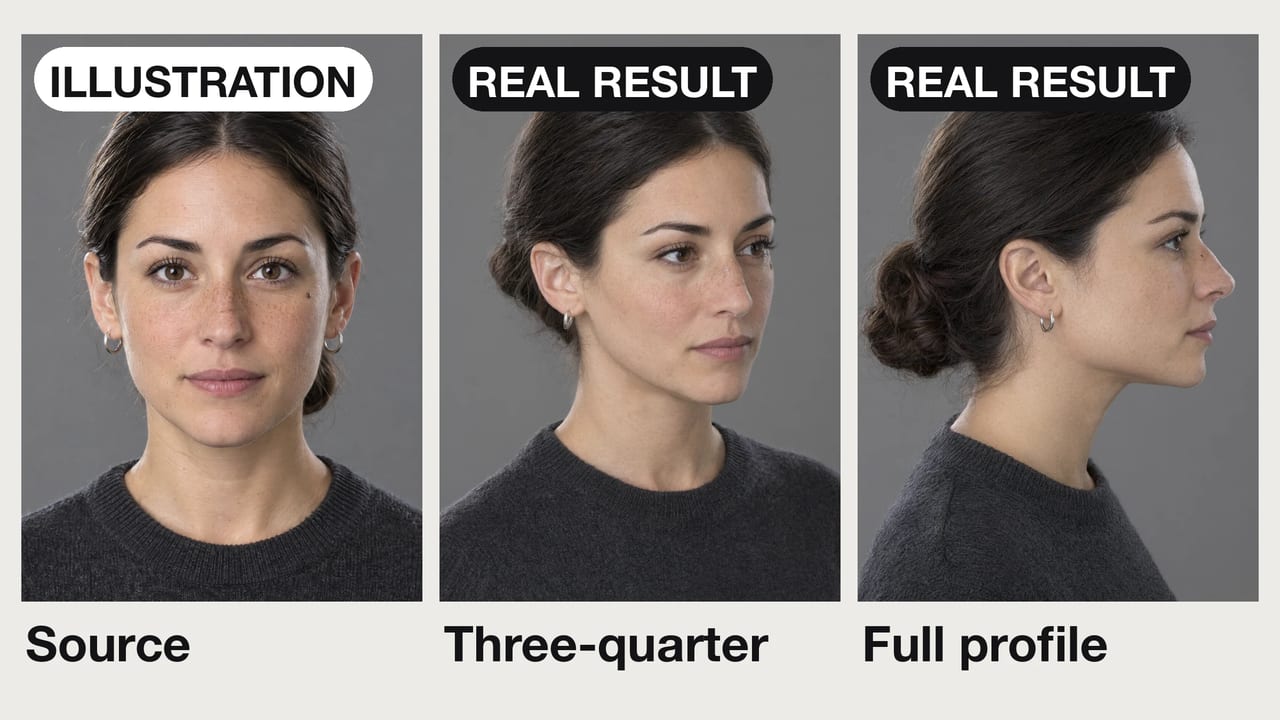
- Inputs: two original portraits of invented people, generated as illustration inputs: a woman facing the camera (six runs) and a man at a garden party looking off to the side (one run).
- Prompts: seven instructions, one run each. The six runs on the first portrait ended with the same sentence: "Keep her freckles, the small mole, the silver hoop earrings, her hairstyle, sweater, grey backdrop and lighting unchanged."
- Results: visual descriptions of each image, shown beside the source in the grids below.
- Credits: 20 per run, 140 for all seven.
3.2What came back
| Instruction (start of the prompt) | What came back |
|---|---|
| "Turn her head slightly toward the left side of the frame." | A modest turn to frame left, eyes still on the lens |
| "Rotate her head 20 degrees toward the left side of the frame." | Almost the same turn as "slightly" |
| "Rotate her head 30 degrees toward the left side of the frame, eyes still looking into the lens." | Almost the same turn again |
| "Turn her head to a three-quarter view facing the right side of the frame, chin lowered about 10 degrees." | A clear three-quarter turn to frame right, chin slightly down |
| "Rotate her head 90 degrees to a full side profile facing the right side of the frame." | A clean profile, but facing the left side of the frame |
| "Rotate her head 90 degrees to a full side profile, nose pointing toward the right edge of the frame, her right ear toward the camera." | The correct side, with one stray mark (see the checklist below) |
| "Turn his head to face the camera straight on, eyes looking directly into the lens. Keep his smile…" (second portrait) | Head and eyes to the lens. Beard, shirt, background and light kept; the smile came back softer anyway |
Each row is a single run on one photo, not a benchmark. Your photos will differ, so treat the table as a guide to wording, not a promise.
4.Degrees or adjectives: does "20 degrees" beat "slightly"?
Not in our test. "Slightly", "20 degrees" and "30 degrees" all produced nearly the same modest turn. Numbers did not work as a fine dial: in our runs, 10 more degrees did not add a visible 10 degrees. What moved the result was naming a different view. "Three-quarter view" turned the head clearly further, and "full side profile" went all the way. The studio's tips favour degrees; in our runs, naming the view moved the head more.

Use view names for the size of the turn: slight turn, three-quarter, profile. Save numbers for small adjustments such as "chin lowered about 10 degrees"; in our three-quarter run the chin came down slightly. A number also keeps the brief unambiguous for whoever reviews it.
5.Why did the profile come back facing the wrong way?
"Left" and "right" are ambiguous in a portrait, because the subject's left is the viewer's right. Our first profile instruction said "facing the right side of the frame" and came back facing left. The second said what points where: "nose pointing toward the right edge of the frame, her right ear toward the camera". That one re-run came back on the correct side. A single re-run proves little, but naming the nose and the ear leaves nothing to interpret.

If a result faces the wrong way, run it again with the nose and ear named rather than mirroring it. The re-run costs another run. A mirrored copy costs nothing, but it moves every one-sided feature.
6.What should I check before using a turned photo?
Check the parts the original never showed. The jawline, the ear and the hairline carry the least original information, so they are where likeness slips first. Then check every one-sided mark. In our second profile, a mole-like spot appeared on the visible cheek. In the source, that cheek has no mole. The real mole is on the cheek that now faces away.

Our guess is that the instruction caused it: we asked it to keep a mole that the new angle cannot show. We did not re-run without the mole instruction to confirm. Either way, list only the features that are visible from the new view, and review every result against this list:
- Jawline and chin: same width and shape as the source.
- Ear: plausible shape, sitting level with the eye, with any earring on the correct ear.
- Hairline and parting: same side and same height.
- Moles, freckles and scars: on the correct cheek and not duplicated.
- Eyes: pointing where you asked, whether that is the lens or off-frame.
- Expression: a turn can soften a smile, even one you asked to keep. Ours did.
7.How far can a turn go?
| Turn | What gets rebuilt | Source that works | What we saw |
|---|---|---|---|
| Slight turn | Very little; most of the face was in the photo | Any sharp portrait | Three wordings gave nearly the same result |
| Three-quarter | The far cheek and the side of the nose | Front-facing or slightly turned | Clean; the chin came down slightly as asked |
| Full profile | The ear, the jaw line, the back of the head | Well-lit and front-facing | Clean, but one of two runs faced the wrong side |
| Beyond profile | Most of the face | Not recommended | Not tested |
The angle changer's own guidance matches this: a small turn to a three-quarter view is the safest ask. A full 90-degree profile works from a well-lit, front-facing source. Past a profile, more of the head is invented than observed.
8.How do I make someone look at the camera?
Ask for it directly, list what has to survive, and then check it. Our second input was a man at a garden party looking off to the side. The instruction was: "Turn his head to face the camera straight on, eyes looking directly into the lens. Keep his smile, hair, beard, linen shirt, the garden background and the warm evening light unchanged." His head and eyes came round to the lens, and the beard, the shirt, the blurred string lights and the warm light held. The smile did not: it came back softer, with the lips nearly closed, even though the instruction said to keep it. Asking is not enough on its own. Compare the expression with the original, and run it again if it matters.

One person in a group shot looking away? We did not test whole-group edits for this guide. The dependable route is manual: crop that person with a generous margin, turn them here, then place the result back into the group photo in your usual editor and match the grain. If the angle is right but the moment is wrong, such as a blink or a flat smile, use the photo fixer instead.
9.When should you not change a head angle?
- Passport, visa and ID photos. The US State Department asks for "the original, unedited photo without filters or digital changes" (travel.state.gov, updated 24 March 2026). The UK requires digital passport photos to be "unaltered by computer software" (GOV.UK, checked 22 September 2026). Take a new photo instead.
- Anyone who has not agreed to it. Turning someone's head changes how they appear. Ask first, and label the edit wherever an unedited photo would be expected.
10.Which tool fits your problem?
| The problem | Use |
|---|---|
| The head faces the wrong way and everything else works | AI angle changer |
| You need a different person's head, hair included, on this body | Head swap, and see the head swap guide |
| The whole body pose is wrong: arms, stance, framing | Change a pose without changing the face |
| A garment needs showing in other colourways | Look Book |
| The angle is right but someone blinked | Photo fixer |
11.What does it cost?
In the Sandbox, where the angle changer opens, each image costs 15 credits on Imagera Typeset 3 (Edit), at 1K or 2K. The price shows on Generate before you commit, and a batch multiplies it. The angle changer's studio page runs Imagera Queen at 20 credits or Imagera Warrior at 25. Each angle you ask for is its own run, and runs that fail are not charged. Our seven test runs on Imagera Queen cost 140 credits together. See credits and plans for how packs and subscriptions compare.
Have a portrait facing the wrong way? Open the AI angle changer, upload it, name the view and where the nose should point, and check the jaw, the ear and every one-sided mark before you use it.