AI Look Book Generator Online: One Shoot, Every Colorway
Recolor outfits and create look book variations from a single photo.
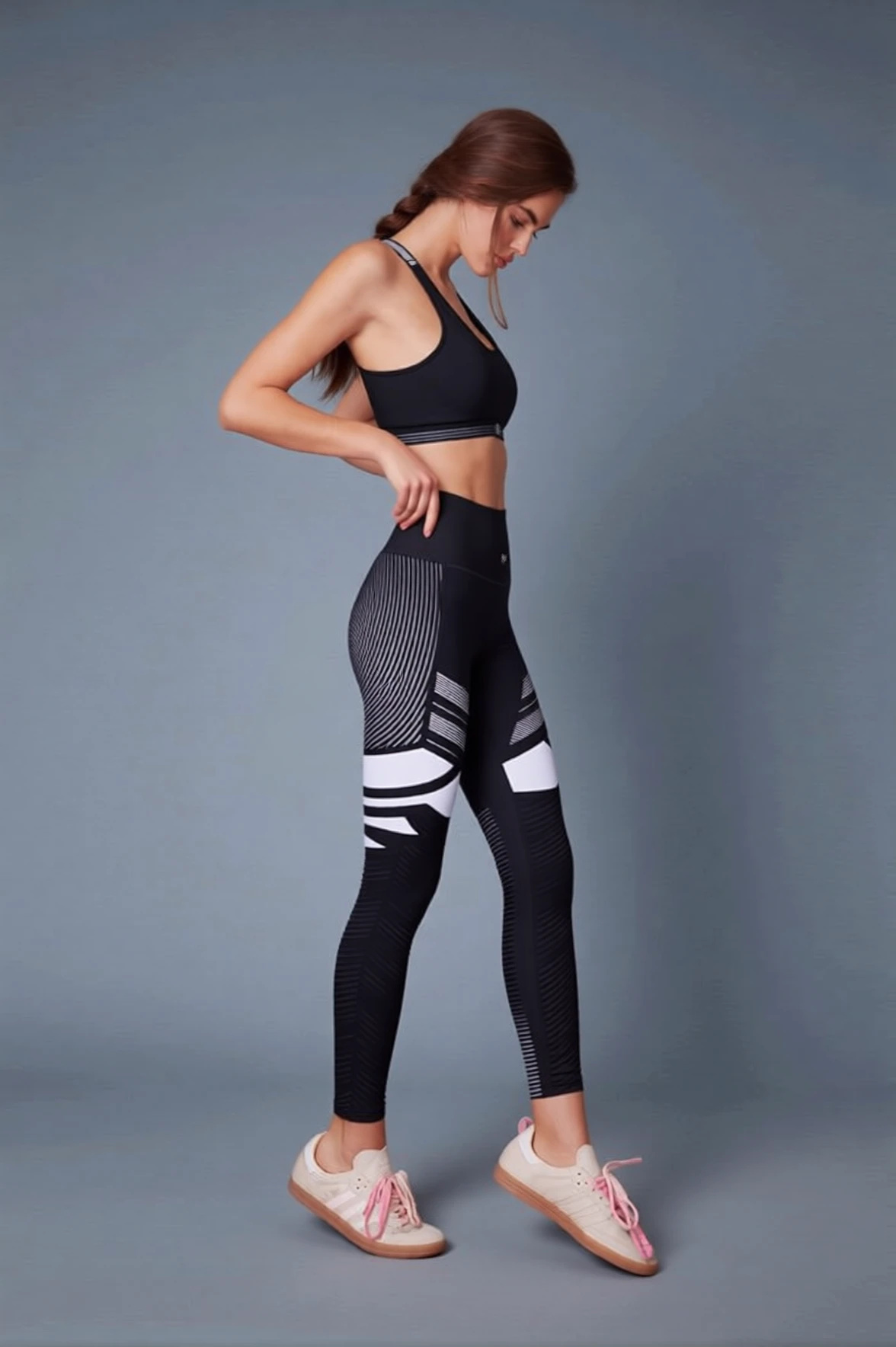
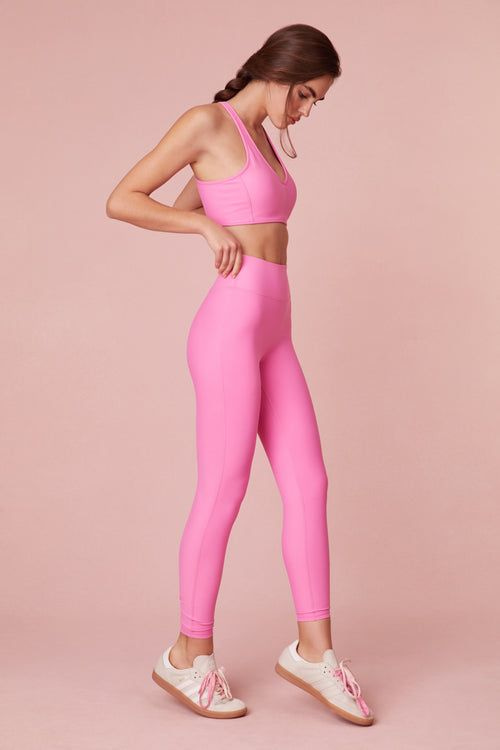 BeforeAfter
What is an AI look book generator?
An AI look book generator takes one photo of a garment on a model and produces the rest of the colorway range from it. Imagera recolors the outfit, updates design details such as mesh panels and sneaker accents, and shifts the backdrop tone, while the model, pose and lighting carry over from the original frame. Each colorway is one written instruction and one edit, from 15 credits at 1K, so a full spread comes from a single shoot.
- Credits
- From 15 credits per colorway at 1K (20 at 2K)
- Files
- PNG, JPG, JPEG or WebP in · PNG or JPG out
- Per edit
- 1 garment photo + up to 2 color references
Updated August 7, 2026
Cite this page: https://imagera.ai/image/look-book
 Illustration
What one garment shot gets you
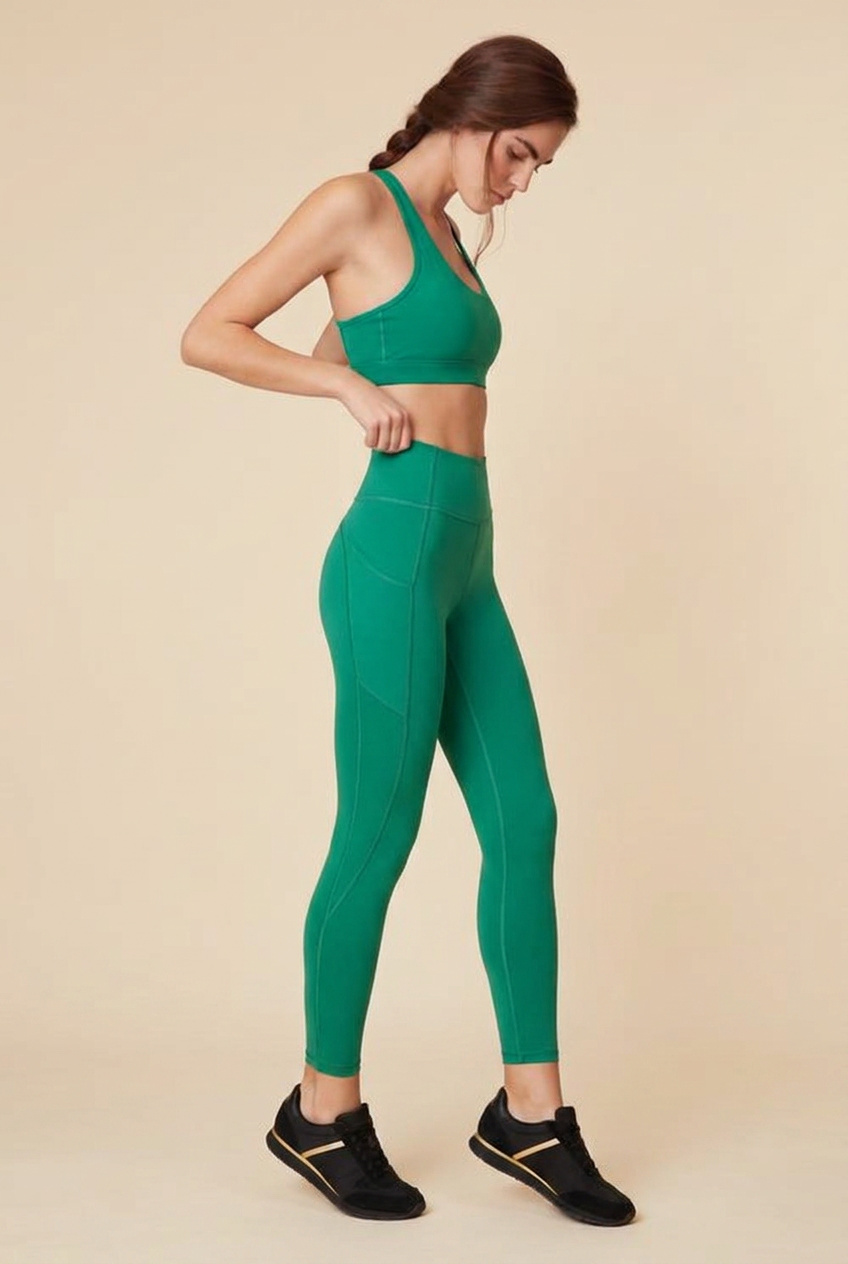
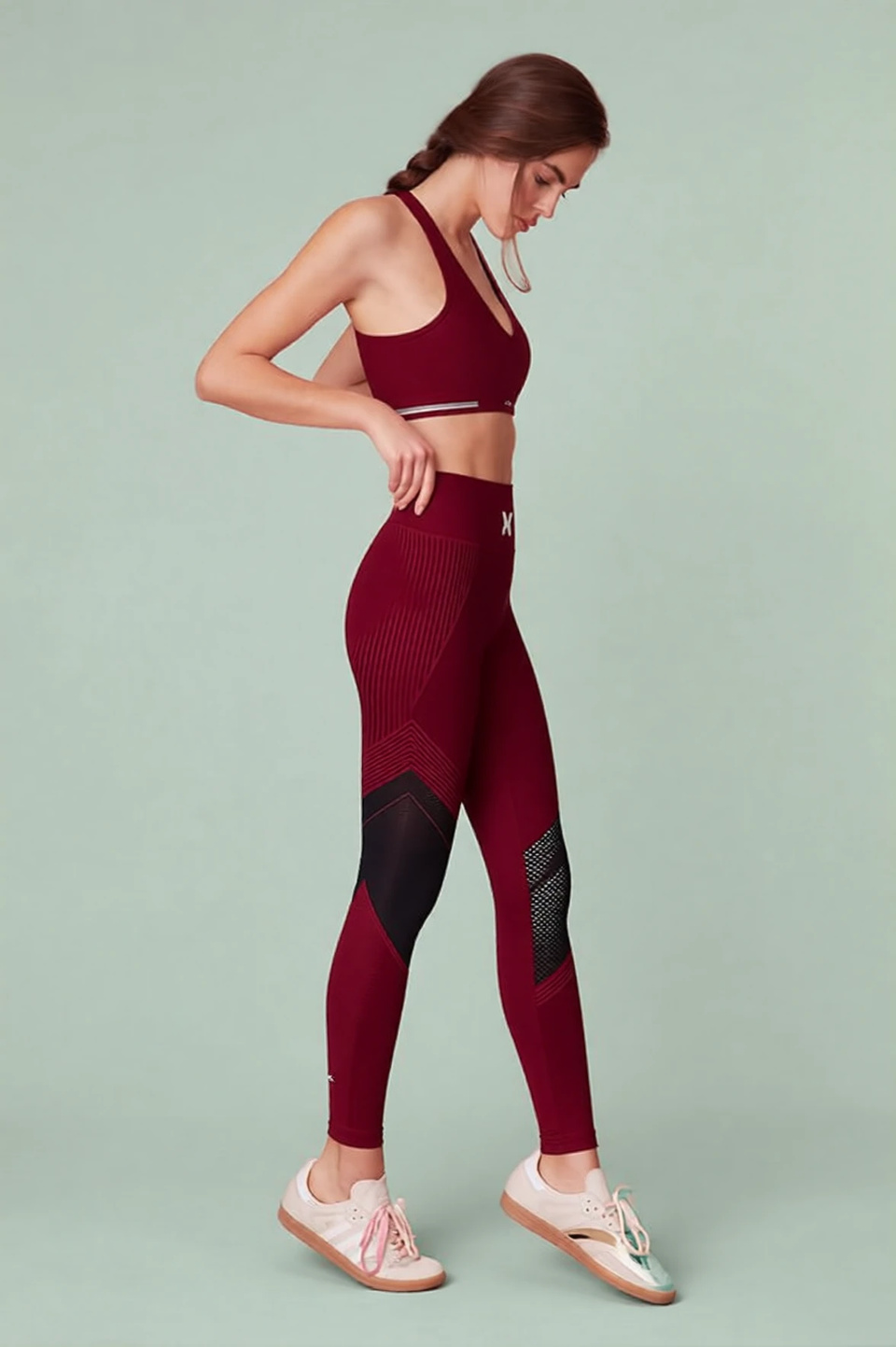
Coordinated Backdrops
Swap each colorway onto a matched background tone — blush, gray-blue, cream, sage — so the whole look book spread reads as one intentional shoot rather than mismatched frames.
Know more →Design-Aware Recoloring
Recolor clothes so folds, seams, stitching, and sheen respond like real dyed fabric — not a flat hue-shift filter. A matte knit stays matte, a glossy panel keeps its shine.
Know more →Full Outfit Coordination
Change outfit, shoes, and background colors together in one prompt for cohesive look book spreads.
Know more →Why this reads as one shoot, not ten
Fabric behaves like fabric, the backdrop moves with the colorway, and the model carries from frame to frame.
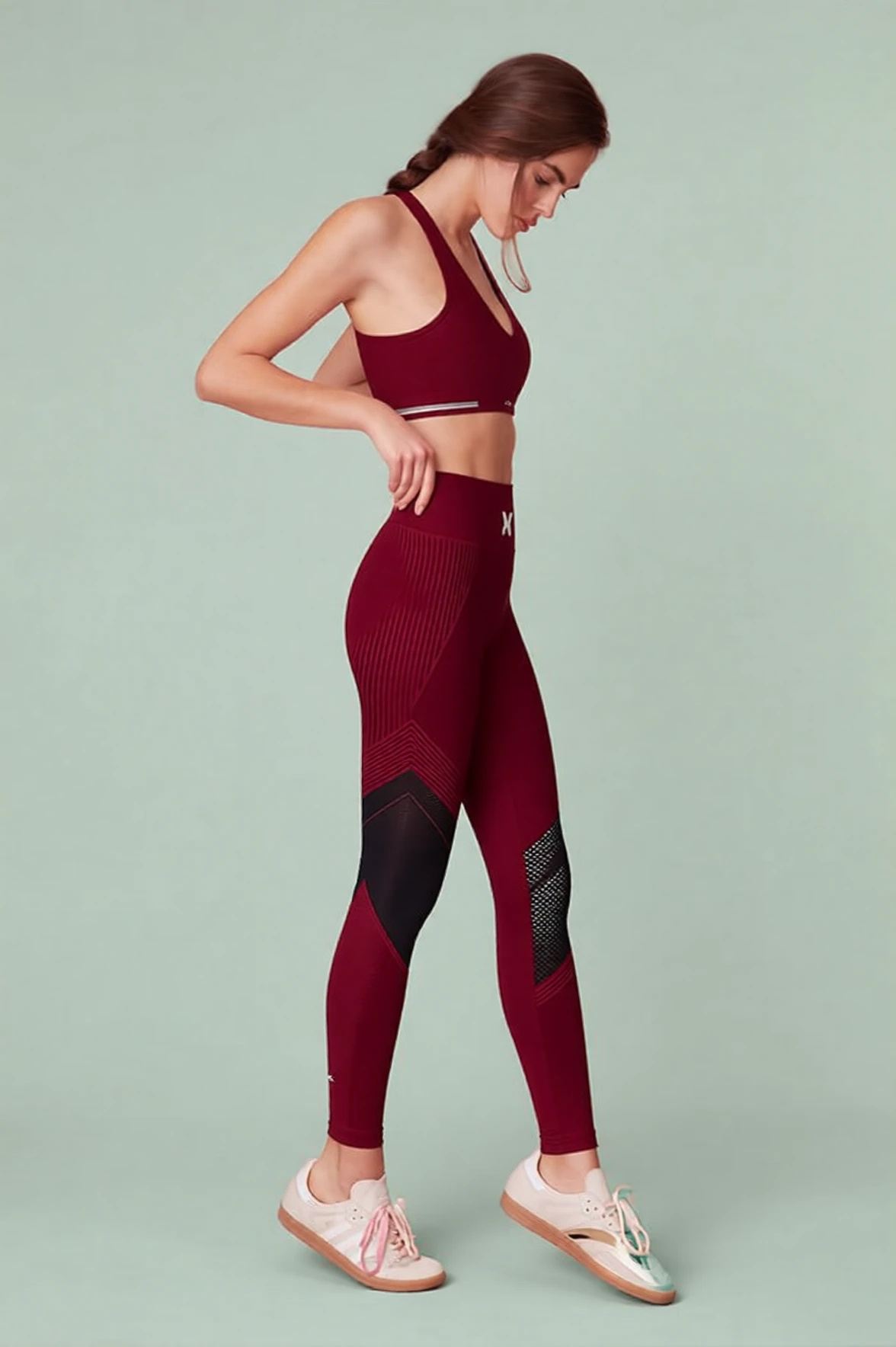
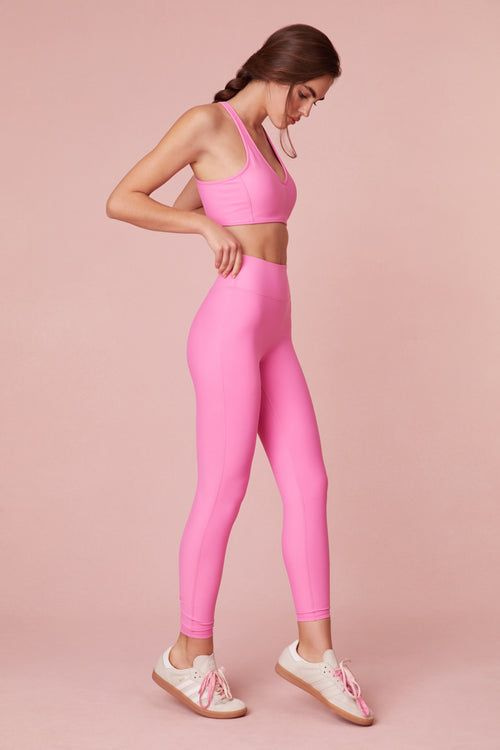 BeforeAfter
Design-aware recoloring, not a hue shift
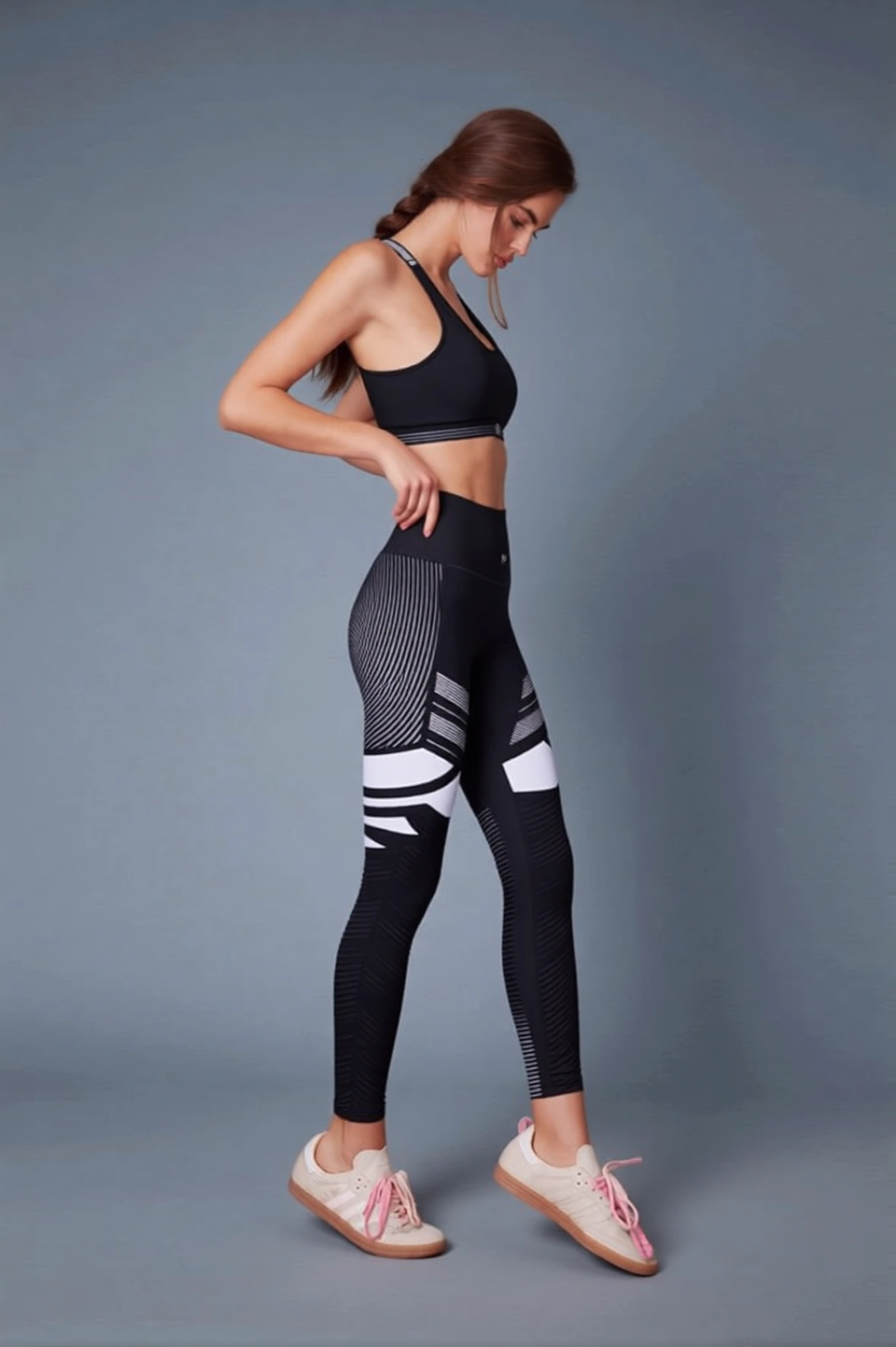
A flat color overlay tints the whole outfit and leaves the folds looking painted on. Here the recolor follows the garment: seams, stitching, ribbed knit and the sheen of a glossy panel all respond to the new color the way dyed cloth would, so a matte cotton stays matte and a performance panel keeps its shine. It can also invent plausible design detail to suit the shade when you leave that open, and it is not consistent about it: from a prompt whose only styling note was "deep burgundy red with athletic design details", the burgundy pass came back with ribbed knit across the hip and a black mesh panel down the lower leg that the pink original does not have, while the emerald pass, asked for design details in the same words, came back a plain set. Name the material as well as the color ("deep burgundy athletic knit with a soft sheen"), and name the panels you do or do not want, and you are directing the design rather than accepting whatever the shade suggested.
Try it now →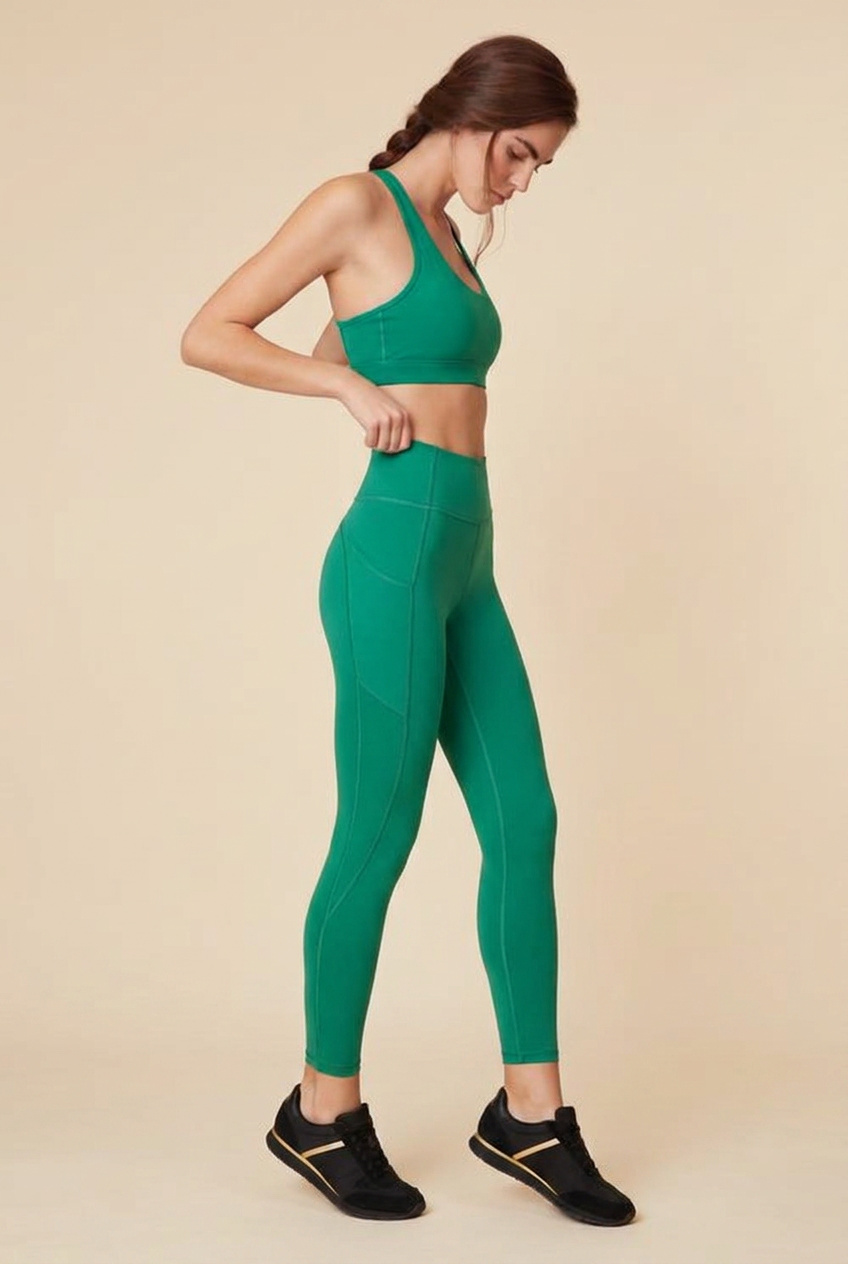 BeforeAfter
Outfit, sneakers and backdrop in one prompt
A look book spread only reads as intentional when every colorway sits on a coordinated backdrop and the accessories agree with the garment. Rather than three passes and a composite, one instruction handles the whole frame: the emerald pass recolored the set, swapped the cream sneakers for black with a gold stripe, and warmed the pink seamless to cream beige — one run, one consistent light, and it drops straight into a product grid beside the other colors. Name every element and its target, because the edit re-renders the whole picture rather than patching the part you mentioned: anything you leave unnamed is redrawn too and can come back slightly different.
Try it now →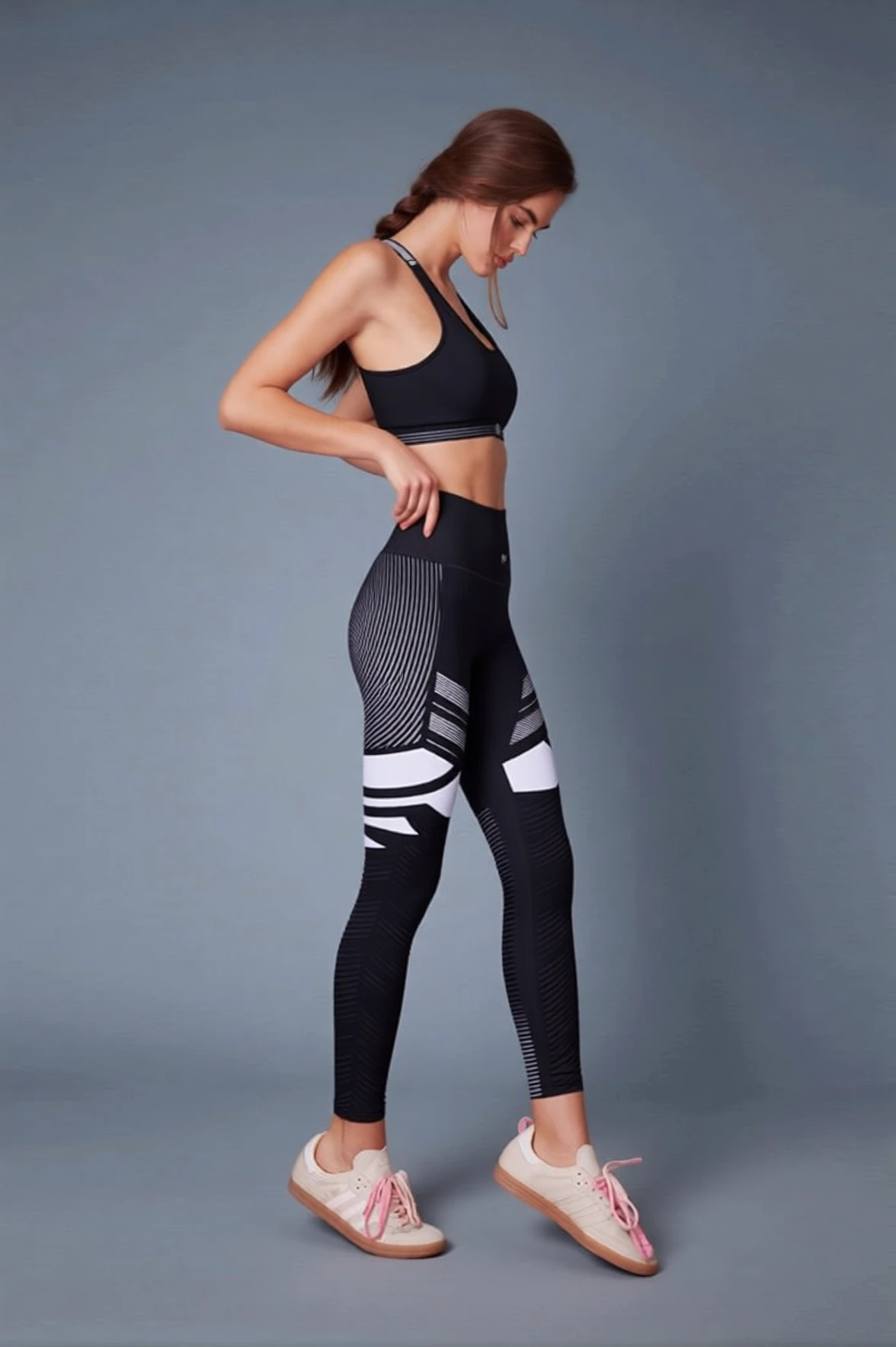 BeforeAfter
The model and pose carry across the range
Drag the divider on any pair above and the person reads as the same model: body proportions, the braid, the hand at the hip, the lowered gaze and the stance all carry over from the source frame while the named elements change. That is what makes a set usable on a real product page — a shopper scanning five colors sees the same garment on the same body, which is what lets them judge fit and pick a size with confidence — and it means a colorway added the week before a launch matches the ones shot months earlier, because they all descend from the one frame. Each colorway is a fresh render of the whole picture rather than a masked patch, so treat the match as very close rather than pixel-identical: look at each frame at full size, and re-run any that drifted with a tighter instruction.
Try it now →How to build a look book from one photo
Shoot the base color once. Write the rest of the range.
Upload the base colorway
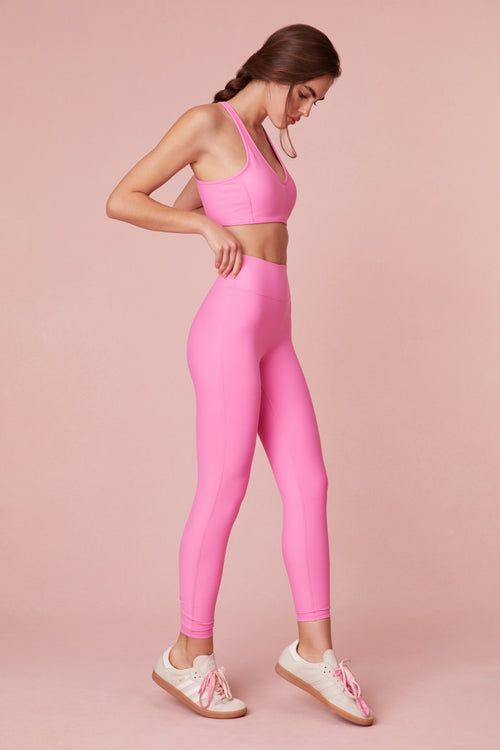
Add the one garment shot you already have — the model in the base color on a clean backdrop, evenly lit. PNG, JPG, JPEG and WebP all work, and an edit takes up to 2 further references if you want to show the target color or a fabric swatch.
Describe the colorway like a stylist brief
Name every element you want changed and its target: the edit re-renders the whole frame, so anything you leave unnamed is redrawn as well. The emerald frame on this page came from three named targets — garment, backdrop and sneakers: "Transform the activewear outfit to emerald green with athletic design details, change the background to warm cream beige tone, and update the sneakers to black with gold accents." Naming what you want held as well ("keep the model, pose and hairstyle the same") gives the render less room to drift.
Generate, compare, download
1K output is the default at 15 credits per colorway — explore directions there, then re-run the winners at 2K for 20 credits when the final grid needs the most detail held. Downloads are PNG or JPG, and 2K output returns up to about 2 megapixels — plenty for a product page, so upscale before a large print.
Who builds colorway grids this way
Activewear and athleisure colorway grids
A leggings-and-bra set typically ships in six to ten colors, and a traditional look book means booking the same model, photographer, studio and stylist for each one, then retouching every set separately. Shooting the base color once and generating the rest keeps the model, pose and light consistent across the whole grid, so the product page reads as one coordinated session — and the color a customer keeps asking for can be added the day before a drop without re-hiring anyone.
Boutique labels previewing a capsule
Before committing fabric and minimums to a color, a small label wants to see the capsule as a spread and, ideally, test it with an audience. Generating the planned range from one sample-garment shot gives a full-looking line sheet and social teasers weeks before manufacturing, and lets two backdrops or two shades be A/B tested for the price of two edits. AI color is a marketing approximation rather than a dye spec, so the physical Pantone is confirmed separately — but the decision about which colors to make gets made on real-looking imagery.
Shopify and marketplace product pages
Sellers filling out a listing with color options rarely have a photo of every variant on the same model in the same light, so the swatches end up as mismatched frames or a color name with no picture. Building the variant images from one strong shot fills the grid with comparable frames: the same body, the same pose, a backdrop family that agrees, and the garment color as the variable. That consistency is what helps a shopper choose a color and a size with confidence, and it scales to menswear, kids apparel, footwear and accessories with the same workflow.
Discover more AI features
Frequently asked questions
How does AI Look Book work?
Upload a fashion or activewear photo and describe the color changes you want. AI recolors outfits, changes design details, updates backgrounds, and even modifies shoe colors to create cohesive look book variations.
Can I change outfit colors and background at the same time?
Yes. Describe all changes in one prompt. Change the outfit from pink to black, background from pink to gray-blue, and sneakers from white to gold-accented — all in a single generation.
Is this useful for fashion brands?
Look Book is designed for fashion brands, activewear companies, and e-commerce. Generate multiple colorways from one photo shoot instead of shooting each variation separately.
Does it preserve the model and pose?
The model, pose, body proportions, facial features, and hairstyle carry over from your source frame, and the colorways come back looking like the same shot of the same person. It is worth knowing how: the edit re-renders the whole frame from your photo rather than masking the garment and pasting it back, so the match is very close rather than pixel-identical, and a detail you did not name can shift. Check each colorway at full size before it goes on a product page, and re-run any frame that drifted with a tighter instruction.
How does an AI look book generator save money versus a full photo shoot?
A traditional look book means booking the same model, photographer, studio, and stylist for every colorway you want to show. Ten colorways can mean ten setups, ten lighting resets, and ten rounds of retouching. An AI look book generator shoots the garment once, then produces every other colorway from that single frame. The model, the pose, and the lighting carry over from that frame into every colorway, so the set looks like one coordinated shoot rather than ten separate ones. The cost is measured in credits per variation instead of studio day-rates, and you can add a colorway the day before a launch without re-hiring anyone. That is why activewear brands, boutique fashion labels, and Shopify sellers use it to fill out a product grid that would otherwise be too expensive to shoot in full.
Can it recolor clothes and swap fabric or design details, not just tint the whole outfit?
Yes. This is a design-aware clothing recolor, not a flat color overlay. You can recolor the outfit from pink to black, then add white mesh panel inserts along the thigh, drop in subtle gray geometric color-blocking on the hips, and update the sneakers to black with gold accents — all in one prompt. The AI keeps the fabric behaving like fabric: folds, seams, stitching, and sheen respond to the new color the way real dyed cloth would, so a matte cotton stays matte and a glossy activewear panel keeps its shine. That is the difference between a believable colorway variation and an obvious hue-shift filter. For the strongest results, describe the material as well as the color — "deep burgundy athletic knit with a soft sheen" reads more convincingly than just "red."
Which product categories does the AI look book generator work best for?
It works best for garments and worn products where colorway is the main variable: activewear sets, leggings, sports bras, hoodies, swimwear, dresses, sneakers, and accessories like bags and caps. It also handles background tone changes so each colorway sits on a coordinated backdrop — soft pink, cool gray-blue, warm cream, sage green — which is what makes a look book spread feel intentional. It is less suited to products where the exact Pantone must be certified for manufacturing, since AI color is an approximation for marketing imagery, not a dye spec. For catalog and campaign visuals, though, it covers the vast majority of fashion and activewear colorway needs. If you also want lifestyle backdrops rather than tone swaps, pair it with AI Background Studio.
How many colorway variations can I create from one photo?
There is no fixed cap. From a single source photo you can generate as many colorways as you have credits for — a five-color capsule, a full seasonal range, or a quick A/B test of two backgrounds. Each variation is an independent edit at the credits per edit shown on this page. 1K output is the default at 15 credits and is the cheaper of the two, so explore directions there first; re-run only the winner at 2K for 20 credits when you want the most detail held. Because every colorway is generated from the same source frame, the set stays visually consistent as it grows rather than drifting toward a different-looking shoot. Many teams generate a wide first pass, pick the winners, then re-run only those for the final grid.
How do I write a prompt for the best colorway result?
Name every element you want changed and the target for each, and state what to keep. A strong prompt reads like a stylist brief: "Change the activewear set from pink to black with modern athletic design; add white mesh panel inserts along the thigh sides; transform the background from soft pink to cool gray-blue; update the sneakers to black with gold accents; keep the model, pose, and hairstyle exactly the same." Being explicit about the material ("matte black knit," "glossy panel") and the background tone produces a cohesive, catalog-ready frame. Vague prompts like "make it a different color" give unpredictable output. Run two or three passes at 1K, the cheaper default size, to compare directions before committing your final set.
Will the AI keep the model, face, and pose identical across every colorway?
Close enough to build a product grid on, which is the bar that matters. Body proportions, facial features, hairstyle, hand positions, and the stance are carried from the source frame, and the elements you name — outfit color, fabric detail, shoe accents, background tone — are what the instruction moves. Each colorway is a fresh render of the whole frame rather than a masked patch, so treat it as a very close match rather than a pixel-identical one, and review each frame at full size before you publish it. That consistency is still the difference between a coherent look book spread and a set of images that clearly came from different sessions: a shopper scanning five colors sees the same garment on the same body, which is what helps them choose a size and color with confidence. If a face or pose looks slightly off, re-run that edit with a cleaner instruction rather than pushing several big changes through one prompt.
Can I match colorways to a brand palette or a specific season?
Yes. Describe the target color in whatever language fits your brief — a named color ("emerald green," "burgundy," "sage"), a mood ("warm cream," "cool gray-blue"), or a palette direction ("muted autumn tones," "bright summer neons"). The AI applies it to the outfit and can shift the background tone to coordinate, so a spring capsule reads soft and warm while a performance line reads bold and high-contrast. Keep in mind AI color is an approximation for marketing imagery, not a certified dye value, so if a colorway must match a manufactured Pantone exactly, treat the AI output as the campaign visual and confirm the physical dye separately. For most catalog, social, and ad use, the match is more than close enough to sell the range.
Does the AI look book generator work on menswear, kids, and accessories too?
Yes. The colorway workflow is not limited to womens activewear — it recolors menswear (tees, hoodies, joggers, jackets), kids apparel, footwear, and accessories like caps, bags, and socks with the same design-aware behavior. Anything worn or shown where color is the main variable is a good fit. Structured items like sneakers keep their paneling and stitching while the color changes; soft goods keep their drape and folds. The one caveat is very reflective or transparent materials (mirror finishes, clear plastics) which are harder to recolor believably than matte fabric. For a typical apparel and footwear range, though, you can build the full colorway grid from one shoot per style.
Learn more
Prompt guides, editing walkthroughs and the wider photo toolkit around a look book spread.
 Use case
Train a Custom LoRA
Train your own subject or style model online — no GPU required
AI Image Prompts Guide
Write prompts for precise outfit recoloring
Photography Studio Overview
Explore all 7 AI photo editing tools
Best Free Background Remover (2026)
One-click transparent PNGs tested on hair, products and fine edges
Edit Images with AI Text Prompts
Change outfits, colors, and styles using text prompts
Midjourney Alternative
Generate fashion lookbook images — compare Imagera vs Midjourney
Key takeaways
Who uses an AI look book generator?
Activewear and athleisure brands building full colorway grids, boutique fashion labels previewing a capsule before manufacturing, Shopify and Etsy sellers filling out a product page with color options, and social teams testing which colorway performs before a drop. The common thread is needing many consistent color variations from one strong photo. For new angles of the same outfit, use the AI angle changer, and the full AI image editor for edits beyond colorways.
How does a look book fit into an ecommerce launch workflow?
A typical launch starts with one clean product shoot per style — a single strong photo of the garment on your model in the base colorway. From that frame you generate the rest of the range: each planned color, each with a coordinated background tone, all holding the same pose so the grid is consistent. You then drop those variations straight onto the product page as color options, into the launch email as a spread, and onto social as a teaser. Because adding a colorway is a credits-per-edit operation rather than a new shoot, you can respond to demand — add the color a customer keeps asking for, or test two backgrounds before you commit — without re-booking anyone. That flexibility is what lets a small team ship a full-looking range on a fast timeline.
How does AI Look Book compare to a manual recolor in Photoshop?
Manually recoloring an outfit in Photoshop means masking the garment by hand, painting in a new hue, and then fixing the folds, seams, and sheen so the fabric still looks real — slow, skilled work that has to be repeated for every colorway and every image. AI Look Book rebuilds the frame in the new colorway from a single plain-English prompt — no masking, no hand-painting — and can change the outfit, shoes, and background together in one pass. Photoshop still wins when you need pixel-exact, art-directed control over a hero image; the AI look book wins on speed and volume when you need many consistent colorways fast. Many teams use both: the AI to generate the full range, then a light manual touch-up on the single hero frame if needed.
AI look book vs a traditional colorway shoot
| What matters | Imagera | Traditional colorway shoot |
|---|---|---|
| Cost per extra colorway | From 15 credits per edit at 1K, no re-hiring | New setup, model, studio time |
| Turnaround | Minutes per variation | Days to schedule + shoot |
| Consistency across colors | Model and pose carry over | Pose/lighting can drift |
| Last-minute additions | Add a colorway anytime | Requires a reshoot |
Color accuracy
AI-generated color variations. Final colors may differ from exact specifications. 15 credits per edit at 1K.
Use a real shoot when a certified dye has to be photographed: treat these frames as campaign and catalog imagery, and confirm the physical Pantone separately before a colorway goes into production.
Shoot once. Ship every colorway.
Open the look book studio: one garment shot, one line naming the color and the fabric, and the credit cost on the button before you run.
Make a colorway →