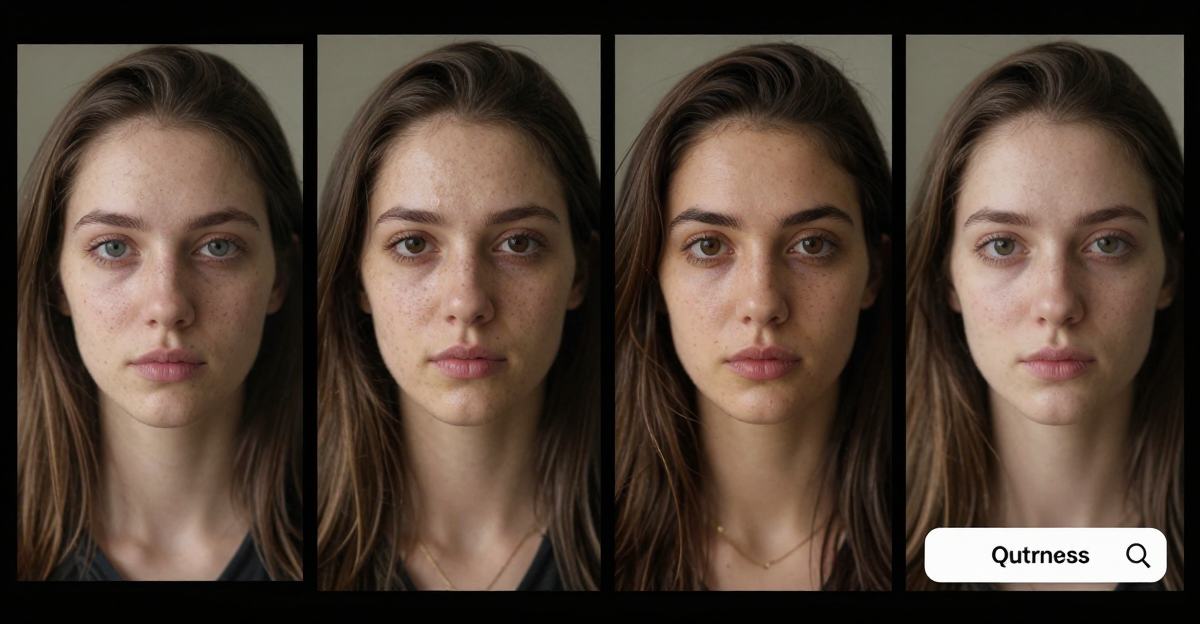
A clip is going round of someone saying something that doesn't sound like them. The face looks right, and you need to know whether software put it there before you share the video, report it or act on it.
The short answer: get the best copy of the file you can and scan the whole clip with an AI video detector. Then pull three sharp frames where the face is large and turned to different angles, and check them with a face swap detector. Watch the clip at quarter speed, looking at the hairline, the jaw and anything that crosses the face. Finally, reverse-search a frame to find the original footage. No single score settles it, so look for several checks that agree.
1.Two questions, two detectors
A face swap keeps real footage and replaces only the face. Most face manipulation methods share one step, "blending the altered face into an existing background image", and that blend leaves a boundary a detector can look for (Li et al., Face X-ray, CVPR 2020, arXiv 1912.13458). So "Is this video AI?" and "Has this face been swapped?" are different questions, and Imagera answers them with different tools:
| AI video detector | Face swap detector | |
|---|---|---|
| The question it answers | Was this clip generated or edited by AI? | Has this face been swapped? |
| What you upload | The clip: MP4, WebM or MOV | A still image: JPEG, PNG, WebP or HEIC |
| Limits | Up to 5 minutes and 50 MB | One image per scan |
| What it runs | Scores sampled frames, then motion and frame-to-frame consistency across the clip | A face-manipulation classifier, AI-image classifiers and a frequency analysis |
| Cost | 20 credits per clip | 15 credits per image |
The face swap detector does not take video. Drop a video on its tab and the studio moves it to the Video tab, shows the new price, and waits for you to press Detect.
2.Step 1: Get the best copy you can
Detectors read fine detail: skin texture, sharp edges and the camera's noise pattern. Every re-encode throws some of it away. Social platforms "often apply aggressive compression and resizing", which degrades "forensic features that are essential for distinguishing authentic content from manipulated media" (Montibeller et al., arXiv 2508.08765, revised 12 September 2025). One 2026 study tested a lightweight detector on 5,180 face images from the Celeb-DF v2 test set at three compression levels. Accuracy fell from 70.23% uncompressed to 58.11% at the heaviest level, c40 (Ramadhani and Ramadhan, IJCIS vol. 7 no. 3, 15 August 2026).
Use the best source you can reach:
- The original file, from whoever recorded or first posted it.
- A download from the platform where it appeared.
- A screen recording, only if nothing else exists. Expect weaker results.
If the clip is longer than 5 minutes or bigger than 50 MB, trim it to the part where the face is clearest. Don't compress it harder.
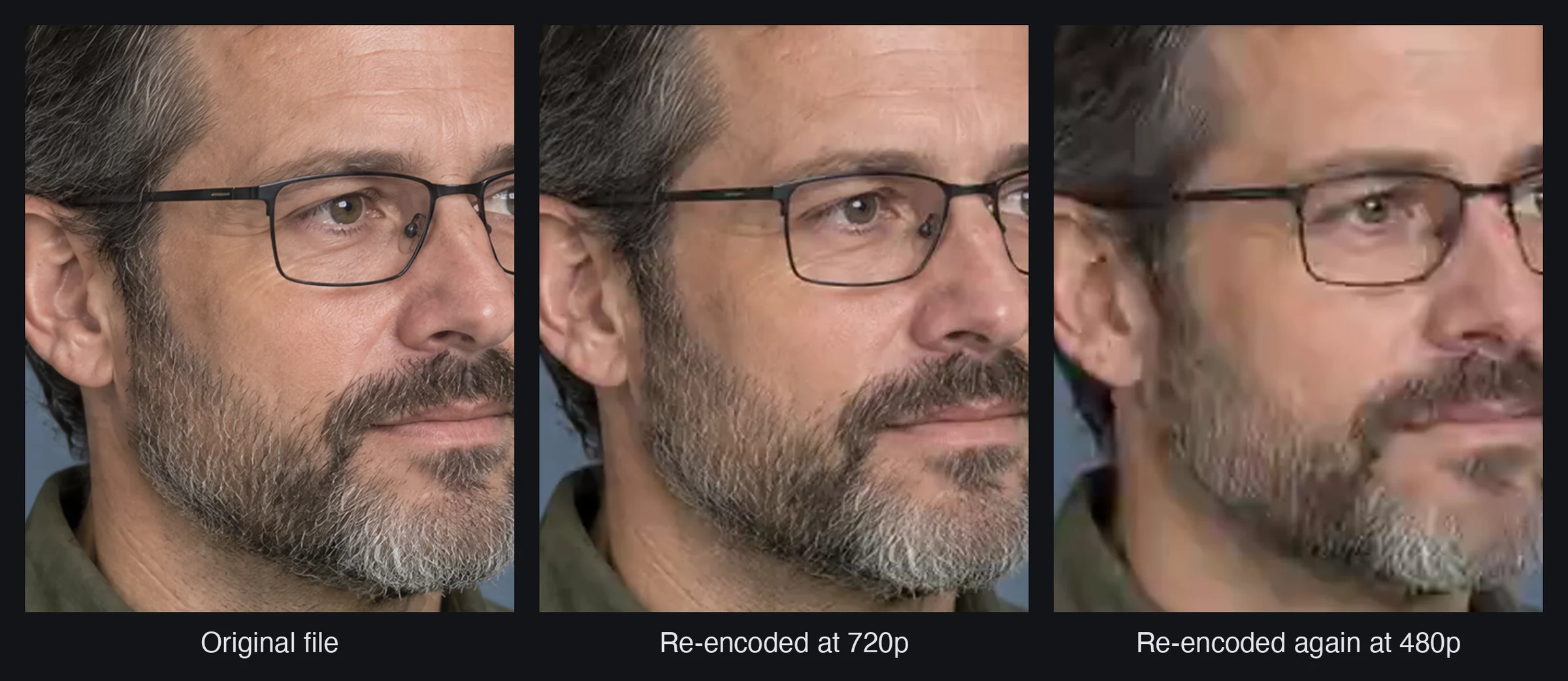
Illustration: one generated frame (not a real person), shown as the original and after two H.264 re-encodes, at 720p and then a heavy 480p pass. Beard texture, glasses edges and skin detail go first, and they are what detectors read.
3.Step 2: Scan the whole clip
Upload the file to the AI video detector (20 credits; the price shows before it runs). The report gives an AI probability from 0 to 100% and a label.
Read the percentage, not just the label. The label turns a probability into a yes or a no, so a score just over the line and a very high score get the same word. Treat anything near 50% as no answer.
In a face swap, the body, the room and the camera movement are real footage, so a low clip score doesn't clear the face. Timing matters too. In a 2026 benchmark where only 20% of each fake video's frames were forged, "all detectors suffer clear performance drops" compared with the fully forged versions (FakeI2V-Bench, arXiv 2608.03096, 4 August 2026). If only a few seconds look wrong, take your frames from those seconds.
4.Step 3: Pull three frames
Choose three moments where:
- the face is large, in focus and without motion blur;
- the head is at a different angle in each: facing the camera, turned three-quarters, and as close to profile as the clip gets;
- nothing is mid-transition, fading or covered by captions.
Why three angles: in a peer-reviewed test of real-time deepfake tools with 47 participants, asking people to turn their heads visibly degraded the swaps, and covering part of the face with a hand, sunglasses or a face mask degraded them most (Mittal, Hegde and Memon, GOTCHA, IEEE EuroS&P 2024, arXiv 2210.06186). A recorded clip is not a live call, but the seam where the new face is blended in is still easiest to judge when the face is large and sharp.
To grab frames without losing quality:
- VLC on a computer: pause on the frame, then choose Video → Take Snapshot (Snapshot on Mac). VLC saves the frame at the video's own resolution.
- ffmpeg:
ffmpeg -ss 00:00:12.5 -i clip.mp4 -frames:v 1 frame-1.pngsaves the frame at 12.5 seconds as a lossless PNG. - Phone: pause and take a screenshot. You get the screen's resolution rather than the video's.
Save frames as PNG so grabbing them adds no extra compression.
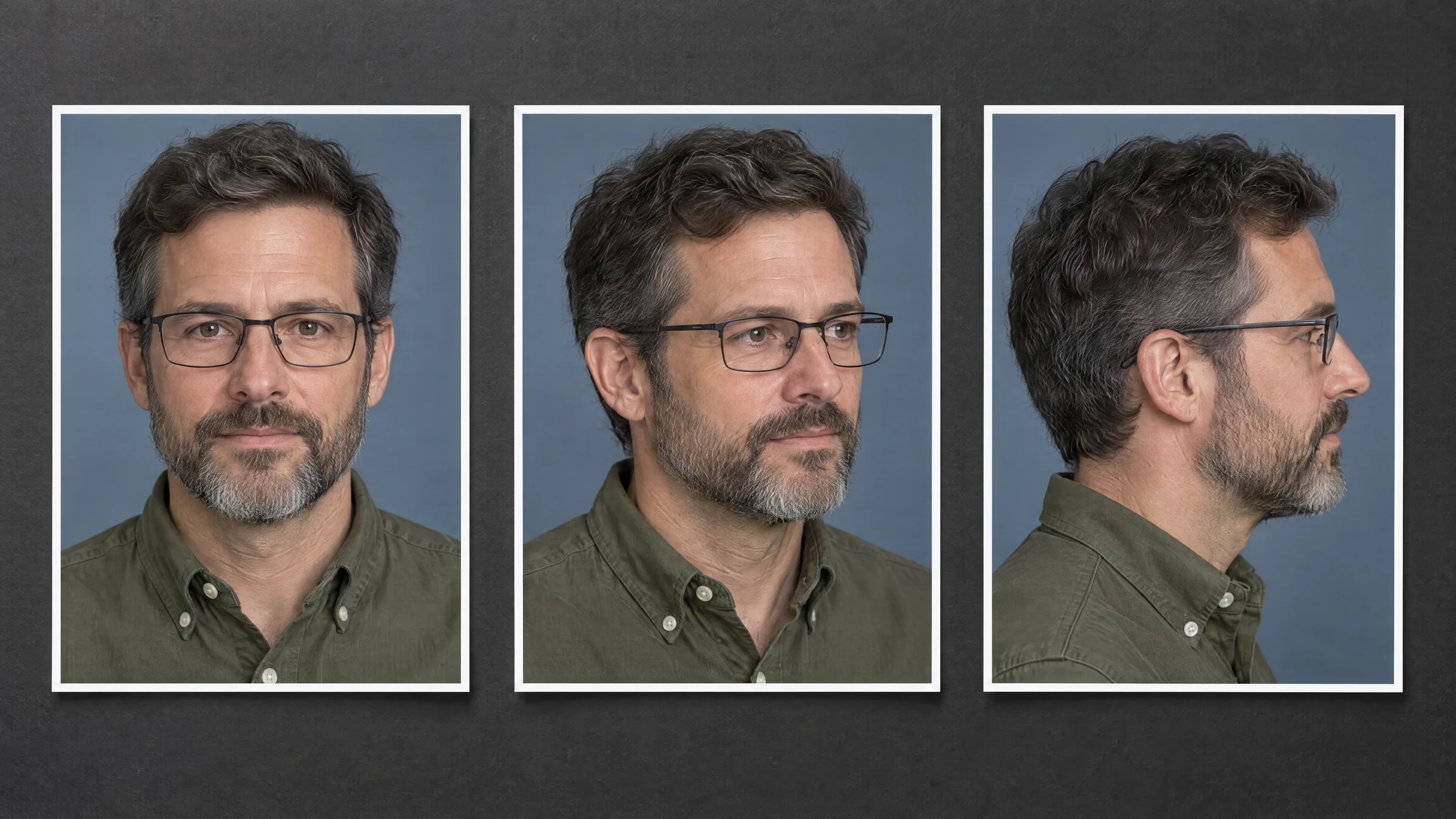
Illustration (invented person): the three frames to pull: frontal, three-quarter and near-profile, with the face large and sharp in each.
5.Step 4: Check each frame with the face swap detector
Upload each PNG to the face swap detector, which costs 15 credits per frame. The whole check, one clip scan plus three frames, comes to 65 credits. Then compare the three results:
- All three high: a steady face-level signal. Do steps 5 and 6 before you decide anything.
- One high, two low: watch that moment at quarter speed. Swaps often fail at one angle rather than everywhere.
- All three low: no face-level signal in those frames. Try one more from the moment that bothered you most.
6.Step 5: Check by eye at quarter speed
Slow playback down (VLC: Playback → Speed; YouTube: Settings → Playback speed) and watch where the swap meets the real frame:
| Where to look | What a swap tends to do |
|---|---|
| Jawline and hairline during a head turn | Smears or wobbles, or shows a soft band where the new face meets the real head |
| A hand, microphone or glasses crossing the face | The face flickers or shows through the object, or the object seems to cut into the face |
| Earrings, glasses arms and beard edges | Double up, melt or disappear for a frame or two |
| Skin on the face compared with the neck and ears | The face looks smoother or sharper, or its colour is warmer or cooler |
| Light and shadow | Shadows on the face disagree with those on the neck and in the room |
| The mouth while talking | Lip movement drifts away from the words |
The GOTCHA researchers recorded the same kind of failure: in their examples, a hand "vanishes behind the face" and sunglasses briefly disappear (Mittal, Hegde and Memon, arXiv 2210.06186).
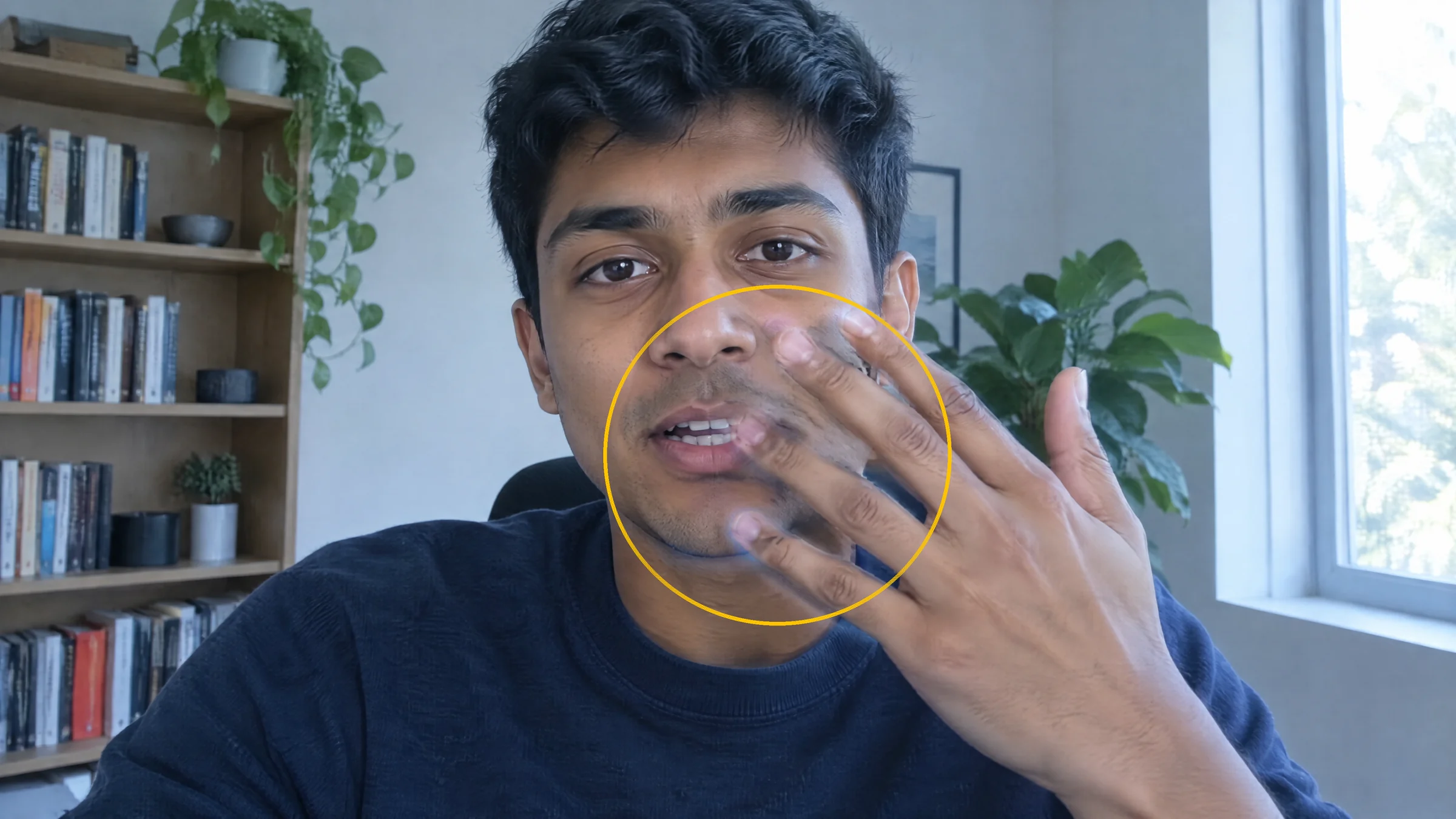
Illustration (invented person, artefact drawn for this guide): a hand crossing a swapped face. Where the fingers overlap the cheek, the face shows faintly through them.
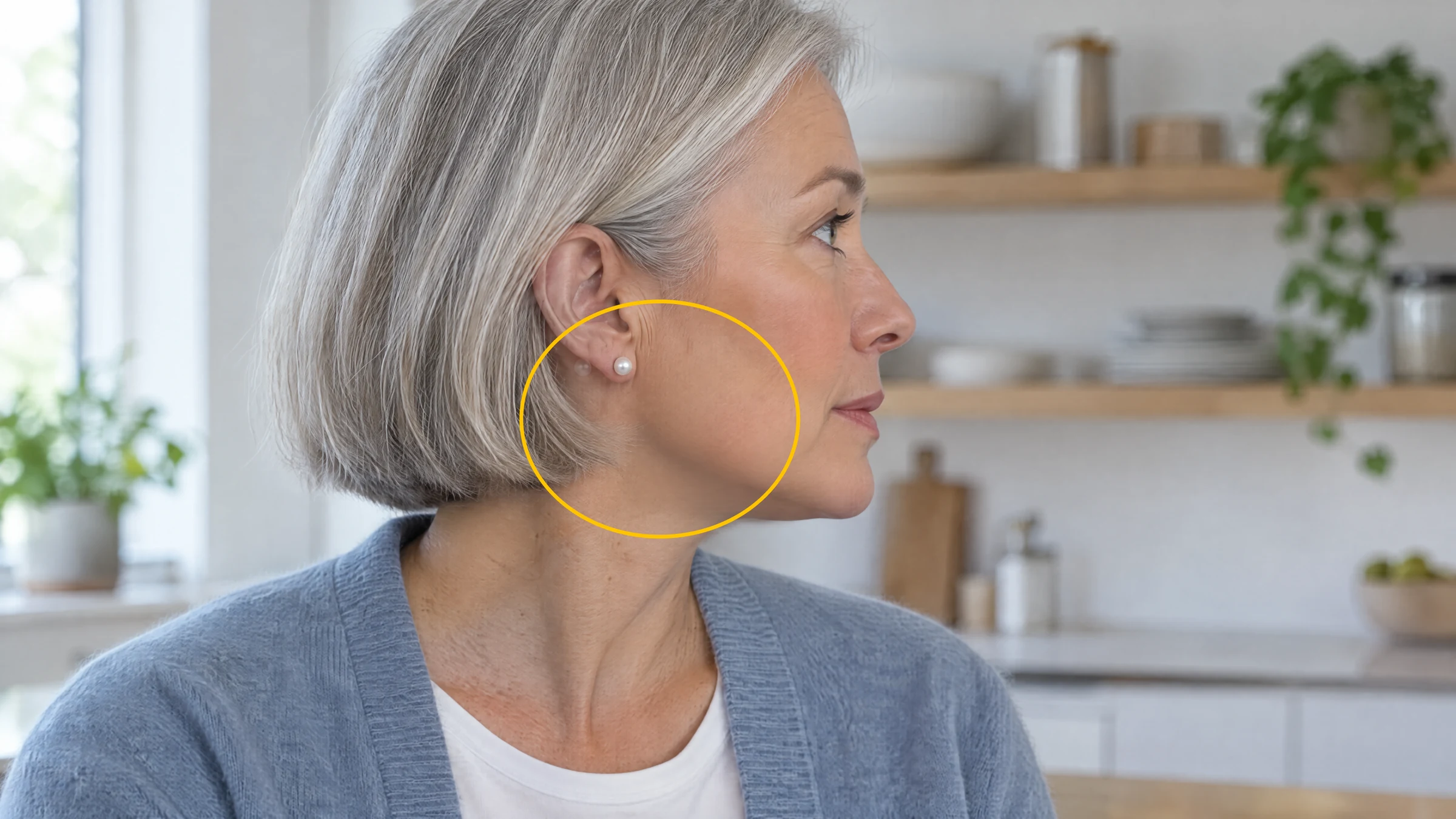
Illustration (invented person, artefact drawn for this guide): a profile turn. The earring shows a faint second copy and the jaw softens into the neck.
On a live call, ask the person to pass a hand slowly in front of their face and then turn fully to one side. Passing both is not proof, because swap tools keep improving; if money or safety depends on the call, ring back on a number you already have. If the voice worries you too, see how to tell if a voice is AI.
7.Step 6: Look for the original footage
Most swaps are built on existing footage, which may still be online with the original face. Find the same shot, background and gestures with a different face, and you have your answer.
- Paste your frontal frame and a frame showing the background into at least two reverse image search engines; each indexes different parts of the web.
- InVID/WeVerify, a browser extension that fact-checkers use, splits YouTube and Facebook videos into keyframes and sends them to reverse search on Google, Bing, TinEye, Yandex and Baidu (Bellingcat toolkit, checked May 2026).
- The original file may carry Content Credentials, a signed record of its edits. Most platforms strip them on upload and screenshots remove them, so their absence proves nothing (TrueScreen, updated 19 July 2026).
8.Reading mixed results
| Clip scan | Frame scans | Most likely meaning | Next step |
|---|---|---|---|
| High | High | Both the clip and the face carry AI signals | Find the original footage and the first uploader before you act |
| Low | High | Fits a face swapped onto real footage | Watch the flagged moments at quarter speed and search for the source clip |
| High | Low | The clip may be generated or edited in some way other than a face swap | Treat the whole clip as suspect and check the voice and the source |
| Low | Low | Neither scan found a signal | This doesn't prove the clip is real. If a lot depends on it, check through a channel you trust |
9.What a result can't prove
Imagera does not publish an accuracy percentage for its detectors, because it has not run a benchmark that could support one. Read every score as a likelihood, not a verdict.
Two recent studies explain the caution:
- DF26 (arXiv 2609.07369, 7 September 2026) found that on fully AI-generated videos of people speaking, both people and "state-of-the-art deepfake detectors" performed "close to random chance" (abstract). That is generated video rather than face swaps, but it shows how fast detectors fall behind new tools.
- FairReL (arXiv 2608.28777, 28 August 2026) found that detectors' "errors remain unevenly distributed across demographic subgroups, with real faces from certain groups more often misclassified as fake" (abstract).
Never accuse a named person on a score alone. Combine the scans, the check by eye and the source search, and keep the file, link and date.
10.If the video shows you
If a face-swapped video puts you in intimate imagery without consent, US law gives you a removal route. Under the TAKE IT DOWN Act, covered platforms must remove it, "along with any known identical copies", within 48 hours of a valid request, including AI "digital forgeries"; enforcement began on 19 May 2026 (FTC, 19 May 2026). Save the link and file first, then use the platform's removal form. Report a platform that doesn't comply at TakeItDown.ftc.gov.
11.Related guides
- Deepfake detection: video, image and audio
- How to tell if a voice is AI
- How video face swaps are made
- 10 visual signs an image was made by AI
- What is a deepfake?
Have a clip you're unsure about? Scan it with the AI video detector, then check three paused frames with the face swap detector. The price shows before each scan runs.