Ecommerce Product Photography: Amazon-ready shots from one photo
Create professional product photography scenes from a single image.
 BeforeAfter
What is AI ecommerce product photography?
AI ecommerce product photography turns one product photo into new listing images. Imagera renders a whole new frame from your photo and a plain-English description of the set — a white seamless surface for an Amazon main image, a marble vanity or a café table for the gallery — with the product drawn into that frame rather than cut out of your photo and pasted onto it. The brand name and the main pack line come through; the smallest print is redrawn at that size, so read the result at full size before it goes on a listing. Each scene is a separate edit, 15 credits at 1K.
- Credits
- 15 per scene at 1K · 20 at 2K
- Files in
- 1 product photo + up to 2 staging references
- Files out
- PNG or JPG
- Licence
- Commercial use on every output
Updated August 7, 2026
Cite this page: https://imagera.ai/image/product-photography
 Illustration
What one product photo gets you
Studio-Quality Without a Studio
Turn a plain product shot into a campaign-quality image with AI-generated scenes, props, and lighting.
Know more →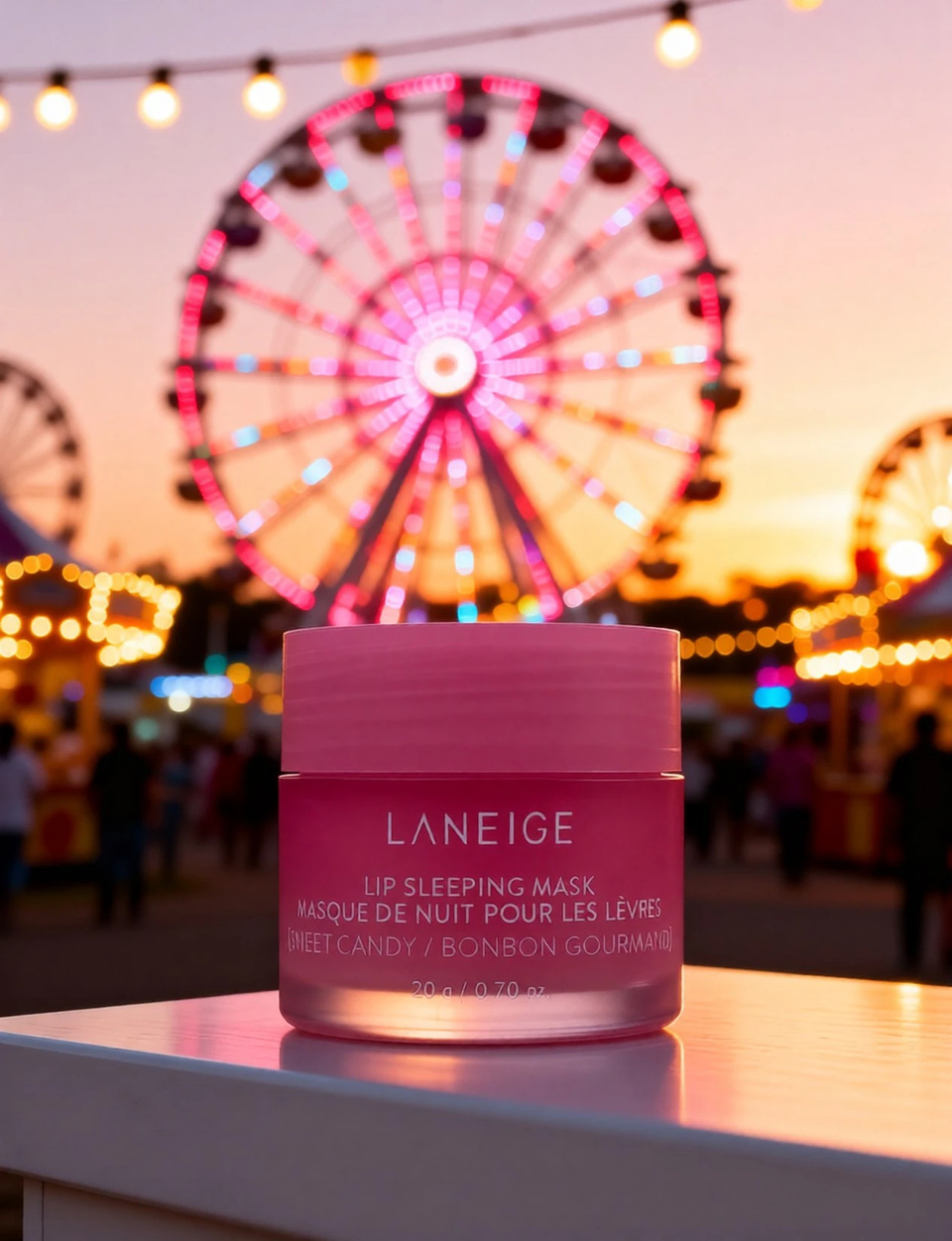
The Brand Mark Comes Through
The brand name and the main pack line carry into every scene. The whole frame is re-rendered, so read the smallest print at full size before a listing goes live.
Know more →One Photo, Whole Gallery
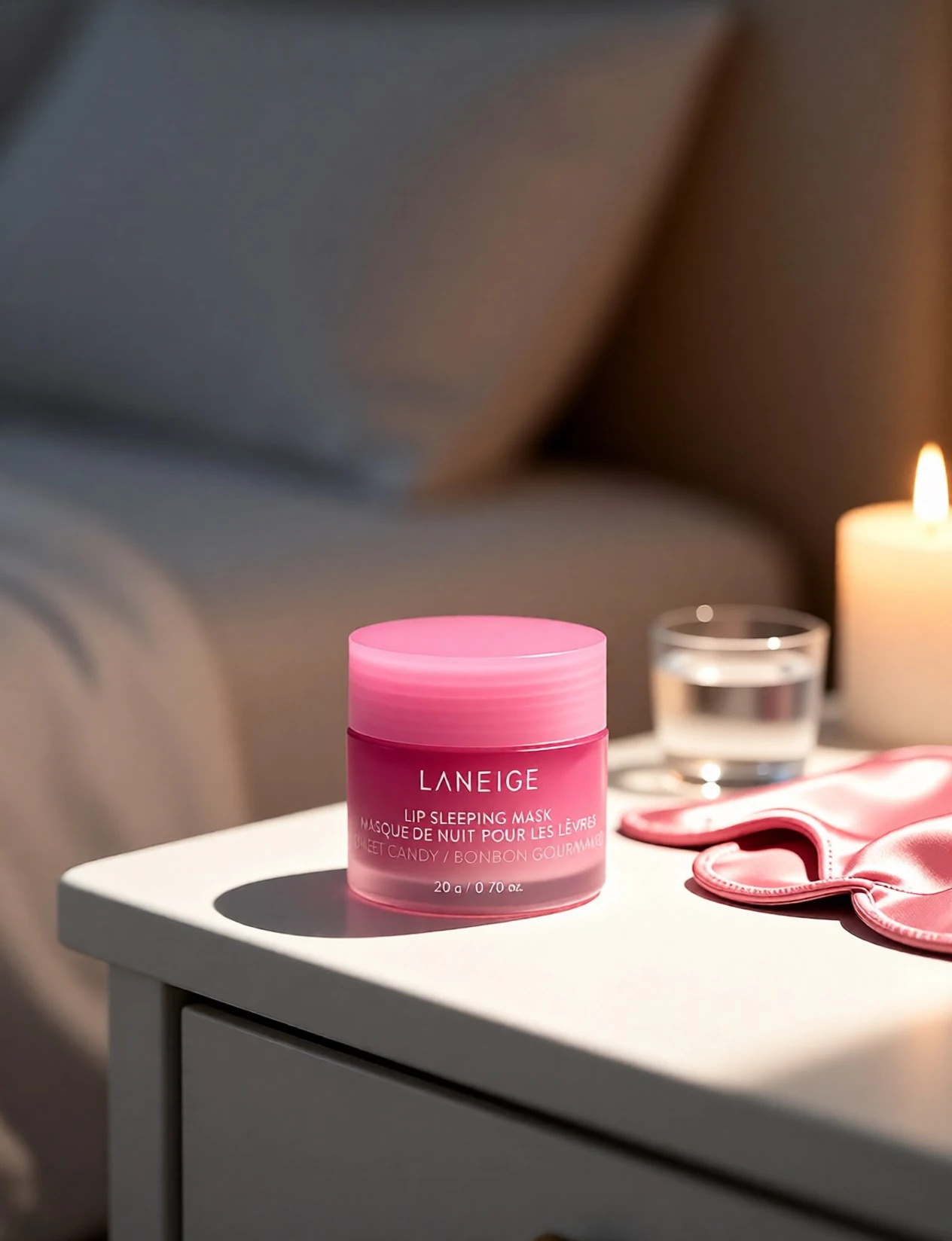
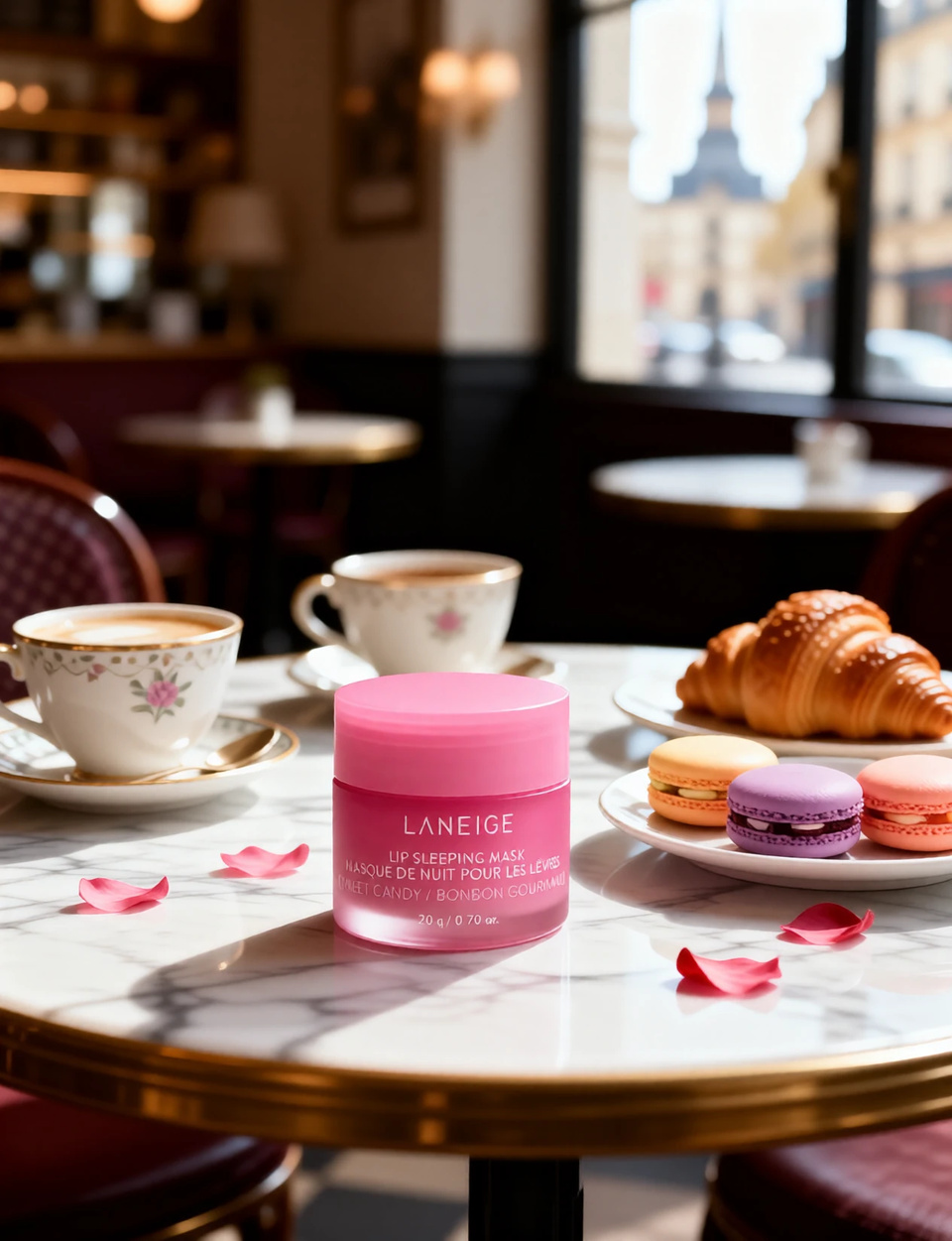
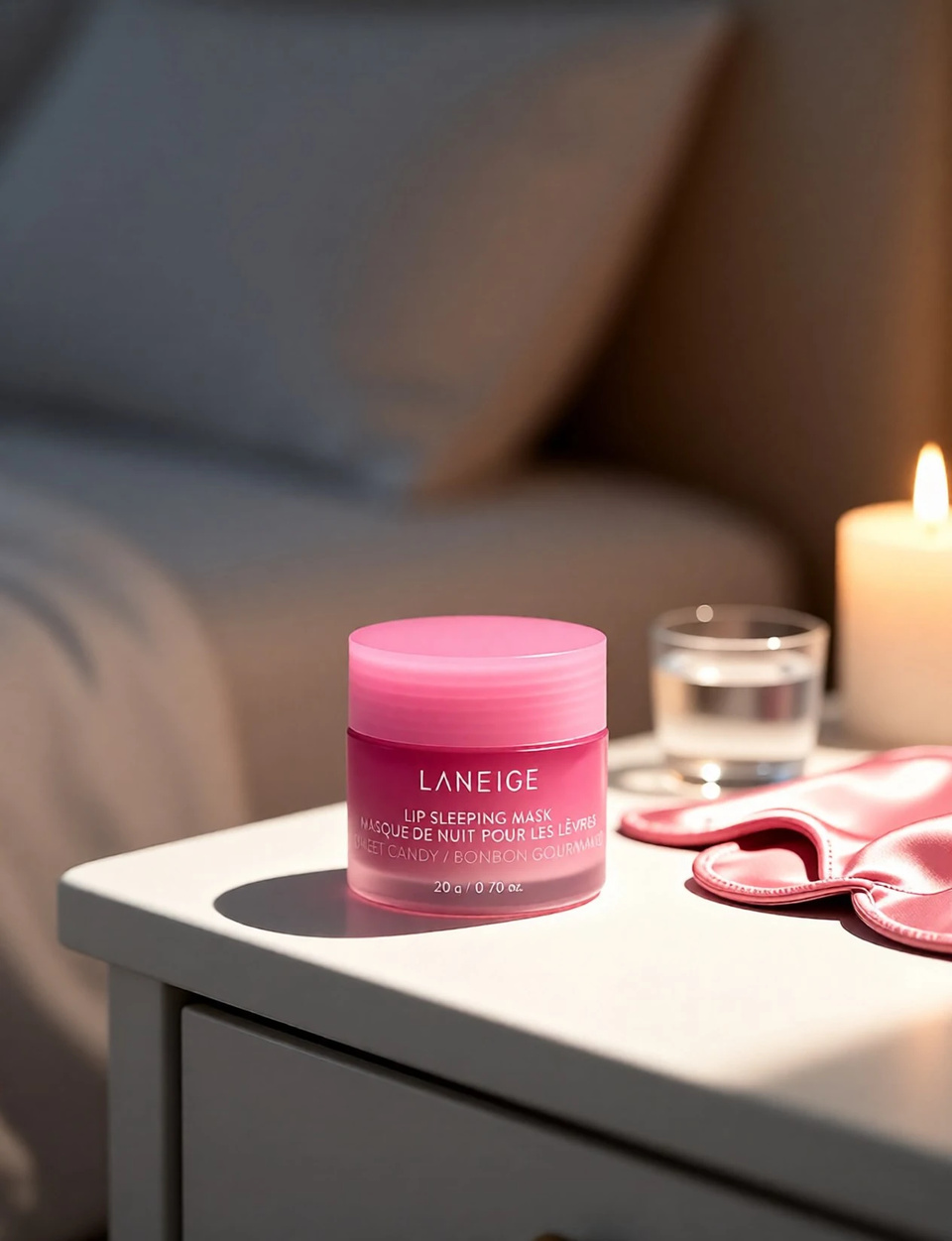
A bedside table, white marble, a Parisian café, a bathroom vanity — a gallery of different sets, every one of them generated from the same single source photo.
Know more →Key features of AI ecommerce product photography
You describe the set; the tool renders the product into it. Both halves of that sentence matter, and the second one is why the last step is always a look at the label.
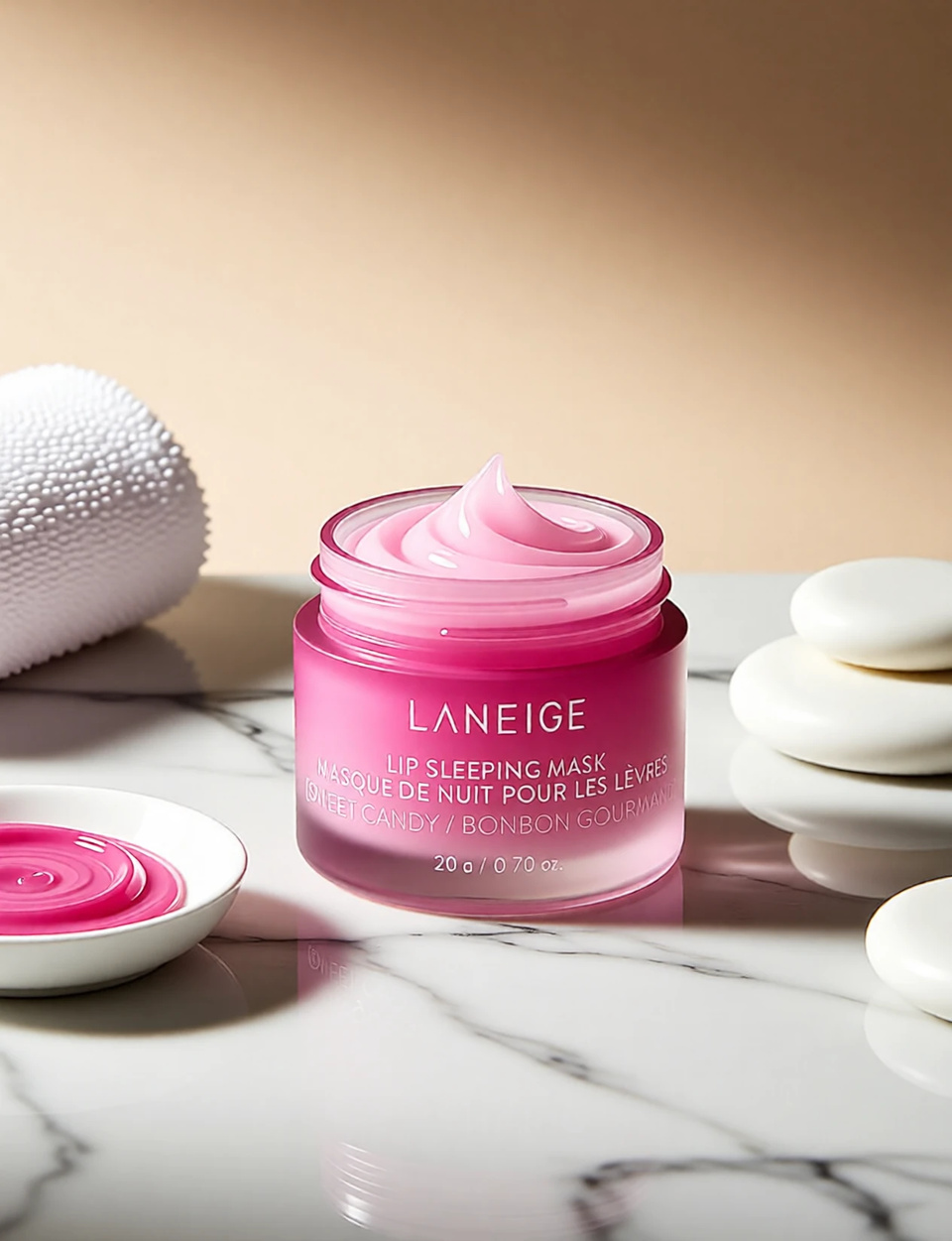
The frame is generated, not cut out and pasted
There is no mask and no cut-out step: your photo and your description go in, and a whole new photograph comes back with the product drawn into it. That is why the staging looks lit rather than composited — the shadows, the reflections and the surface belong to the same render as the product. It also means the product itself is being interpreted. The scene beside this row is the clearest example in the set: the prompt asked for an upscale shot on veined white marble under soft-box light and said nothing about opening anything, and the jar came back with no lid at all, balm swirled up out of it and more of it in a dish alongside. Read the result before you publish it, the same way you would read a proof.
Try it now →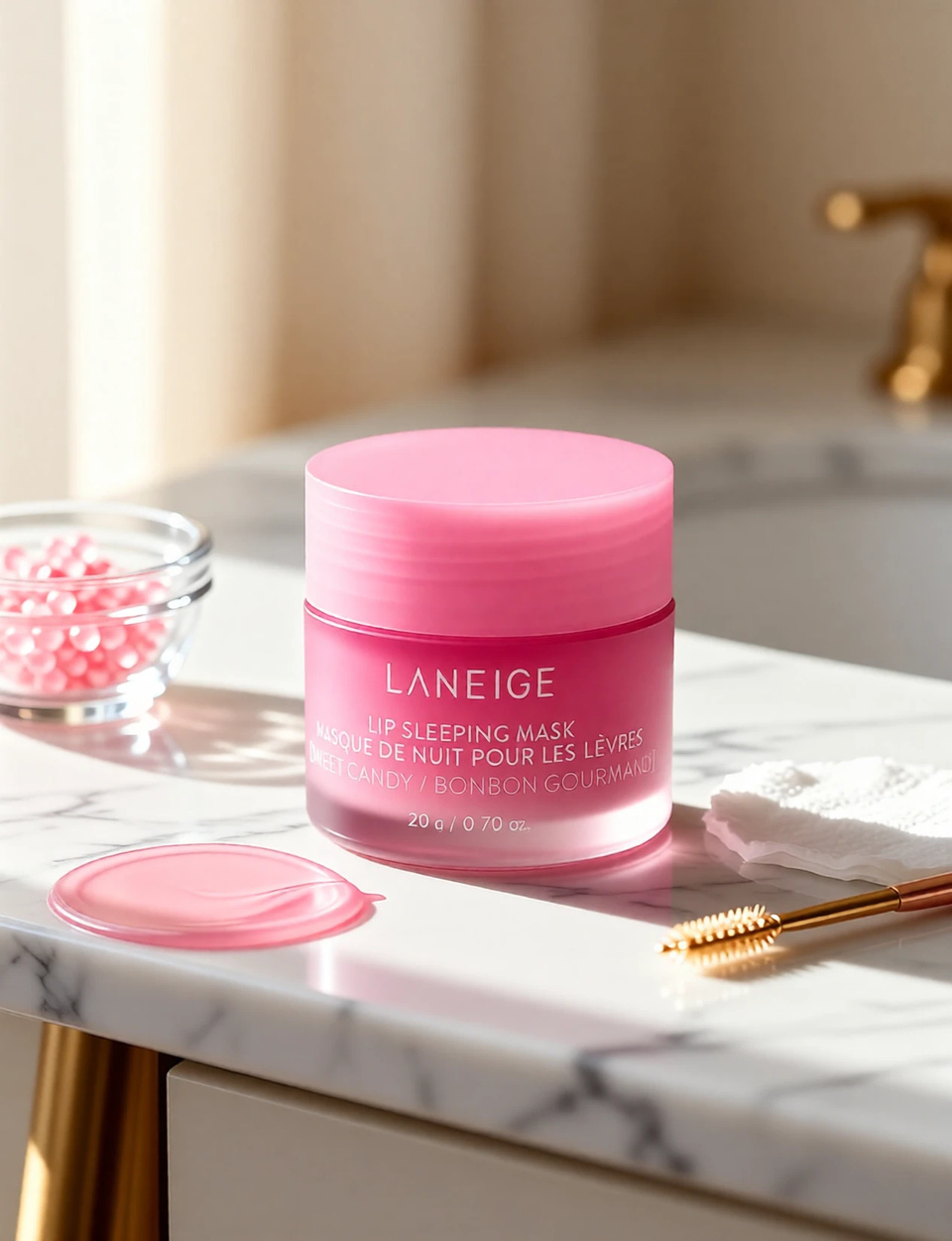
Read the label at full size before you publish
Across this demo set the brand name and the product line come through in every scene; the smallest line on the pack — a variant name, a net weight, a barcode — is redrawn at that size and can soften or pick up a wrong character. Start from a source photo where the text is already readable, open each output at full size, and re-run any scene where the fine print did not survive. A listing image where the ingredient copy has gone wrong costs more trust than the reshoot it saved.
Try it now →Describe the set the way you would brief a photographer
Name the surface (white marble with veining, a wooden table, a café tabletop), the lighting (soft box, golden hour, diffused window light), the background treatment (softly blurred, fully detailed) and any props. Each of those choices changes the scene. When a sentence will not pin a surface or a room, the studio takes up to 2 extra reference photos alongside the product, so a surface or a set can go in as a picture rather than as a sentence. Reuse the same description across every SKU and the catalogue comes out as one coordinated set, which is hard to hold across a physical shoot spanning weeks.
How to make product photos from one image
No studio booking, no props to source, no photographer on the clock.
Upload the product photo
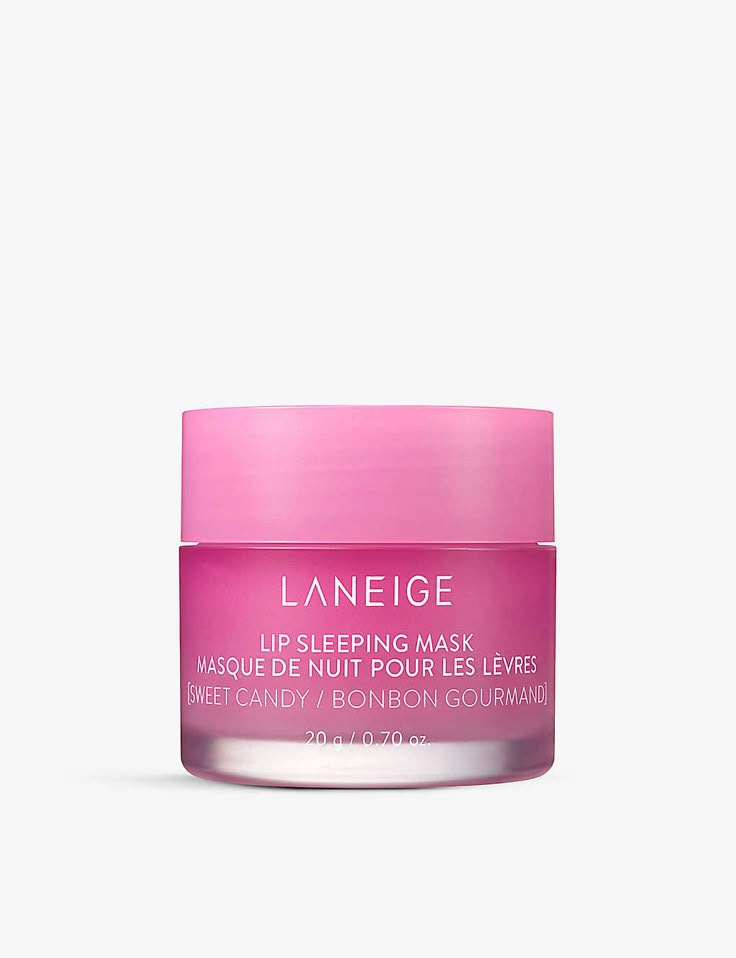
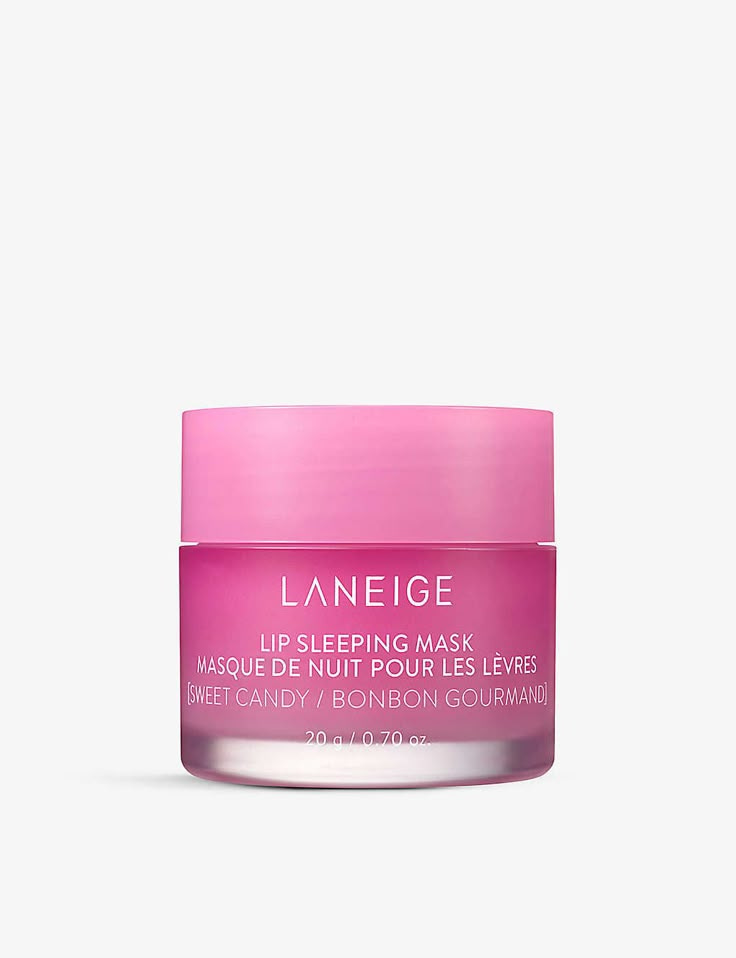
One clear, evenly lit shot with the label readable is enough — a supplier packshot or a phone photo on a plain background both work. JPEG, PNG and WebP are accepted, up to 50MB each. Every scene is rendered from this photo, so what it shows sharply is what comes through; the packshot in the hero above is the one every scene on this page was made from.
Describe the scene
Write the set the way you would brief a photographer. The studio ships with worked prompts to adapt — the bedside scene in the hero above came from: "Create a minimalist product photography scene positioned prominently on a white bedside table surface. Use soft, diffused lighting creating gentle shadows. Keep background beautifully blurred with soft gray-beige tones." — and a bolder one in the same set reads: "Create a realistic product photography scene positioned on a white platform in the foreground with sharp focus. In the background, photograph a real outdoor carnival fairground during golden hour sunset."
Pick the engine and download
1K output is the default at 15 credits per scene and the cheaper of the two, so explore backdrops there first; re-run the winner at 2K for 20 credits when you want the most detail held. Download as PNG or JPG with commercial rights.
Where sellers use it
Amazon and Shopify listing galleries
A listing that converts usually needs one clean hero plus several supporting shots, and both come from the same upload. Marketplace main images have their own rules — product on pure white, filling most of the frame, no props or added text — so that slot is described as a white seamless surface with soft, even light and nothing else in shot. The secondary slots are where lifestyle scenes are allowed and do the selling: the product on a marble vanity, a café table, an outdoor set. Every scene is an independent edit, so the set is built in one sitting and a seasonal backdrop can be swapped in later without touching the original photo. Set the output shape to the one your storefront expects rather than leaving it on auto, which rounds the packshot to the nearest listed ratio.
DTC, Etsy and dropshipping brands without a studio
Small brands and dropshippers often have nothing but a supplier packshot to work with, and a physical shoot for every new product is out of reach. Starting from that one photo, the tool builds the styled scenes a brand page needs — warm café lighting for a food item, a bathroom vanity for skincare, a bedside table for anything sold as part of a routine. Because the pack is redrawn into each scene rather than lifted out of the original, give the outputs the same read you would give a printer proof before they go on a product page.
Campaign and social tests before a launch
When a social team wants to know which backdrop stops the scroll, the answer is to try several rather than guess. A fairground at golden hour, a Parisian patisserie and a minimalist white surface can all be generated from the same product photo in minutes, priced per scene, and run as ad variants. The strongest one then gets re-run at 2K for the final creative — which is also the pass where the pack copy is worth checking properly, since a test frame and a published frame have very different standards.
Discover more AI features
Frequently asked questions
How does AI Product Photography work?
Upload a product image and describe the scene you want. The tool renders a new photograph from your image plus your description — surface, props, lighting and the product itself are all drawn into one new frame, which is how a plain packshot comes back as a styled set. Nothing is cut out and pasted, so the product is redrawn along with the scene: check the pack copy on the result at full size before it goes on a listing.
What types of products work best?
Works with cosmetics, skincare, food, electronics, jewelry, fashion accessories, and more. Any product with a clear shape and branding can be placed into AI-generated scenes.
Will the product branding stay sharp?
The important part usually does. Shape, color, the brand name and the main pack line come through recognizably in every scene, because the whole frame is generated from your source photo. The smallest print is the exception: a variant name, a net-weight line or a barcode is being redrawn at that size and can soften or come back with a wrong character. Read the fine print on the output at full size and re-run the scene if it did not land.
Can I use these for e-commerce and marketing?
Yes. Full commercial license included. Use for Amazon listings, Shopify stores, social media ads, email campaigns, and print materials. Professional quality without the studio cost.
Can AI ecommerce product photography meet Amazon main-image requirements?
Amazon's main product image must show the product on a pure white background with the product filling most of the frame, no props, text, or logos added to the image. For that specific slot, generate a clean studio scene: describe a white seamless surface with soft, even lighting and no background props, then crop so the product fills the frame. For secondary listing images, lifestyle scenes are allowed and encouraged — that is where AI product photography shines, letting you place the same product on a marble vanity, a café table, or an outdoor set. A practical workflow is one clean white-background hero for the main slot plus several lifestyle scenes for the gallery, all from a single source photo. See the Amazon product photography rules and how-to guide for the current image spec.
How is AI product photo editing different from a real product photo shoot?
A real shoot needs the physical product in hand, a photographer, a set with props and backdrops, controlled lighting, and post-production. Each new scene or angle usually means re-styling the set and shooting again. AI product photography starts from one existing product photo and builds the scene, props, and lighting from a text description, carrying the shape, color and branding of the product across from your source photo. You trade physical set-building for prompt-writing, so producing ten different backdrops costs credits per scene instead of studio hours. The limit is that AI generates the environment around your product; it cannot invent a product you have never photographed, and it is for marketing imagery rather than technical spec shots.
What kinds of scenes and backgrounds can I generate for a product?
Describe almost any setting and the AI renders your product into it: a minimalist white surface with soft diffused lighting for a clean catalog look; a white marble vanity with neutral cream tones for cosmetics and skincare; a marble café table in a Parisian patisserie surrounded by macarons for food and lifestyle; an outdoor carnival fairground at golden hour for a bold campaign frame; or a natural white marble slab with visible veining for an upscale hero shot. You control the surface, the props, the lighting direction, and the mood in plain English. The product is rendered in sharp foreground focus while the background can be softly blurred or fully detailed depending on your prompt. If you only need to swap the backdrop rather than build a full scene, the AI Background Studio is the focused tool for that.
How many product photos and scenes can I create from one image?
From a single product photo you can generate as many scenes as you have credits for — a clean white hero, three lifestyle backdrops, and a seasonal campaign frame, for example. Each scene is an independent edit at the credits per edit shown on this page. 1K output is the default at 15 credits and is the cheaper of the two, so explore directions there first; re-run only the winner at 2K for 20 credits when you want the most detail held. Because every scene is generated from the same source photo, the product reads consistently across the set, so a full gallery hangs together. A common approach is to generate a wide first pass of backdrops, choose the strongest, then re-run only those for the final listing images.
How do I write a prompt for the best product photography result?
Describe the surface, the lighting, the background treatment, and any props, and name the product detail you need held. A strong prompt reads like a photographer's brief: "Create a minimalist product photography scene on a white marble surface with visible veining; use soft box lighting for even, flattering illumination; keep the background softly blurred with neutral cream tones; keep the product label and packaging text sharp and legible." Naming the lighting style ("soft diffused," "golden hour," "soft box") and the surface material makes the result look intentionally shot rather than pasted in. Run a couple of passes at 1K, the cheaper default size, to compare backdrops before you finalize a listing image.
Will my product label, logo, and packaging text stay readable?
The brand name and the main pack line normally do; the smallest print is the one to check. Each scene is a whole new frame generated from your photo, so the product is redrawn rather than lifted out and dropped into a background — big, high-contrast lettering survives that reliably, while a variant name, a net weight or a barcode set in tiny type is the first thing to soften or pick up a wrong character. This matters because a marketplace listing where the brand or ingredient text has gone garbled looks untrustworthy and can hurt conversion. Start from a source photo where the product is well-lit and the text is already readable, check the output at full size before you publish, and re-run any scene where the fine print did not survive.
Can I keep a consistent look across a whole product catalog?
Yes, and it is one of the strongest reasons e-commerce teams use AI product photography. Because you control the surface, lighting, and background tone by prompt, you can reuse the same scene description across every product so the catalog reads as one coordinated set — the same marble surface, the same soft box lighting, the same neutral backdrop for every SKU. That visual consistency is hard and expensive to hold across a physical shoot spanning many sessions, but trivial to repeat with a saved prompt. Consistent listing imagery makes a store look established and helps a shopper compare products fairly, which is exactly what a good catalog is supposed to do.
What are the limits of AI product photography I should know about?
AI product photography generates the environment around a product you have already photographed; it cannot invent an angle or a detail of the product that does not exist in your source image, so it is not a substitute for a proper macro or spec shot when a buyer needs to inspect fine physical detail. The same re-render is why the smallest print on a pack needs checking: a brand name comes through, a net-weight line or a barcode often does not survive at that size. Highly reflective, transparent, or intricate products (mirror-finish metal, clear glass, fine jewelry with faceting) are harder to place convincingly than matte, solid-shaped items. And because AI color and lighting are approximations for marketing, the output is meant for listings, lifestyle, and campaign imagery rather than certified color-accurate reference. Within those bounds — clean product in, believable scene out — it covers the large majority of everyday e-commerce imagery needs at a fraction of studio cost.
Learn more
Guides on marketplace image rules, prompt writing and product backgrounds.
AI Background Changer for E-Commerce
Replace product backgrounds with professional AI scenes for online stores
AI Image Prompts Guide
Write prompts for professional product scenes
Photography Studio Overview
Explore all 7 AI photo editing tools
Best Free Background Remover (2026)
One-click transparent PNGs tested on hair, products and fine edges
Edit Images with AI Text Prompts
Edit product photos with text prompts — resize, recolor, and adjust details
DALL-E Alternative
Generate product scenes and mockups — compare Imagera vs DALL-E
Browse All Guides
Step-by-step tutorials for product photography and image editing
Key takeaways
Who uses AI product photography?
Amazon and Shopify sellers building out a listing gallery, Etsy and DTC brands producing lifestyle scenes without a studio, dropshippers who only have supplier photos to work from, and social teams testing which backdrop converts before a launch. The common thread is turning one product shot into many polished, on-brand scenes. For deeper walkthroughs, see the ecommerce product photography AI guide and the AI background changer for product photos guide.
AI product photography vs hiring a product photographer?
A professional photographer delivers art-directed, physically-lit shots and is the right choice for a flagship campaign, complex staging, or macro detail a buyer must inspect. AI product photography is the right choice when you need volume, speed, and consistency at low cost — dozens of listing and lifestyle scenes from one photo, produced in minutes and priced in credits. The two are complementary rather than competing: a common pattern is to commission one strong hero shoot, then use AI to spin up the long tail of backdrops, seasonal variants, and social scenes around those source images. That keeps the polish of a real shoot while covering the everyday imagery a growing catalog constantly needs.
AI product photography vs a shoot vs a background remover
| What matters | Imagera | Traditional shoot | Background remover |
|---|---|---|---|
| Starting point | One product photo you already have | The physical product, in a studio | One product photo you already have |
| What comes back | A new frame — surface, light, props and the product rendered together | A photographed set | The product isolated on white or a flat colour |
| Cost per extra scene | 15 credits per scene at 1K, from one photo | Re-style the set, re-shoot, retouch | A second cutout of the same photo |
| Turnaround | Minutes per scene, in the browser | Days to book a studio and edit | Seconds per cutout |
| Best use | Listing, lifestyle and campaign imagery | Certified spec and macro detail shots | Isolating the product on a plain background |
Build the listing gallery from the photo you already have
Open the studio with the product shot maker selected. Credits show on the button before you run.
Create product shots →