Describe a song or sing it in your own voice, then make it a playlist or a music video.
Describe a song or sing it in your own voice, then make it a playlist or a music video.
Imagera AI - AI content creation platform for generating images, cloning voices, and enhancing videos. Privacy Policy | Terms
Remove background noise from a voice recording or video
Choose a file to start.
Remove background noise from audio and video in your browser with Imagera's free noise remover. It is built for podcasters, video creators and anyone with a voice note, interview or lecture recorded near a fan, a hum or a busy room. Add a MP3, M4A, WAV, MP4, MOV or WebM file on a phone, tablet or computer, set how much to remove, and listen. When you remove background noise from video, the picture is copied as recorded and only the sound is rewritten. 2 free downloads, 8 more after sign-in.
Published · Updated · by the Imagera teamImagera is a browser-based AI studio for images, video, music and voice, so you do not need a separate app and account for every model. Pricing is credit-based: one balance covers every tool, and each job shows its credit price or estimate before you run it.


The noise model works in frames of 480 samples at 48 kHz, 10 milliseconds each, so every second of sound gets 100 rounds of cleaning, each with its own voice score.
The noise model hands back each frame 20 ms late, which is 960 samples at 48 kHz. The tool removes that delay, so a cleaned voice in a video stays on the lips.
A strength of 50% gives an even mix: half cleaned sound and half original, lined up sample for sample.
Voice found is the share of 10 ms frames the model rates at least 50% likely to be speech; below 5%, a note says little speech was found.
Try Instant Voice ClonerThe cleaner is an open-source, BSD-licensed noise-suppression model, compiled to WebAssembly and loaded from this site as a file of about 1.4 MB. It listens in 10 ms frames at 48 kHz, so the sound is resampled to that rate first. Each channel gets its own model state; stereo stays stereo, and surround is folded down to two channels.
In every frame the model keeps what sounds like speech and turns the rest down. That suits steady and broadband noise: hiss, hum, fans, air conditioning, traffic and room noise. Each frame also gets a voice score, which feeds the Voice found figure on the result.
Noise removal is a mix, not a preset. At 90% the output is that share of cleaned sound plus the rest of the original recording, lined up sample for sample, so the two never smear or double when combined.
Full strength removes the most, but on music or in a very noisy room it can sound thin or underwater. Turning it down lets a little of the room back in, which often makes a voice sound natural again. The Noise removed field on the result repeats the strength you used, so two runs are easy to compare.
With a video, only the sound is decoded, cleaned and encoded again. The picture is copied into the new file without re-encoding, and the result’s Picture field reads Original, not re-encoded. MP4 and MOV videos come back as MP4 with AAC sound, or Opus when the browser has no AAC encoder; WebM stays WebM with Opus sound.
Timing is corrected twice. The model’s own 20 ms lag is removed, and so is the silent lead-in some encoders add, which is measured in your browser before the run. The cleaned track ends where the original did. Only the main video and audio tracks are kept, and a picture format this browser cannot copy stops the run with a message.
For an audio file, Format offers M4A or WAV, starting at M4A. M4A holds compressed AAC sound at 96 kbps per channel. WAV holds 16-bit samples with no compression, which suits further editing. Both are written at 48 kHz, the rate the model works at. MP3 is accepted as input but never written.
If the browser cannot save M4A, the run stops and suggests WAV. Older browsers that cannot decode audio on the page read the whole file at once instead; that route saves WAV only and takes files up to 300 MB.
Because the model keeps whatever sounds like speech, other voices tend to stay too: a TV, a crowd or a second person in the room. Echo from a bare room is made of the voice itself, and this tool has no step that removes it. A closer microphone or a softer room fixes echo at the source.
Music is not speech, so under a voice it is thinned out along with the noise, and a song on its own can lose much of its sound. If the file barely sounds like a voice, the result says that little speech was found. That note is a hint that the file is not a voice recording.
The file is read from your device, cleaned in the browser tab and assembled in memory as a new file. It is not uploaded for noise removal. The page loads its own code and the noise model, and a failed run can send an error report with the file’s size and type, never the sound.
The working budget is 15 minutes or 1 GiB per run on a phone and 60 minutes or 4 GiB on a computer. These are upper limits rather than promises: an older phone can run out of memory sooner. Trim a long recording into parts first if it does not fit.
The free Audio to Text tool can turn the cleaned take into SRT subtitles or a transcript. When a line was fluffed or never recorded, the paid voice studio can learn your voice from a clean sample and speak new text in it.
For a wider audience, the paid dubbing studio can voice the cleaned video in other languages. Noise in the picture, such as grain, is a separate job for the paid video enhancer.
Choose a MP3, M4A, WAV, MP4, MOV or WebM file: a voice memo, a podcast take, an interview or a talking-head video.
Leave Noise removal at 90% for a noisy room, or lower it for a lighter touch. Format applies to audio files; a video keeps its own container.
Press Remove noise, then play the result next to the original. Check Voice found, Format, Size and, for a video, Picture.
2 free downloads, 8 more after sign-in.
| This free tool | Paid AI tools |
|---|---|
| Turns down noise around the voice you recorded | The voice studio reads new lines from text in a cloned voice |
| Copies a video’s picture and rewrites only its sound | The video enhancer sharpens and upscales the picture itself |
| Keeps the speech in its original language | Dubbing re-voices the cleaned video in another language |
| 2 free downloads, 8 more after sign-in. | Paid tools use their own displayed prices and access conditions. |
Yes. The picture goes into the new file exactly as it was encoded, and only the sound is cleaned and encoded again. Look for Original, not re-encoded under Picture on the result.
Save the memo to Files from Voice Memos, open this page in Safari and choose the M4A. Leave Noise removal at 90%, run it, listen, and keep the cleaned copy as M4A or WAV.
Yes. A fan or an air conditioner makes steady noise that barely changes from second to second, the kind the model is built for. The whir drops back while the voice stays.
Yes. Microphone hiss and the steady hum of wiring or lights are the broadband and steady noise this model reduces. Lower the strength if the voice starts to sound thin.
Yes. The noise model runs as WebAssembly inside this page in a current phone, tablet or computer browser. There is no app or plug-in to add.
It turns wind down the way it turns down any sound that is not a voice. Gusts loud enough to overload the microphone also distort the voice, and no cleaner can rebuild that part; a windscreen helps on the next shoot.
No. The tool has no echo-removal step, and echo is made of the voice itself, so it mostly stays. It can still lower the steady noise of the room under the echo.
Yes. Room tone and the noise floor are steady sounds, so they drop between words and under them. If the pauses then sound too dead, set Noise removal lower so a little of the room returns.
Usually not. The model keeps anything that sounds like speech, so voices from a TV or a nearby table tend to stay. It cleans noise around one voice; it does not pick one speaker out of several.
It is not made for music. Instruments are treated as noise and thinned out, so a song can come out thin. Keep it for speech: podcasts, interviews, voice-overs, lectures and calls.
Start at 90%. If the voice sounds thin or underwater, step it down and run it again; if noise is still clear between sentences, push it to the top of the slider.
No. A gate mutes sound only in the pauses, so the noise is still heard under every word. This model cleans every 10 ms frame, including while someone is talking.
Yes. Tape hiss is steady, broadband noise, which the model reduces. Digitize the tape first, then add the audio file or the video. It does not repair dropouts, wow and flutter, or a muffled voice.
Yes. The model’s 20 ms delay and any silent lead-in from this browser’s encoder are removed before the sound is written, and the track keeps its original length. Watch a word with a clear lip shape to confirm.
No. Cleaning happens inside your browser, and the new file is built in its memory. The page still downloads its code and the noise model, and it can report a failed run without the recording.
It is the share of the recording the model heard as a voice. Long pauses and music lower it. Under 5%, the result adds a note that little speech was found.
Audio recordings and videos: MP3, M4A, WAV, MP4, MOV or WebM. A video with no sound track stops with a message, because there is no noise to remove.
Your first 2 downloads are free with no account. Sign in free for 8 more. Any paid Imagera plan makes downloads unlimited, and adds AI credits for the paid tools. Processing and the preview are always free.
Your first 2 downloads and every download on a paid plan have none. Free downloads 3 to 10, after sign-in, carry a small “Made with imagera.ai” badge in the corner. The result on screen is always clean.
Cut a big video into evenly sized parts
Open tool
Rejoin split parts back into one file
Open tool
Save stills from a video as JPG or PNG
Open tool
Turn a video clip into an animated GIF
Open tool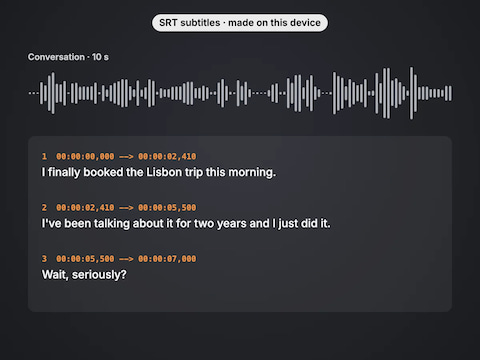
Transcribe audio or video into text and SRT subtitles
Open tool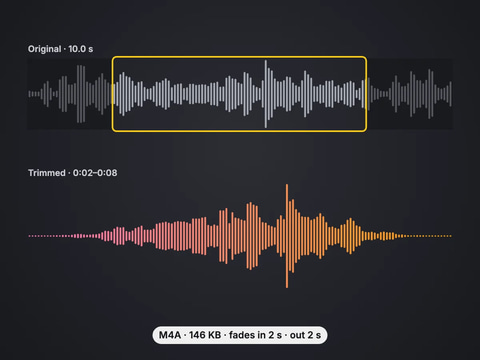
Cut an audio file to the part you want, with fades
Open toolComplete your workflow
These pair with Instant Voice Cloner. Every tile says what the tool actually does — without leaving this page.
Describe a song or sing it in your own voice, then make it a playlist or a music video.
Five Imagera voice engines in one studio for natural narration, character voices and multilingual speech.
Five Imagera music engines in one studio for full songs, vocals, instrumentals and soundtrack creation.
Full AI music studio. Generate, extend, remix, add vocals, separate stems, and more.
Imagera AI Team
Unified AI creation platform
Ready to try your own file?
Back to noise remover