Finds the eyes for you
No clicking on each pupil. The tool locates faces and eyes automatically, for up to 10 people in one photo.
Imagera AI - AI content creation platform for generating images, cloning voices, creating avatars, and enhancing videos. Privacy Policy | Terms
Faces · free · private
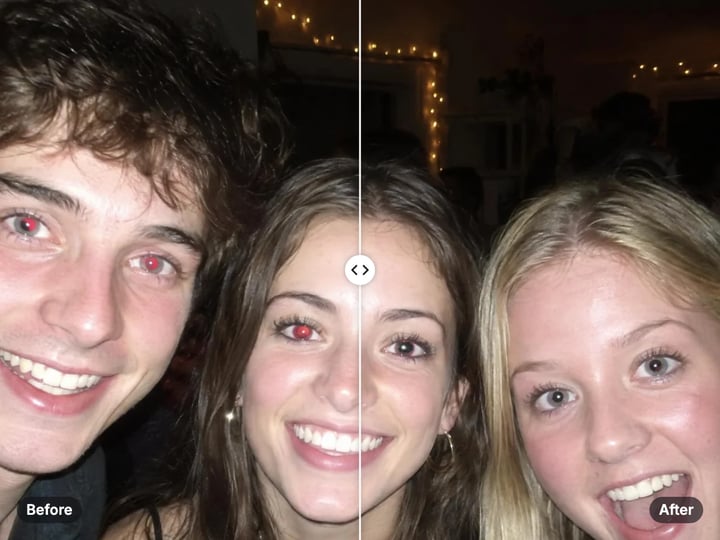
Drop in a flash photo and the red pupils are found and fixed automatically, for every face in the shot. It runs in your browser, and your photo is never uploaded.
Faces and eyes are found by a model that runs in your browser. Your photo is never uploaded or saved on our servers.
 Real result

Quick answer
To remove red-eye from a photo for free, open Imagera’s Red Eye Remover, add your photo and press Remove red-eye. The tool finds every visible face and its eyes automatically, for up to 10 people, then replaces the red in each pupil with a natural dark tone. Only the eyes change. It runs in your browser, so your photo is never uploaded or saved on our servers.
Your photo never leaves your device — nothing is uploaded or saved on our servers.
How it works
Drop in a flash photo as JPG, PNG, WebP or HEIC. It stays on your device.
Press Remove red-eye. Faces and eyes are found automatically.
Compare before and after. Raise the sensitivity if some red remains.
Save the corrected photo straight to your device.
Why this one
No clicking on each pupil. The tool locates faces and eyes automatically, for up to 10 people in one photo.
The fix is limited to the area inside each eye, so red lips, clothes and backgrounds are left untouched.
Red is replaced with a dark, natural pupil tone and blended softly at the edge, so the eye does not look painted over.
Face detection runs in your browser. Family photos and pictures of children never leave your device.
Continue in Imagera
Red-Eye Remover edits the pixels you have. These studios use AI to create what is not in the picture yet — they run on credits.
 Next step
Fix closed eyes, add a natural smile — rescue any photo
Open studio Imagera
Too small to print? Enlarge a photo to 4K, 8K or 16K (15,360 px on the long edge).
Open studio Imagera
Edit images with Imagera Edit. Inpaint, modify, and transform any part of your image.
Open studio Imagera
Replace any photo background with AI-generated luxury scenes.
Open studioWho it is for
Fix a whole table of red eyes from one flash shot before you share the album.
Clean up red-eye in scans from film cameras with built-in flashes.
Keep kids’ photos private: detection runs on your device, not a server.
Guide
Red-eye happens when a camera flash fires close to the lens in dim light. In the dark, pupils open wide. The flash travels through the open pupil, reflects off the blood-rich back of the eye and bounces straight back into the lens. The camera records that reflection as a red glow where a dark pupil should be.
It is most common with small cameras and phones, where the flash sits right next to the lens, and in photos taken at night, at parties or indoors. Children often show stronger red-eye because their pupils open wider in low light.
Some cameras fire a pre-flash to make pupils shrink before the photo is taken. That reduces red-eye but does not always remove it, which is why so many flash photos still need a fix afterwards.
The tool works in three steps, all inside your browser.
1. Find the faces and eyes. An on-device face model locates each visible face, up to 10 per photo, and maps the outline of each eye and the position and size of each iris.
2. Find the red. Inside a small area around each pupil, and only inside the eye outline, the tool looks for pixels that are much redder than they are green or blue. The Sensitivity control sets how red a pixel must be to count.
3. Replace it. Red pixels are toned down to match the other colors and darkened slightly, giving a natural pupil. The edge is blended softly so there is no hard circle.
Because the search is limited to the eyes, red lipstick, clothing and backgrounds are never touched. When it finishes, the tool tells you how many eyes it fixed.
Start with the default sensitivity. At 60 the tool catches typical red-eye while ignoring the natural pink at the corner of the eye.
Some red left? Raise the sensitivity to 70–85 and run it again. This catches paler or orange-tinted red-eye, which is common in older film prints.
Iris looks too dark? Lower the sensitivity to 40–50. People with light brown or hazel eyes can have warm tones that a high setting starts to pick up.
Use the largest version you have. The face model needs to see a face clearly. A small thumbnail or a tightly cropped group shot may not give it enough to work with.
Zoom in on the result. Drag the before/after divider across each face. A good fix looks like a normal dark pupil with the catchlight, the small white reflection, still in place.
It fixes red pupils on human faces that are reasonably visible: looking roughly toward the camera, not tiny in the frame and not covered by sunglasses or hair. It handles several people in one photo.
It does not fix pet eyes. The face model is built for human faces. Pets also usually show green, yellow or blue eye-shine rather than red, which needs a different kind of correction.
It does not repaint white eye-glow. Sometimes a flash turns the whole pupil white or pale yellow rather than red. There is no red to remove, so the tool leaves it alone.
If no faces are found, the tool tells you instead of returning a changed photo. If faces are found but no red is present, you get your photo back with a note saying the eyes were checked and no red-eye was found.
Red-eye photos are usually personal: birthday parties, family dinners, nights out and photos of children. Many online red-eye tools upload those photos to a server to process them.
Imagera’s Red Eye Remover does not. The face model and the fix both run inside your browser, on your own phone or computer. Your photo is never uploaded and nothing is saved on our servers. The tool reads your photo, finds the eyes and gives you the corrected version, all on your device.
This also means it works on iPhone and Android photos directly in the browser. HEIC photos from an iPhone are read on your device, so you do not need to convert them first.
Processing is unlimited. Your first few downloads need no account; after that, a free sign-in keeps them going. There is no watermark on the result.
Flash photos often have more than one problem. The free Red Eye Remover solves the most specific one: red pupils. It is quick, automatic and private, and it leaves the rest of the photo exactly as it was.
Imagera’s paid AI Photo Fixer uses AI to fix the other flash problems. It opens closed eyes, adds a natural smile, clears glare on glasses, and its one-tap Auto Beautify tidies lighting and skin. It runs in the cloud, keeps your history and is paid with credits.
For most party and family photos, the free tool is all you need. If the red is gone but someone blinked or the flash bounced off their glasses, the AI Photo Fixer is the next step.
You can also run the free Photo Enhancer after removing red-eye to balance light and color, still with nothing uploaded.
Free vs studio
Questions people ask
Open this page in Safari or any browser on your iPhone, choose the photo and press Remove red-eye. HEIC photos work directly, and the photo never leaves your phone.
Yes. The tool finds up to 10 faces in one photo and fixes every red pupil it finds. It shows how many eyes were fixed when it finishes.
No. The face detection is built for human faces, and pets usually show green or yellow eye-shine rather than red. The tool will not change pet eyes.
The red-eye may be paler or more orange than usual. Raise the Sensitivity slider and run the fix again on your original photo.
No. The tool only looks inside the outline of each eye, so red anywhere else in the photo is left alone.
Yes, as long as the faces are clear enough to detect. Scan at a good resolution and raise the sensitivity if the red has faded toward orange.
You get your photo back with a note saying how many eyes were checked and that no red-eye was found. Nothing in the photo is changed.
Turn on more room lights so pupils shrink, ask people not to look straight into the flash, or turn the flash off and use your phone’s night mode instead.
More free tools
Complete your workflow
These pair with Eye & Smile Fixer. Every tile says what the tool actually does — without leaving this page.
Fix damaged or low-quality photos
Bring faded photos back
Enlarge after you fix
Edit images with Imagera Edit. Inpaint, modify, and transform any part of your image.
Remove flyaway hair and fix fine imperfections with surgical AI precision.
Change the words, color or font of text baked into a photo, poster or screenshot.
Free passport, visa & ID photos — auto-cropped to any country's exact size, background and file size, right on your device.
Imagera AI Team
Unified AI creation platform