A real multi-size favicon.ico
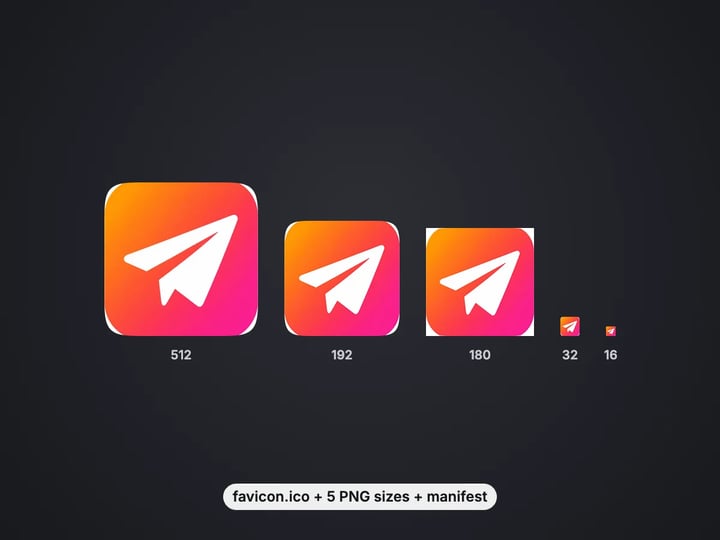
16, 32 and 48 px in one .ico file, as browsers and Windows expect.
Imagera AI - AI content creation platform for generating images, cloning voices, creating avatars, and enhancing videos. Privacy Policy | Terms
Convert & compress · free · private
Turn a logo or picture into favicon.ico, the PNG icons phones use, site.webmanifest and the tags to paste into your page. Your image never leaves your device.
Every icon is drawn and packed in your browser on your own device. Your image is never uploaded or stored on any server.
 Real result
Quick answer
To make a favicon, open Imagera's free favicon generator, choose your logo and press Make favicons. You get favicon.ico with 16, 32 and 48 px images inside, PNG icons at 16, 32, 180, 192 and 512 px, a site.webmanifest and a file with the tags for your page head. Put the files at your site root and paste the tags. It all runs in your browser, so your logo is never uploaded.
Your image never leaves your device — nothing is uploaded or saved on our servers.
How it works
Pick a square PNG with a transparent background if you have one. JPG, WebP and HEIC work too.
Keep it transparent or pick a color, and add padding so the icon is not cramped.
Press Make favicons and check the preview in light and dark tabs.
Download all as a .zip, put the files at your site root and paste the tags from favicon-head-tags.html.
Why this one
16, 32 and 48 px in one .ico file, as browsers and Windows expect.
Apple touch icon (180 px) plus Android icons at 192 and 512 px, with a ready site.webmanifest.
See the icon in a light and dark browser tab and on a phone home screen before you download.
A small file with the exact link tags to add to your page head.
Continue in Imagera
Favicon Generator edits the pixels you have. These studios use AI to create what is not in the picture yet — they run on credits.
 Next step
For advanced users — bring your own LoRA for a consistent style or character.
Open studio Imagera
Too small to print? Enlarge a photo to 4K, 8K or 16K (15,360 px on the long edge).
Open studio Imagera
Edit images with Imagera Edit. Inpaint, modify, and transform any part of your image.
Open studio Imagera
Replace any photo background with AI-generated luxury scenes.
Open studioWho it is for
Replace the blank browser tab icon with your logo in a few minutes.
Get the .ico, PNG sizes, manifest and head tags in one pass, with no build tooling.
Make your site look finished in tabs, bookmarks and on phone home screens.
Guide
One image in, a complete icon pack out. Every file is named the way browsers and phones look for it.
favicon.ico holds three sizes in one file: 16 px for browser tabs, 32 px for high-resolution tabs and the taskbar, and 48 px for desktop shortcuts. Each size inside is a compressed PNG, which every current browser reads.
favicon-16x16.png and favicon-32x32.png are the same tab icons as separate PNGs, which modern browsers prefer when you list them.
apple-touch-icon.png (180 px) is what an iPhone or iPad shows when someone adds your site to the home screen.
android-chrome-192x192.png and android-chrome-512x512.png are used by Android and by installed web apps, and are listed in site.webmanifest.
favicon-head-tags.html holds the exact tags to paste into your page's head.
Every size is resampled from one large master with a sharp resampling filter, so small icons stay as crisp as the pixels allow.
1. Choose your logo and press Make favicons. 2. Press Download all to save one .zip with every file. 3. Unzip it and upload every file to the root of your site, the same folder as your home page, so they live at addresses like yoursite.com/favicon.ico. 4. Open favicon-head-tags.html, copy the tags and paste them inside the head section of your page template. 5. Optionally, open site.webmanifest and fill in your site's name and short name.
Browsers cache favicons hard. If you still see the old icon, open the site in a private window or clear the cache before assuming something went wrong.
On hosted builders and store platforms, look for a "favicon" or "site icon" setting instead. They usually ask for one square PNG: use android-chrome-512x512.png from the pack.
A favicon is shown at 16 by 16 pixels in most tabs. That is 256 pixels in total, so detail that looks good in your logo simply disappears.
Use a mark, not a wordmark. A full company name becomes a gray smear at 16 px. Use a symbol, a monogram or the first letter.
Go bold. Thin lines vanish. Thick shapes and strong contrast survive.
Mind the padding. A little padding (5–10%) stops the icon feeling cramped, but too much makes it tiny. Leave padding at 0 for a mark that is already drawn with space around it.
Check dark mode. The preview shows your icon in a light and a dark tab. A black logo on a transparent background disappears in dark tabs; if that happens, pick a white or colored background.
Fill or fit. Whole image keeps a wide logo complete but small. Fill square crops it from the center to use every pixel.
Transparent lets the tab color show around your mark. It looks most native in browser tabs, but check the dark-tab preview: dark marks can vanish.
White gives a clean tile that reads on any tab color. It suits dark or colorful logos.
Color fills the icon with a brand color. Combined with Rounded or Circle in Advanced, it makes the tile-style icon many apps use.
One exception is built in. iPhones draw transparent home-screen icons on black, which rarely looks intended, so the Apple icon always gets a solid background: your chosen color, or white if you chose transparent. iOS applies its own rounded mask, so the Apple icon is left square on purpose.
The background color is also written into site.webmanifest as the theme color, which Android uses for the browser bar and splash screen.
Your logo never leaves your device. The icons are drawn on your browser's canvas, resampled on your device, and favicon.ico is assembled byte by byte in your browser. Nothing is uploaded or saved on our servers.
That matters for unreleased brands and client work. A new logo is often confidential until launch, and many online favicon tools send the file to their server to do the job.
It is also quick: the whole pack is ready in about a second, and you can try backgrounds, padding and shapes as often as you like, since every run starts from your original.
A free sign-in, which you need after the first few downloads, does not change any of this. Signing in never sends your image anywhere.
The free favicon generator turns an image you already have into every icon a site needs. It is quick, private and unlimited. The first few downloads need no account, and then a free sign-in keeps them coming.
What it cannot do is design the icon. If you have no logo yet, or your logo is a long wordmark that will never read at 16 pixels, you need a simple mark first.
The paid Imagera AI image generator creates artwork from a short description: a monogram, a flat symbol, a mascot or an emblem in the colors you name. Generate a few options, pick one, and bring it back here to make the favicon pack. The generator runs in the cloud, uses credits and keeps your results.
Have a logo? Stay with the free tool. Need one? Start with the generator.
Free vs studio
Questions people ask
Choose your PNG and press Make favicons. The pack includes favicon.ico with 16, 32 and 48 px images inside, built in your browser.
Browsers use 16 and 32 px in tabs, 48 px for shortcuts, 180 px on iPhones and 192 and 512 px on Android. This tool makes all of them from one image.
It is the 180 px icon an iPhone or iPad shows when someone adds your site to the home screen. It needs a solid background, which this tool adds.
It tells Android and installable web apps which icons to use and which theme color to show. Link it from your page with the tag in the head tags file.
Upload them to the root folder of your site, next to your home page, then paste the tags from favicon-head-tags.html into your page head.
Browsers cache favicons for a long time. Open the site in a private window or clear the cache to see the new one.
Transparent looks native in light tabs, but dark marks can disappear in dark mode. Check the dark-tab preview and pick a white or colored background if needed.
Yes. Open Advanced and set Icon shape to Circle or Rounded. The corners outside the shape are transparent.
No. Processing is unlimited without an account. The first few downloads need no sign-in; after that, a free sign-in keeps downloads going.
More free tools
Compress, convert & resize to any size
Turn iPhone photos into JPG, PNG or WebP
Combine images into one PDF
Smaller JPG files, white background
A lossless PNG copy of any photo
Open web images in any app
Keep transparency, open anywhere
Smaller web images, transparency kept
Lighter photos for faster pages
Open AVIF images in any app
Exact pixel sizes and social presets
Copy the text out of a screenshot, photo or scan
Trace a PNG or JPG into a scalable SVG
Complete your workflow
These pair with Pro LoRA Generator. Every tile says what the tool actually does — without leaving this page.
Enhance and upscale your generated images to 16K
Transform images into cinematic AI videos
Make a generated portrait speak your script
Ask 10 AIs the same question. Steal the best answer.
Add freckles, pores, scars, tattoos. Remove blemishes. Fix plastic AI skin instantly.
Edit images with Imagera Edit. Inpaint, modify, and transform any part of your image.
Remove flyaway hair and fix fine imperfections with surgical AI precision.
Change the words, color or font of text baked into a photo, poster or screenshot.
Imagera AI Team
Unified AI creation platform